

 -Open the app to adjust settings
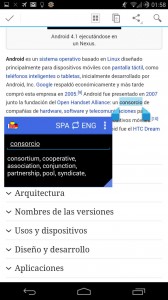
-Once the app has been setup, you’ll have a floating dictionary on your screen at all times. This dictionary can be dragged around the screen and used to translate words to and from all sorts of different languages. It will appear over top of your browser, for example, as well as your messaging applications and just about everything else on your phone
Users can change the bubble size or lock it into place. The app remembers your position and size settings, so there’s no need to worry about readjusting it every time you use your phone.
This app is useful for people who are trying to learn another language and anyone who is fluent in another language but occasionally needs help with vocabulary.
So far, supported languages include Spanish, English, Polish, Arabic, Russian, Catalan, Chinese, German, Russian, French, Hungarian, Italian, and Portuguese
More languages are expected to be added in the near future. Since the app is currently in beta stage, there are some bugs and errors. However, the developer seems committed to improving the app over the coming weeks and making it the best translator app it could be.
Once again, you can download Floating Translator here: https://play.google.com/store/apps/details?id=apps.easylife.translator
-Open the app to adjust settings
-Once the app has been setup, you’ll have a floating dictionary on your screen at all times. This dictionary can be dragged around the screen and used to translate words to and from all sorts of different languages. It will appear over top of your browser, for example, as well as your messaging applications and just about everything else on your phone
Users can change the bubble size or lock it into place. The app remembers your position and size settings, so there’s no need to worry about readjusting it every time you use your phone.
This app is useful for people who are trying to learn another language and anyone who is fluent in another language but occasionally needs help with vocabulary.
So far, supported languages include Spanish, English, Polish, Arabic, Russian, Catalan, Chinese, German, Russian, French, Hungarian, Italian, and Portuguese
More languages are expected to be added in the near future. Since the app is currently in beta stage, there are some bugs and errors. However, the developer seems committed to improving the app over the coming weeks and making it the best translator app it could be.
Once again, you can download Floating Translator here: https://play.google.com/store/apps/details?id=apps.easylife.translator
Use an Android Floating Translator to Learn Foreign Vocabulary
2 min read
Are you learning another language? The best way to learn a foreign language is to immerse yourself in it wherever you go.
Since you probably spend a lot of time on your phone, it’s important to use your phone as part of this immersion experience.
Today, I’m going to show you how to use your phone as a foreign translator and add a floating foreign vocabulary box to your Android screen.
-Download Floating Translator Beta here
-Open the app to adjust settings
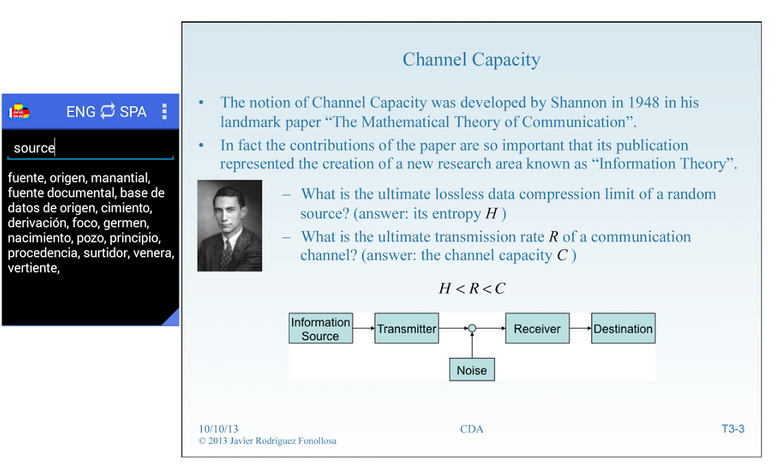
-Once the app has been setup, you’ll have a floating dictionary on your screen at all times. This dictionary can be dragged around the screen and used to translate words to and from all sorts of different languages. It will appear over top of your browser, for example, as well as your messaging applications and just about everything else on your phone
Users can change the bubble size or lock it into place. The app remembers your position and size settings, so there’s no need to worry about readjusting it every time you use your phone.
This app is useful for people who are trying to learn another language and anyone who is fluent in another language but occasionally needs help with vocabulary.
So far, supported languages include Spanish, English, Polish, Arabic, Russian, Catalan, Chinese, German, Russian, French, Hungarian, Italian, and Portuguese
More languages are expected to be added in the near future. Since the app is currently in beta stage, there are some bugs and errors. However, the developer seems committed to improving the app over the coming weeks and making it the best translator app it could be.
Once again, you can download Floating Translator here: https://play.google.com/store/apps/details?id=apps.easylife.translator
-Open the app to adjust settings
-Once the app has been setup, you’ll have a floating dictionary on your screen at all times. This dictionary can be dragged around the screen and used to translate words to and from all sorts of different languages. It will appear over top of your browser, for example, as well as your messaging applications and just about everything else on your phone
Users can change the bubble size or lock it into place. The app remembers your position and size settings, so there’s no need to worry about readjusting it every time you use your phone.
This app is useful for people who are trying to learn another language and anyone who is fluent in another language but occasionally needs help with vocabulary.
So far, supported languages include Spanish, English, Polish, Arabic, Russian, Catalan, Chinese, German, Russian, French, Hungarian, Italian, and Portuguese
More languages are expected to be added in the near future. Since the app is currently in beta stage, there are some bugs and errors. However, the developer seems committed to improving the app over the coming weeks and making it the best translator app it could be.
Once again, you can download Floating Translator here: https://play.google.com/store/apps/details?id=apps.easylife.translator
Newsletter
Get the latest tech news delivered to your inbox weekly.