

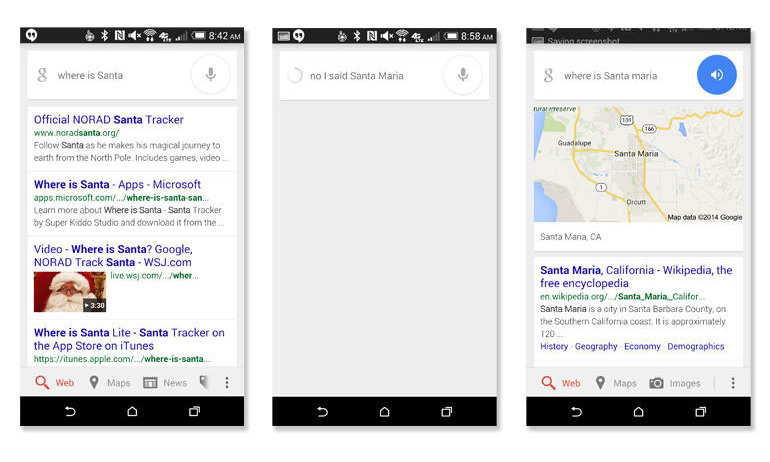
 This is an awesome feature and one that will likely impress critics of Google’s voice-activation features. Instead of swerving off the road when you try to correct a mistake, people like me can calmly say “No, I said”.
Google also released this change with an eye towards its competitor, Apple. Siri currently does not have any type of “OK, I said” feature and it’s not very good at correcting itself after mistakes are made.
This is an awesome feature and one that will likely impress critics of Google’s voice-activation features. Instead of swerving off the road when you try to correct a mistake, people like me can calmly say “No, I said”.
Google also released this change with an eye towards its competitor, Apple. Siri currently does not have any type of “OK, I said” feature and it’s not very good at correcting itself after mistakes are made.
Use “No, I Said” Command to Correct Google Now
2 min read
I’ve never found a voice-to-text system that’s 100% accurate. I don’t think one exists.
That’s why it can be so frustrating to use voice activation features on your Android device. The few times I’ve used Google Now while driving, I feel like I’m driving more dangerously because I have to correct all the mistakes Google made.
That’s why I was happy to discover a new feature with Google Now. That feature is simply, “No, I said.”
For whatever reason, Google isn’t widely advertising its new feature. Instead, it has quietly added it to the official Google Search app and Google Now.
The feature was also slipped into a recent Google+ demo video under the title, “If it ain’t baroque, don’t fix it. But if it is, you can tell Google…and it’ll correct itself. Works on the Google app for iOS and Android.”
This is an awesome feature and one that will likely impress critics of Google’s voice-activation features. Instead of swerving off the road when you try to correct a mistake, people like me can calmly say “No, I said”.
Google also released this change with an eye towards its competitor, Apple. Siri currently does not have any type of “OK, I said” feature and it’s not very good at correcting itself after mistakes are made.
This is an awesome feature and one that will likely impress critics of Google’s voice-activation features. Instead of swerving off the road when you try to correct a mistake, people like me can calmly say “No, I said”.
Google also released this change with an eye towards its competitor, Apple. Siri currently does not have any type of “OK, I said” feature and it’s not very good at correcting itself after mistakes are made.
Newsletter
Get the latest tech news delivered to your inbox weekly.