

Word Lens Lets You Translate Words by Taking a Picture
2 min read
Translation apps are some of the coolest pieces of technology available today.
Google Translate has long been working on an update that will let you live translate foreign languages simply by holding your phone up to a foreign language speaker’s mouth. In fact, that technology is virtually here.
Another cool piece of translation technology was recently added to Google Translate. Google acquired Quest Visual and its popular Word Lens app.
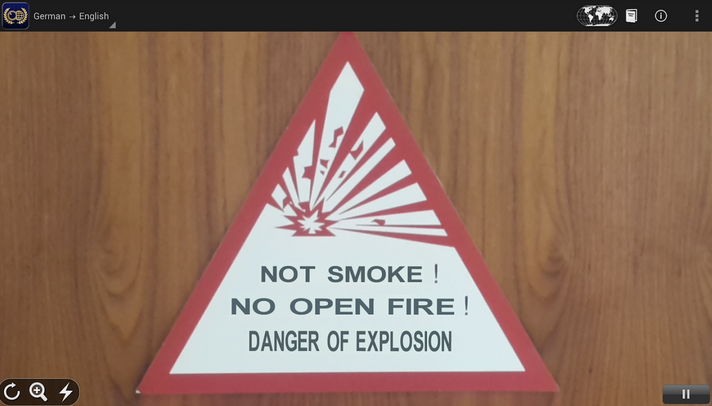
Basically, Word Lens translates pictures.
That means you can take a picture of a sign that says “No Trespassing” and instantly translate it into a number of foreign languages.
The app is available on Google Glass, where users can simply activate the app when they’re reading a foreign language sign in order to instantly receive a translation in another language.
The app is also available on the Play Store and iTunes App Store. After the Google acquisition, all Word Lens apps and language packs were released for free. You can download the Word Lens app for Android here: https://play.google.com/store/apps/details?id=com.questvisual.wordlens.demo
After downloading Word Lens, you’ll need to download specific language packs. Language packs are available for:
-English to/from Russian
-English to/from Spanish
-English to/from French
-English to/from Italian
-English to/from German
-English to/from Portuguese
https://www.youtube.com/watch?v=h2OfQdYrHRs
Just take a picture of any sign and, if the wording is clear and easy-to-read, Word Lens will automatically translate that text into your chosen language before your eyes. The app includes a flashlight function and a zoom in function that will help you capture text in the best possible light.
Some of the cool features included with Word Lens are:
-Automatic offline support
-Translating anything is as easy as taking a picture
-Look up translations by typing them in or by clicking on a word
If you’re going traveling in the near future or living in a foreign country, then this app could save your life or at least help you feel more comfortable. Once again, Word Lens is free for a limited time and can be downloaded here.
Newsletter
Get the latest tech news delivered to your inbox weekly.