

Android L vs Android 4.4 KitKat Comparison - What's Hot and What's Not
3 min read
Now that the announcement has been made by Google about Android L, the comparison exercises have started in right earnest. The existing Kit Kat is being compared with the new and promising Android L. After reviewing some recent developments, we are happy to join the bandwagon as well and bring to you a comprehensive analysis of features presented in the developer preview version of the Android L released at the Google I/O, a month back.
Evaluating Key Factors
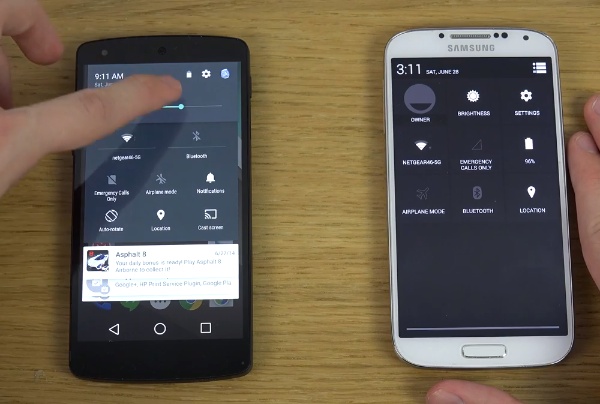
We are evaluating the two versions on common parameters such as: a) Availability – The Android L is expected to hit the market in autumn this year and several sweet treat names have been popping up or are being suggested for it. However, it would not be prudent for any Android user to assume he would get the upgrade automatically. Even if you are the user of Kit Kat, which is the current system, your upgrade to Android L still depends on a variety of factors. b) Design – The Material Design is the novelty and the big change when it comes to design of Android L. For those hankering for a change since the Ice Cream Sandwich days, this one will surely bring a lot of cheer. The generation of color as a function of the content being shown along with usage of shadow lights accord better depth to the presentation of the Android L. c) Lockscreen – This is the very first sight as soon as you switch on the device. The difference in Android L is the inclusion of notifications and the swipe upwards to unlock, the swipe to the left to get the camera and to the right for the dialer. d) Homescreen – Here the changes are not very striking except for the addition of some new icons. The style change when it comes to the navigations buttons is the one to notice in Android L. e) Multitasking – The 3D rotary style of viewing in the Android L comes as a wonderful and innovative change as compared to the 2D open apps list on the Kit Kat. You just swipe the card of each app to its side and tap ‘X’ to activate it. f) Notifications – The notification bar has been redesigned in the Material Design layout. There is no drop down but just an initial swipe down from the screen top followed by a second swipe to get to the quick settings. There is no need to tap any button. The quick settings come loaded with a brightness slider, ‘do not disturb’ notification and the cast screen. The most viewed notifications will also be displayed on priority as Android L would learn from the user experience over time. g) Performance – this is expected to change big time due to the Android Run Time or ART speed of execution and though the Kit Kat itself is not too slow at the moment, over time the user will start noticing the difference. h) Battery – Life of the battery is in for definite improvement as there is a battery saver mode function that can conserve battery power from getting drained or wasted. The above parameters and associated improvements surely make the developments on Android L something to look forward to for smartphone enthusiastsOne Click Root Author
One Click Root Author
Content Writer
Experienced writer covering technology and mobile development.
You Might Also Like
Google
Android 14 Root Methods: What Changed?
Explore the new root methods and security changes in Android 14.
Google
Latest Android Security Updates Impact Root Access
Understanding how the latest security patches affect root methods.
Google
Google Pixel 8 Pro Root Guide Released
Complete step-by-step guide to rooting the Google Pixel 8 Pro.
Comments
JD
John Doe
2 days ago
Great article! Very informative and well-written. Thanks for sharing.
JS
Jane Smith
5 days ago
I found the security section particularly helpful. Looking forward to more content like this!
Leave a Comment
Newsletter
Get the latest tech news delivered to your inbox weekly.
Popular Posts
-
1
Getting Started with Android Development
12.5K views
-
2
Best Practices for Mobile Security
8.2K views
-
3
Understanding Smartphone Hardware
6.8K views