Android Wear is gaining in popularity, albeit slowly. Till now, the concept of such wear was not known to many people. Moreover, the brands that are offering this product are few and they have not been very aggressive with their marketing. Those who knows about Android Wear have been taking their time buying it because they are waiting for the right and relevant apps that would make their experience a better one.
Keyboard App – A Definite Plus To Encourage Use Of Android Wear
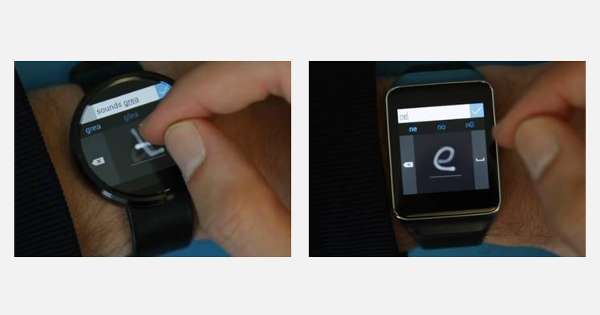
The Analog Keyboard released by Microsoft is a step in the right direction and will surely spur more fence sitters to buy Android Wear. Though it is a prototype at the moment, it is quite handy and will definitely go on to become an app of choice for all those wishing to text. This app enables the user to text by just drawing letters on the face of the watch. The app today only supports the square-screened smart watches having resolution of 320x320 but analysts are hopeful its usage will extend to other smart watches also with different screen shapes in the near future.
Handwriting Recognition Is A Game Changer
The app above can be downloaded easily from MicrosoftResearch page. The handwriting recognition feature of this app sets it apart from anything else till now as users can now input text even on smaller screens in total privacy and without any background noise. Unlike keyboards that are currently in use where the keys jostle for space, the handwriting recognition Analog keyboard offers the entire area of the screen for each symbol so that the user can comfortably enter each letter on the small screen without mistyping.
There is a nice illustrative video that actually shows how the prototype is performing on a Samsung Gear as well as on the Motorola 360. The video depicts messaging, typing of special characters, searching with examples so that the user can learn quickly and implement.
Useful Tips Provided By Microsoft
As with anything that is technical, there are some tips and best practices that the user will do well to follow to optimize user experience. Microsoft has taken the trouble to put together tips that will make this possible. They are:
- Type lowercase only as uppercase is not supported.
- It is better to be slow and neat when using it initially as you need to watch the strokes totally fading out on the panel to see if they are being displayed separated from each other and are legible. By doing that you will improve accuracy and that is good for the recipient of your messages as well.
- Use of frequent words is auto corrected once you finish entering all the characters. So use words like ‘this, and, is”, and don’t bother to correct them if you have typed them wrongly
- Write rare words slowly and verify characters as the system may not immediately recognize them.
- The backspace can also be used to repeat by long pressing it.