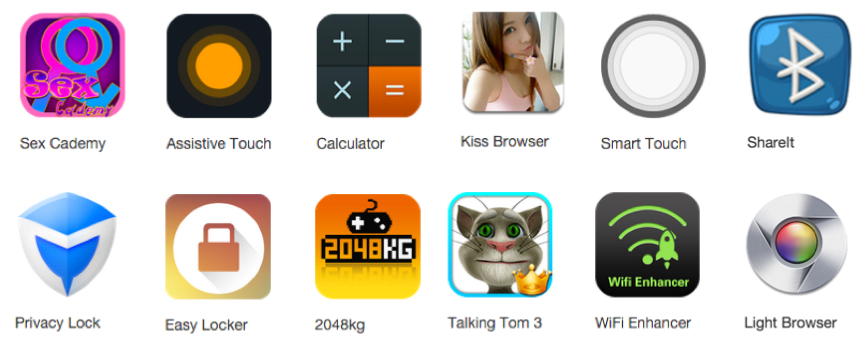
Have you downloaded an app from outside the Google Play Store lately? If so, then you might have a dangerous new Android malware called “Kemoge”.
That malware installs itself after you download a seemingly innocent app. After the installation is complete, the app performs 8 well-known root exploits in an attempt to gain root access to your device. After gaining root access, it contacts servers and appears to try to perform further action on your device.
The malware was discovered by
mobile security researchers at FireEye, who talked about it in a blog post here.
Users in Over 20 Countries Are Affected
Unlike most mobile malware, Kemoge is affecting users all over the world (i.e. in more than just India, China, and other notorious mobile malware havens).
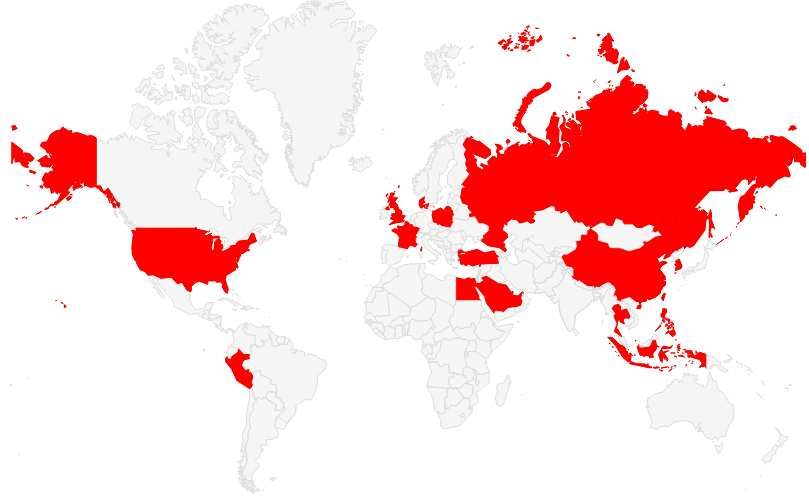
So far, the malware has been spotted on devices in 20 countries, including the United States and the UK. FireEye also claims the malware has affected major organizations “including governments and large-scale industries.”
New Malware Affects Non-Rooted Devices
This malware gains root access to your device after it’s installed. You do not need to have a rooted Android device in order to get affected by this malware. It affects everyone.
All you need to do to get infected by this malware is be using a standard Android device and click on an app advertisement.
How does Kemoge Attack your Device?
Here’s how the malware is thought to work:
-The app is installed when you click on advertisements for mobile games and free Android apps. It does not install itself through the Google Play Store.
-After you install the app, it immediately executes 8 different Android roots in an attempt to gain root access to your device.
-After root access is granted, Kemoge will start to mimic legitimate code libraries in an effort to get a permanent foothold on your device. Those code libraries include essential Facebook processes (com.facebook.qdservice.rp.provider, for example) as well as core Android processes like com.android.provider.setting.

-Kemoge also takes the unusual step of uninstalling antivirus software that’s on your device. It will immediately uninstall Lookout, for example, which is a legitimate antivirus software program. Yes, it appears that Kemoge takes a proactive stance against antivirus attacks.
-After lodging itself onto your device and removing existing antivirus, the app will start to contact remote servers to tell your phone to perform various malicious functions. It can steal your information, for example, or upload data to remote servers.
How to Remove Kemoge Malware
I’ve got some bad news if you want to remove Kemoge: the malware isn’t that easy to remove. Since the malware installs itself at the root levels of your device, you can’t just restore to factory settings to remove it.
Instead, you need to flash your device. Unfortunately, some users are reporting that even reflashing doesn’t work – which is bad news.
The lesson? Don’t download and install apps from outside the Google Play Store. If you absolutely must do that, make sure you’re 100% sure about the source, author, and website from which you’re downloading. Otherwise, it’s just too risky.