

Samsung Galaxy S3 Bug Allows Anyone to Bypass the Lock Screen
2 min read
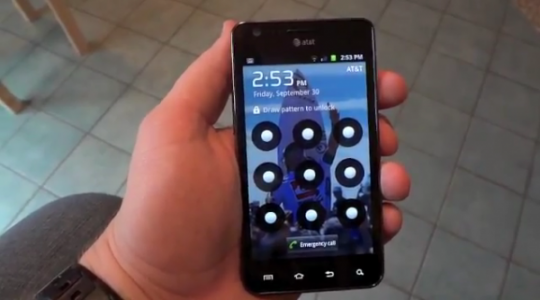
Mobile operating systems are never 100% safe. And Samsung Galaxy S3 users learned that the hard way earlier this week when a new bug was revealed. That bug allows anyone to bypass the GS3 lock screen – even if there’s a password or screen lock combination setup.
Unfortunately, the bug also affects the Galaxy Note 2. Someone with the right expertise can bypass all of the following lock screens on the Note 2 and the GS3:
-Password Lock
-Face Lock
-PIN
-Pattern lock
So basically no type of lock screen pattern is secure. And to make matters worse, getting past the lock screen is surprisingly easy – you don’t need any hacking experience or special computer knowledge. Instead, you only need to press the right button at the right time.
Sorry Samsung users: you can no longer trust your lock screen to secure your phone.
How to get past the Samsung lock screen without a code
Whether you’re trying to break into your own phone or hacking into somebody else’s, here’s how to get past the lock screen on any Samsung Galaxy S3 or Note 2: http://seclists.org/fulldisclosure/2013/Mar/50 Read that article to find out more...just don’t get mad at us when your friend hacks into your phone and sends embarrassing text messages to your mom. If you’re too lazy to read that article, here’s a condensed version: -Lock the handset -Activate the screen and tap the Emergency Call button -You’ll see an ICE button on the bottom left corner of the screen. Tap it. -Tap the physical ‘Home’ button on your handset -Tap on an application or widget on the device’s home screen -You now have access to basic app and calling functionality on the handset Yes, getting past the lock screen is that easy. Another bug involves pressing the ‘Power’ button immediately after tapping the physical Home button. Your timing has to be perfect though, and not all users will get it on the first try. But if you’re trying to regain access to a locked handset, this could be your best option. Of course, you could always root Android and avoid all this hassle. And thanks to One Click Root, rooting Android has never been easier. [youtube id="gD4WhCVeH4w" width="100%" height="400"]One Click Root Author
One Click Root Author
Content Writer
Experienced writer covering technology and mobile development.
You Might Also Like
Android Security
Android 14 Root Methods: What Changed?
Explore the new root methods and security changes in Android 14.
Android Security
Latest Android Security Updates Impact Root Access
Understanding how the latest security patches affect root methods.
Android Security
Google Pixel 8 Pro Root Guide Released
Complete step-by-step guide to rooting the Google Pixel 8 Pro.
Comments
JD
John Doe
2 days ago
Great article! Very informative and well-written. Thanks for sharing.
JS
Jane Smith
5 days ago
I found the security section particularly helpful. Looking forward to more content like this!
Leave a Comment
Newsletter
Get the latest tech news delivered to your inbox weekly.
Popular Posts
-
1
Getting Started with Android Development
12.5K views
-
2
Best Practices for Mobile Security
8.2K views
-
3
Understanding Smartphone Hardware
6.8K views