
InstaCollage - Adding a New Creative Dimension of Expression for Photography Lovers
4 min read
Seldom do you find apps on the Android market that combine the multiple features of several apps all into one. It is equally rare to find a truly unique and remarkable camera-based app either as a flood of tried and tested apps in this category have made this genre rather stagnant in innovation on the Google Play Store. But what if we told you that you could enjoy both of these elusive privileges in one brilliant little app that offers a refreshing new experience for photography app lovers worldwide.
InstaCollage is one such Android app that lets you do just that through its multiple effects combined through an array of features and all that are available on many apps. This amalgamation of features helps you edit images all at one go and that too when multiple images are on the same screen.
InstaCollage is essentially a custom image editing app that lets you create photos using a plethora of attractive frames and effects, text and doodles all in an easy to use interface.
 All of these frames are distinct from each other and can be selected one by one which then takes you into the image editing page. A number of options are available here where you can start by tapping onto a subsection of the frame.
Doing this will then navigate you back to your Android device’s gallery from where you can pick an image that you want to insert into a frame within the collage.
You can move the image and change the size of it through the editing toolbar below and move the image within the frame by simply sliding it.
Further to that you can change the effect of the main screen frame that allows you to change it colour in the background through an interactive colour spectrum. Slide your hand across it and the colour changes accordingly.
You can also add a texture to it with over 20 different textures available for the background.
Alternatively you can select frames from the list on the tool bar. Also give a circular finish to each image from the same set of options.
The next available image editing feature is the image effects which range from
All of these frames are distinct from each other and can be selected one by one which then takes you into the image editing page. A number of options are available here where you can start by tapping onto a subsection of the frame.
Doing this will then navigate you back to your Android device’s gallery from where you can pick an image that you want to insert into a frame within the collage.
You can move the image and change the size of it through the editing toolbar below and move the image within the frame by simply sliding it.
Further to that you can change the effect of the main screen frame that allows you to change it colour in the background through an interactive colour spectrum. Slide your hand across it and the colour changes accordingly.
You can also add a texture to it with over 20 different textures available for the background.
Alternatively you can select frames from the list on the tool bar. Also give a circular finish to each image from the same set of options.
The next available image editing feature is the image effects which range from
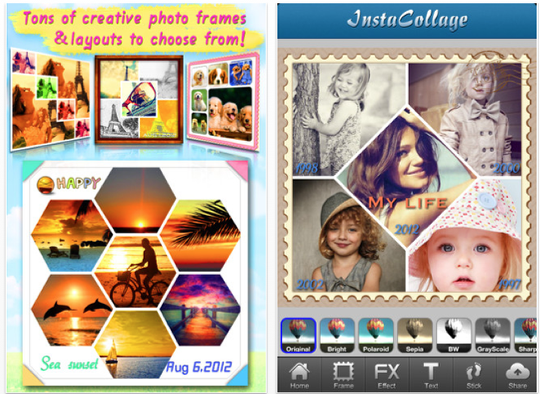 All of the above effects are distinct and the interactive touch adds the effect instantaneously.
What’s more? Well, you can even add a text across the frame and change the color of the font and choose from over 15 strikingly creative fonts that give that extra hint of professionalism in your imagery.
You can play with the font size and give it a slight tilt as well.
This app offers you the opportunity to revel in the bedazzled output of your visual creations and proudly share it with your friends and family on your social networks.
The next option is for that of a doodle whose colour can be edited from the spectrum that appears below the main image.
In order to alter the effects, the developers of the InstaCollage app have also thrown in there a ‘change’ button for your convenience. In case you want to put an end to the current setup, you can either save it or start all over with the ‘restart button’ to the extreme right.
That’s InstaCollage for you, an app that makes your editing looks like that done by a true craftsman. A good photographer is always looking for unique new dimensions to express his creativity and InstaCollage is the ideal companion for such individuals. Prepare to experience itchy trigger fingers on your Android device camera buttons once again and let your creative photography skills shine bright through a splendid new avenue.
All of the above effects are distinct and the interactive touch adds the effect instantaneously.
What’s more? Well, you can even add a text across the frame and change the color of the font and choose from over 15 strikingly creative fonts that give that extra hint of professionalism in your imagery.
You can play with the font size and give it a slight tilt as well.
This app offers you the opportunity to revel in the bedazzled output of your visual creations and proudly share it with your friends and family on your social networks.
The next option is for that of a doodle whose colour can be edited from the spectrum that appears below the main image.
In order to alter the effects, the developers of the InstaCollage app have also thrown in there a ‘change’ button for your convenience. In case you want to put an end to the current setup, you can either save it or start all over with the ‘restart button’ to the extreme right.
That’s InstaCollage for you, an app that makes your editing looks like that done by a true craftsman. A good photographer is always looking for unique new dimensions to express his creativity and InstaCollage is the ideal companion for such individuals. Prepare to experience itchy trigger fingers on your Android device camera buttons once again and let your creative photography skills shine bright through a splendid new avenue.
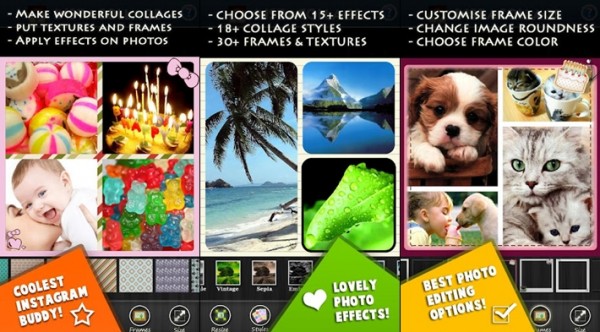
All of these frames are distinct from each other and can be selected one by one which then takes you into the image editing page. A number of options are available here where you can start by tapping onto a subsection of the frame.
Doing this will then navigate you back to your Android device’s gallery from where you can pick an image that you want to insert into a frame within the collage.
You can move the image and change the size of it through the editing toolbar below and move the image within the frame by simply sliding it.
Further to that you can change the effect of the main screen frame that allows you to change it colour in the background through an interactive colour spectrum. Slide your hand across it and the colour changes accordingly.
You can also add a texture to it with over 20 different textures available for the background.
Alternatively you can select frames from the list on the tool bar. Also give a circular finish to each image from the same set of options.
The next available image editing feature is the image effects which range from
- Normal
- Sombre
- Sepia
- Invert
- Pixelate
- Posterize
- Flip
- Cherry
- Jazz
- Noocturna
- Lavender
- Moonlight
- Euphoria etc.
All of the above effects are distinct and the interactive touch adds the effect instantaneously.
What’s more? Well, you can even add a text across the frame and change the color of the font and choose from over 15 strikingly creative fonts that give that extra hint of professionalism in your imagery.
You can play with the font size and give it a slight tilt as well.
This app offers you the opportunity to revel in the bedazzled output of your visual creations and proudly share it with your friends and family on your social networks.
The next option is for that of a doodle whose colour can be edited from the spectrum that appears below the main image.
In order to alter the effects, the developers of the InstaCollage app have also thrown in there a ‘change’ button for your convenience. In case you want to put an end to the current setup, you can either save it or start all over with the ‘restart button’ to the extreme right.
That’s InstaCollage for you, an app that makes your editing looks like that done by a true craftsman. A good photographer is always looking for unique new dimensions to express his creativity and InstaCollage is the ideal companion for such individuals. Prepare to experience itchy trigger fingers on your Android device camera buttons once again and let your creative photography skills shine bright through a splendid new avenue.

One Click Root Author
One Click Root Author
Content Writer
Experienced writer covering technology and mobile development.
You Might Also Like
Reviews
Android 14 Root Methods: What Changed?
Explore the new root methods and security changes in Android 14.

Reviews
Latest Android Security Updates Impact Root Access
Understanding how the latest security patches affect root methods.

Reviews
Google Pixel 8 Pro Root Guide Released
Complete step-by-step guide to rooting the Google Pixel 8 Pro.
Comments
JD
John Doe
2 days ago
Great article! Very informative and well-written. Thanks for sharing.
JS
Jane Smith
5 days ago
I found the security section particularly helpful. Looking forward to more content like this!
Leave a Comment
Newsletter
Get the latest tech news delivered to your inbox weekly.
Popular Posts
-
1
Getting Started with Android Development
12.5K views
-
2
Best Practices for Mobile Security
8.2K views
-
3
Understanding Smartphone Hardware
6.8K views