Dell Magazines that laid the foundation of this historic game called Sudoku which was originally published as ‘Number Place’ has made a significant impact on global pop culture. It published this uber-addictive numeric puzzle game that was constructed by a 76 year old retired architect who went by the name of Howard Garns, a freelance puzzle maker, who today is quite the worldwide phenomenon.
Sudoku Master is a brilliant adaptation of this game for the Android platform and recreates the same magic and thrill you experienced scouring the last pages of newspapers and inking them all.
What comes as a great time-spender or waster, Sudoku has been a part of many lives right since the day it got published in the Dell Magazines.
The very same 9x9 grid with 3x3 mini grids within it with number 1-9 has made it to the Android screen for you and if you walk in and see that the newspapers last pages are filled in with pencil already by another Sudoku fanatic in the house you know you have you Android device to look up to.
The Sudoku Master game developed by CanadaDroid, has one of the better interfaces amongst the Android world for Sudoku games.
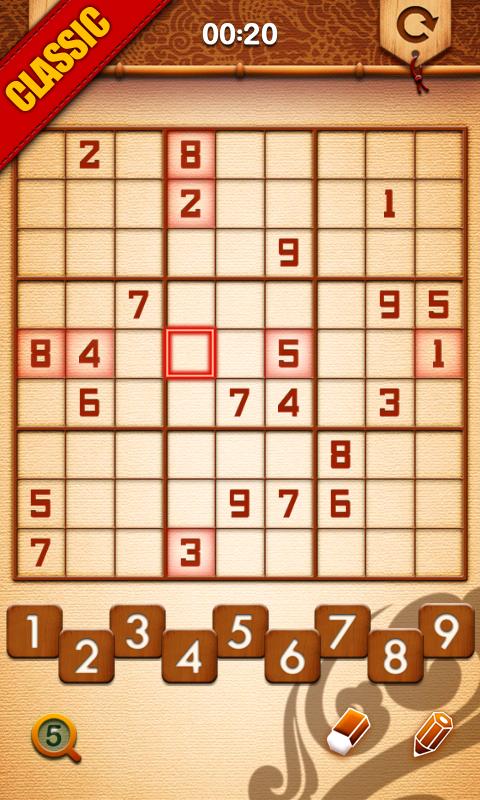
With a brownish tinge and a reddish colour to add in the effect, the Sudoku Master app comes with killer graphics and easy functionality for the veteran and the average everyday Sudoku player.
With two major options to play, i.e. casual and classic, you are set for a gaming experience you’ll get addicted to without getting too lost in the shuffle too early.
The 9x9 grid appears on the screen once you opt in for your mode, post which you have the grid in front of your screen with numbers 1-9 arranged in and ‘up & down’ fashion for you to easily pick a number and add to the box within the grid. With a smooth interface, the user has to click on the part of the screen where he/she wishes to add the number and press the number from the list down.
The user can also add in multiple numbers in to the grid to keep as an option on order to make the best alternate judgement.
This further helps in not going wrong and having a safeguard as against leaving the boxes empty.
There are 4 levels to the game with
You also additionally have the auto save and resume functionality so that you can start a game and come back to it later when you feel like.
The pencil marks function again helps the game experience more enjoyable and is a differentiating factor against other apps in the same category.
The Sudoku Master app also comes in with an auto undo and re-do option.
To cheat a little but, the Sudoku Master app also has the error-entry option where it highlights when you a have added in a wring number entry
Further to that, you have statistics tracking for the game to make sure and see how you are progressing in the app.
You also get to see your performance against the best score you hit the last time played.
In addition to this, the app extends its reviewing to the users and asks you to rate the app so that consistent improvements can be made to it over consistent periods of time.
That’s Sudoku Master for you. Get it from Google Play Store today for free and make your gaming experience contribute to your numeric intelligence.
We’ve all once upon a time in our lives whilst reading the local newspaper stumbled upon the need pages where this 9x9 box with partially filled numbers exists and it seemed as though it were inviting you to fill the rest of it up. That’s right; the name that went by the name if Sudoku, has something for you at the top of your Android devices too. With Super Sudoku, this game seems to spoil you, the average Sudoku player. The features embedded inside it will definitely show you how.
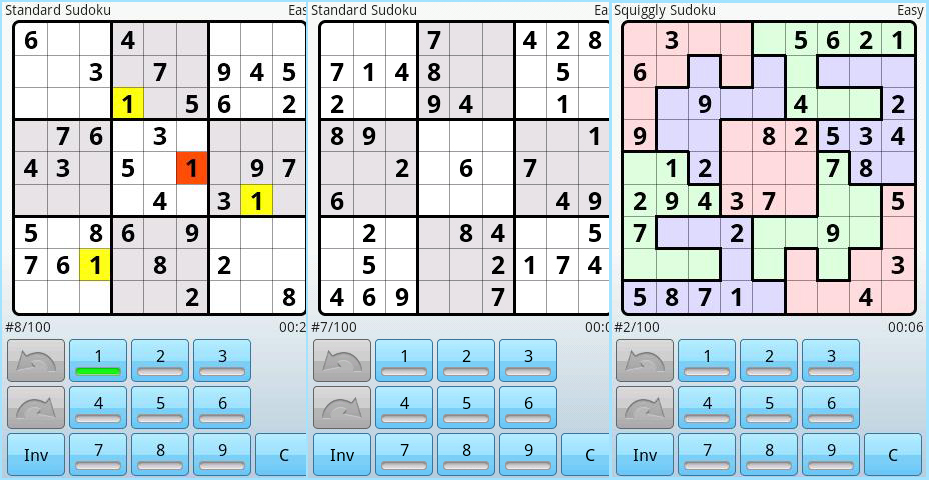
The interface of the Super Sudoku app is rather simplistic and has nothing much to offer graphically. With a simple white background the 9x9 grid cut down into 9 3x3 grids has an alternate tinge of grey and white and with black borders.
There isn’t much to the look and feel of the Super Sudoku app other than a few minor features thrown in here and there.
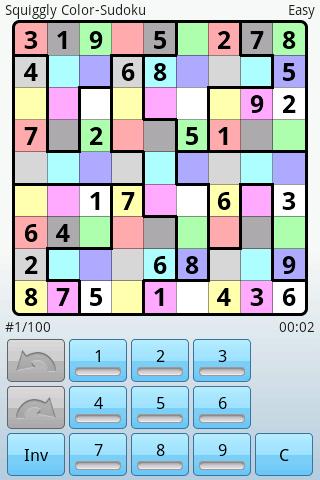
The functionality of the app with the kinds of puzzles and the variations added in there though are pretty one of a kind if you compare it to other apps in its class. It offers different kinds of variations that will pique your interest such as:
- Squiggly Sudoku
- Colour Sudoku
- X- Sudoku
- Squiggly X-Sudoku
- Hyper
- Percent
You’re in for quite a ride. The above puzzles may seem to be confusing but each of the come with additional features to get you tickling your brain, much like never before.
With 5 levels of difficulty ranging from:
- Very Easy
- Easy
- Normal
- Hard
- Very Hard
The Super Sudoku app offers a set of 100 odd puzzles in each of the categories that make about 500 odd puzzles for you to play unstoppably.
Once you start the puzzle the grid appears in the centre of the screen with the four corners displaying the category name to the top right, the kind and genre of the puzzle to the top left, the number of the puzzle from the list of 100 within its category, and most importantly the time at the bottom right.
The app comes without ads and can be enjoyed for hours and hours without any external disturbances.
The numbers are displayed at the bottom that seem to look like a calculator set of numbers but the + and – signs are replaced with the undo and re-do buttons and a “C” button that allows you to cancel you last move.
The game also comes with an Auto save feature that helps you resuming the game from were ever you left it!
Another great feature is the part where, on clicking on a particular number from the list of 1-9 (not the grid), it highlights that particular number on the grid, which tells you where you have placed a particular number on the grid.
Based on the difficulty this app also awards you points based on how well you performed. This allows you to match up against players on the global level.
And to do this, this Android app also gives you global statistics to refer to and identify your standing among the world of fellow brainiacs so that you can level up. It acts as a big motivator to play even better.
So there you have it, Super Sudoku proves to be an incredibly stylish Sudoku app with an intuitive interface that amalgamates the world of numeric puzzle players and making this world a smarter place.