
Google Assistant – now reads and replies messages from more apps; but under investigation in the EU
3 min read
The day will come when we all become very dependent to AI and that future is starting to shape now as Google Assistant, Alexa, and Apple’s Siri are becoming smarter than ever. These AI assistants do some of the work for us and, occasionally, we don’t even have to touch our phones to do some tasks.
As for well-loved Android, here are the latest news from Google’s very own Assistant.
Google Assistant now reads and replies to messages from more apps
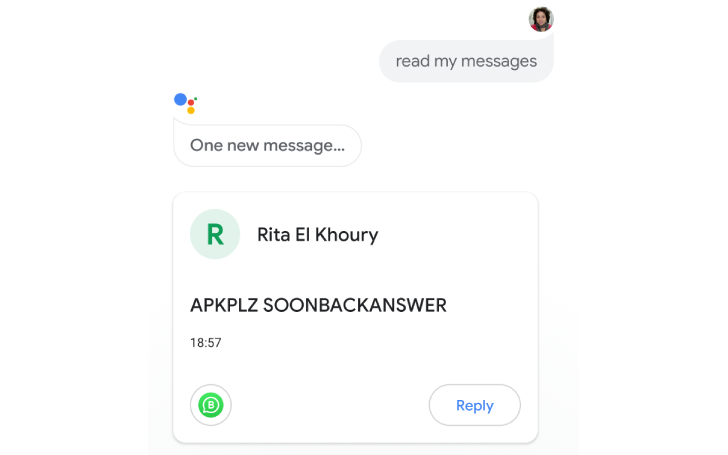
Previously, Google Assistant can only read and reply messages from selected apps, particularly Google-developed apps such as the built-in Messages app and Hangouts. Today, however, the it seems the number of supported apps just exploded.
Testing confirms that Google Assistant can now read and reply to messages from third-party SMS apps such as Pulse SMS, WhatsApp, Slack, Telegram, etc. Some people are reporting success with Google Voice, too. It’s possible some people out there have seen this integration with different apps for a while now, but it seems many people are just seeing the feature now.
To see if Google Assistant can read and reply to messages from your favorite app, follow these steps:
- Once you receive a message, open Google Assistant on your phone by saying “Hey Google” or whichever method you prefer. Then say, “Read my messages.”
- If you’ve never done this before, Google will ask for your permission to read notifications. Click “OK” on the pop-up (if you’ve done this before, skip to step 6).
- In the Notification Access section of settings, toggle the Google switch to “On.” Hit “Allow” in the pop-up.
- Now say, “Hey Google, read my messages” again. This time, Assistant will open.
- Assistant will show you the first message and ask you if you’d like it read out loud. It will also tell you which app it came from.
- You can either ask Google to reply to the message and speak what you want it to say or you can type it out manually.
- Once you’re done, you can have Assistant send the message. If there are any other messages, Assistant will repeat the process.

One Click Root Author
One Click Root Author
Content Writer
Experienced writer covering technology and mobile development.
You Might Also Like

Google Assistance
Android 14 Root Methods: What Changed?
Explore the new root methods and security changes in Android 14.

Google Assistance
Latest Android Security Updates Impact Root Access
Understanding how the latest security patches affect root methods.

Google Assistance
Google Pixel 8 Pro Root Guide Released
Complete step-by-step guide to rooting the Google Pixel 8 Pro.
Comments
JD
John Doe
2 days ago
Great article! Very informative and well-written. Thanks for sharing.
JS
Jane Smith
5 days ago
I found the security section particularly helpful. Looking forward to more content like this!
Leave a Comment
Newsletter
Get the latest tech news delivered to your inbox weekly.
Popular Posts
-
1
Getting Started with Android Development
12.5K views
-
2
Best Practices for Mobile Security
8.2K views
-
3
Understanding Smartphone Hardware
6.8K views