Today, we will be bringing to you possibly one of the best weight loss apps on the Android platform. For every individual, there comes a point in time where they realise that they are way above weight of what it used to be. Unfortunately, motivation and professional knowledge does not come as easy to everyone as it does to professional athletes. However, it does not mean that we are incapable of empowering ourselves to follow in their footsteps.
Coming to our rescue is a wondrous Android app developed by MyFitness Pal Inc., which in itself should tell you that this one’s a killer of an app. Designed to modify the way you eat in a way that will help you lose weight in minimal time, Calorie Counter is right up there with its game among the top health apps listed on Google Play Store, and it intends to step up your fitness game to the next level too.
The Calorie Counter Android app has a all-inclusive set of over 3,000,000+ foods and cuisines and has a huge list of what all food elements are in it and in what amounts
Though the Calorie Counter app does not prescribe any types of exercises, what it actually does is tell you how much you have eaten in terms of calories in each day and if you happen to follow a weight loss regime this app is the perfect indicator and calculator for how much you actually should be eating and what all your actually intake is.
You can then measure this and use the app to fix an appropriate diet so that you calories are in check.
The Calorie Counter app allows for a huge database of food and this will help you select the right kinds of food.
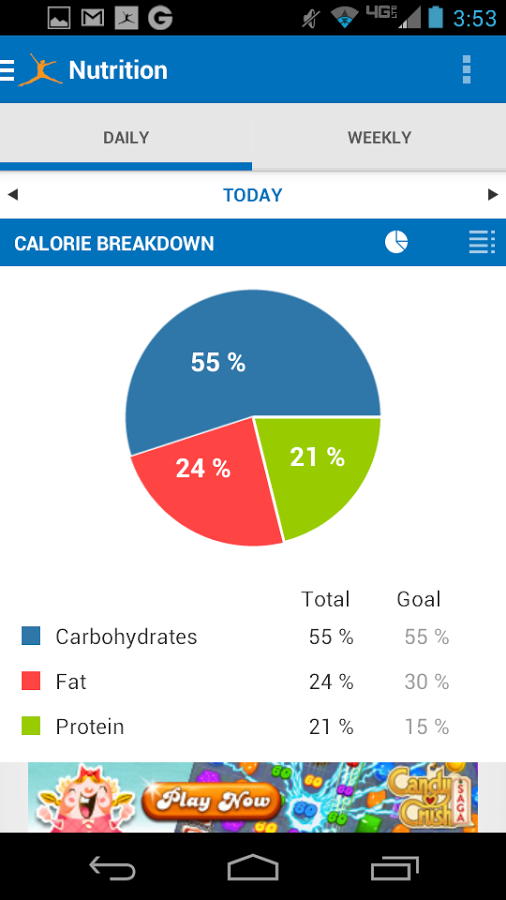
Ahead of that, Calorie Counter also allows you to add in the food of your type and it will subsequently tell you everything about it.
You also have the ability to play along this calorie tracking game with other health conscious friends. Here you can add in friends who are using the app and who are following a similar calorie counter regime.
A daily progress report is visible too.
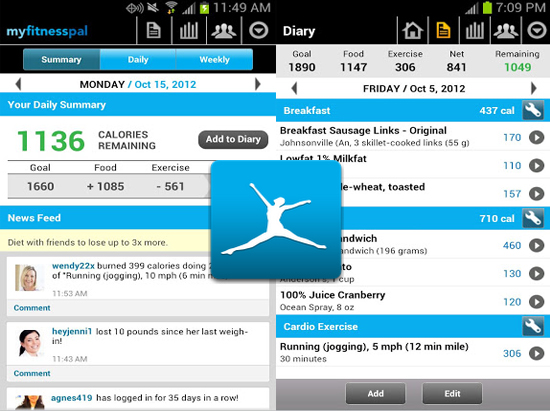
Now when you enter the Calorie Counter app the interface is very much similar to a social M media tool with parameters like:-
The goal is the constant depending on what you added right in the start.
The food tab will tell you the intake in numbers of the food that you took and the numbers obviously signify the calories.
The exercise will show you a ‘-‘ before to show that it helped reduced the calories and the net bar right next to that will tell you how much you are left with displaying how close you are to your goal.
This is the daily summary that will show you In green and large the number of calories remaining and this can be added to your diary on the app as well.
It also shows you how much calorie intake you had on a specific basis being during lunch, dinner, snacks, etc. All you have to do is add in the kind of food you took in from the huge library of foodstuffs and the app will tell you where you stand.
You can create unlimited custom exercises and also see the cardio and strength training.
All in all, the Calorie Counter app is wide-ranging in functionality and perfectly apt to ensure that you are well in shape way before you chow down incessantly on unhealthy fast food items. Calorie Counter is meant to be a 24/7 motivator to help you steer clear of bad eating habits.
Have you ever sat to wonder, and you may even have wondered that the average human sleeps for 8 hours, which means 1/3rd of the day is spent in energizing yourself by remaining in a different world of sleep all together. SleepBot, the app that Mashable rated as one of the top 10 best apps from 2013 is an app that will amaze from you form the word go as not only do the features of the app justify the cause but the cause itself is surreal and something not many have ever thought of.
The SleepBot app that has taken a good amount of time in the developmental phase SleepBot will analyse the behaviour of your body and attempt to enlighten you on what and how your body reacts and responds to multiple factors that contribute to the night.
The interface of the SleepBot app is navy blue in colour and looks like the night sky when seen on your Android device screen.
The plethora of alarm and notification options available in Sleepbot include:-
- Smart Cycle Alarm
- Movement Tracker
- Sound Recorder
- Sleep Debt Log
- Data Analysis
- Trend Graphs
- Sleep Help
- Auto-Wi-Fi/Silence/Airplane modes
- Export
- Sync to mysleepbot.com
The smart cycle alarm will automatically wake up you up every day at that particular time and make sure you’re up.
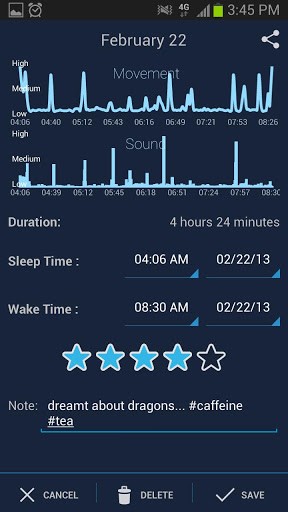
The movement tracker is an ingenious feature added in there. It tracks the movement that you made during the night and makes an account of it through a graph. This is depicted as high, medium and low.
Further, it also records the sounds that you made in the night. It then will sync and see the connection between the two parameters.
The sound correlation is seen too with the increase and decrease in sound made and the graphs for sound and movement are up and down so you can make the relation.
It then shows you the lag in sleep or the excessive sleep you has with the Date, Sleep and Wake time, Hours and Debt in the form of a table.
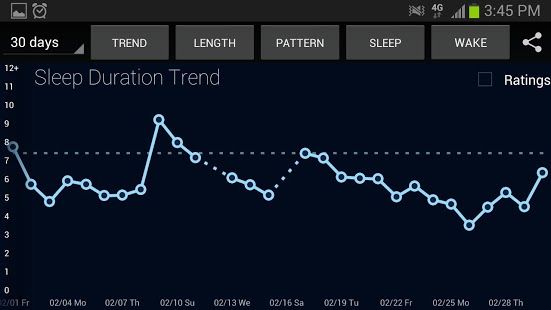
At the end, you get to see a trend in the way the sleep is going and how much of it you had. In addition to this, you can also see graphs of 30 days that display stats of:
- Trend
- Sleep
- Pattern
- Sleep
- Wake
Further to this, the SleepBot app goes steps further to give you solutions on how to stay awake example :- extra cups of coffee, A caffeine Chart, Quick Strategies etc.
It also gives you more about sleep and things that you should know about the phenomenon.
The SleepBot app also has an in built widget that will allow you to add in a time to wake up and whether or not to record the sleep and movements. The widget will also show you a graph of the sleep record that you are having in the night.
This way you can actually track what is happening in those 8 hours of sleep when you don’t have conscience of anything happening in you.
SleepBot is an app that is right up there in terms of functionality with the best health and lifestyle apps, and is a definite download especially if you want to know about what all you will do when you are asleep and how you can improve your sleeping habits.