

Nobody Tells the Weather Like 1Weather
Weather applications on Android are so numerous and so varied that for every user there’s one perfect match. But who has the time to sit around scrolling through millions of weather apps on Google Play Store to find the one that is exactly what you need and nothing more and nothing less. By a blanket, 1Weather comes to being close to what most people mostly need. The idea is simple. It’s not just a good weather app, it’s a great one. And once you get familiar with it, there’s no way you’ll challenge their claims of excellence either.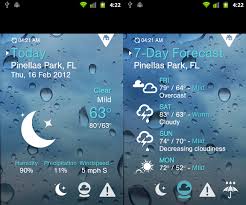 Developed by the OneLouder company, the 1weather app allows you to access full suite of accurate and the latest and completed updated weather information. The app is clean and very functional yet it looks good. That is everything a weather app needs.
Fonts are easily legible which is great since you don’t want to spend unnecessary time reading something as banal but important as weather. The screen doesn’t looked cluttered but is spaces out well. 1Weather has a simple solution that enables its clean look. It gives you multiple pages for different sets of information.
For your current weather information, you can stick to the main page. Information like humidity and temperature also are presented along with this. An animated weather icon that you begin to recognise saves you the time to have to read this information manually.
A right scroll brings you to the upcoming forecast for seven straight days.
Developed by the OneLouder company, the 1weather app allows you to access full suite of accurate and the latest and completed updated weather information. The app is clean and very functional yet it looks good. That is everything a weather app needs.
Fonts are easily legible which is great since you don’t want to spend unnecessary time reading something as banal but important as weather. The screen doesn’t looked cluttered but is spaces out well. 1Weather has a simple solution that enables its clean look. It gives you multiple pages for different sets of information.
For your current weather information, you can stick to the main page. Information like humidity and temperature also are presented along with this. An animated weather icon that you begin to recognise saves you the time to have to read this information manually.
A right scroll brings you to the upcoming forecast for seven straight days.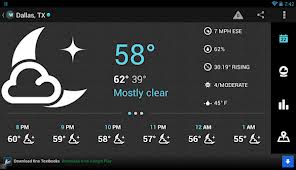 It begins with the usual set of features which include animated maps. Animated maps help you read the weather quickly and the colour coding makes it a fun task to do rather the tedious boring one that a conventional weather report will make it out to be, Also due to the animation, even a quick single glance allows you to register the weather information you are looking for and thus the 1weather app cuts down on the user time requirements that most apps need.
It provides a radar feature so you can find the weather in a wider region associated with a location without having to manually keep shifting the position. It allows you to know what’s approaching rather than just the immediate details too.
The daily weather alarms tell you important daily weather details and also focus on the alerts so that you can prepare for weather issues and also accordingly plan your day.
It begins with the usual set of features which include animated maps. Animated maps help you read the weather quickly and the colour coding makes it a fun task to do rather the tedious boring one that a conventional weather report will make it out to be, Also due to the animation, even a quick single glance allows you to register the weather information you are looking for and thus the 1weather app cuts down on the user time requirements that most apps need.
It provides a radar feature so you can find the weather in a wider region associated with a location without having to manually keep shifting the position. It allows you to know what’s approaching rather than just the immediate details too.
The daily weather alarms tell you important daily weather details and also focus on the alerts so that you can prepare for weather issues and also accordingly plan your day.
Go the Extra Mile in Understanding Nature's Moods with AccuWeather
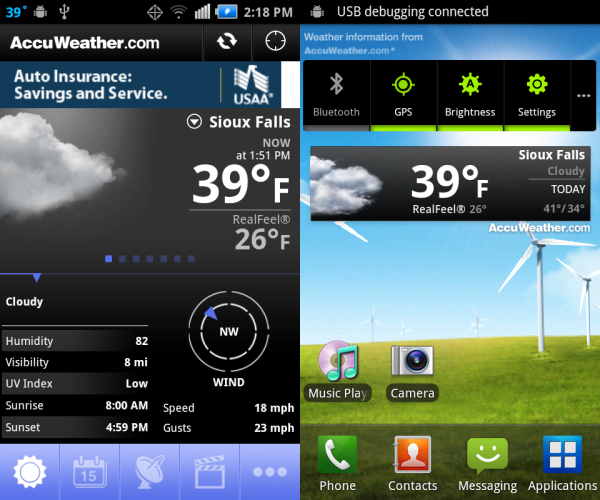
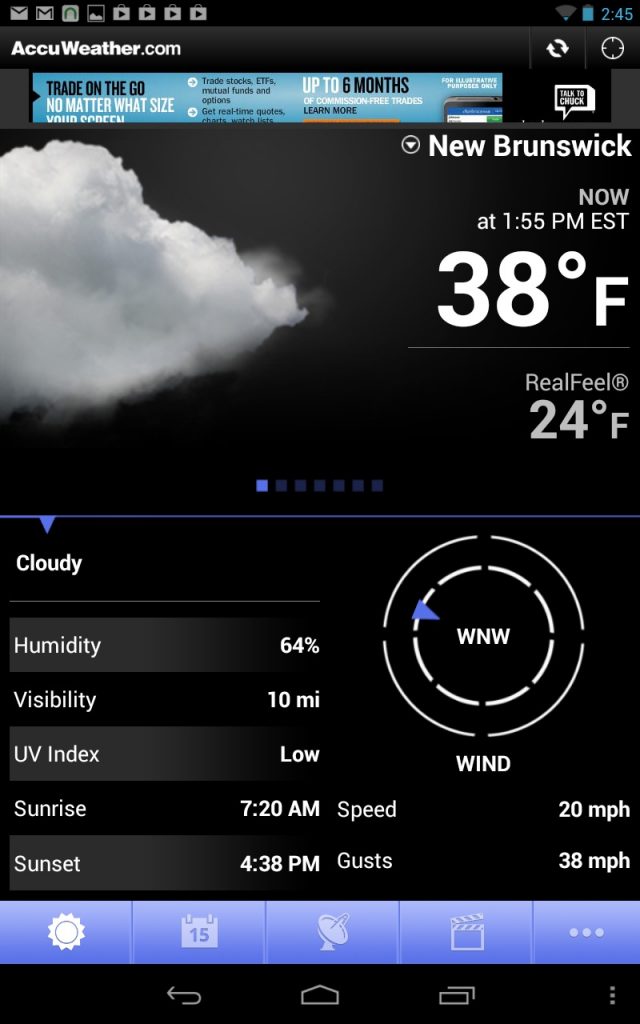 The tabbed design of the AccuWeather app has everything organised in this format so that it is easy to access and cumbersome dropdown lists that are never ending and seem to be part of some weather apps for some unfathomable reason can be avoided. It has 6 different tabs to choose from at the bottom. These are the conventional tabs and they include the usual Weather tab, the Radar tab, Risk tab, Alarms tab, Alert tab.
The Weather tab allows you to choose the format to view the weather in which includes current weather, hourly updates, and weekly (5 day) forecasts among other options. Images are used to make readability better. This ensures that you can just look at the app and know what to expect once you get familiar with the app. That way you don’t spend time studying the weather, a cursory glance does the trick. The pictures are quite detailed and they tell you whether the weather will be cloudy, rainy, sunny and also the pressure, temperature and humidity to expect.
The radar feature shows you an animated radar that tells you the weather of the general area. This needs a good internet connection and a bad connection can lead to terrible picturing. The app is however good for those travelling as the information provided isn’t limited to the geographical area you currently are.
The video tab comes in here and presents you with a local report, breaking news related to the weather, regional reportage on the topic and even an overall national overview, thus, making it a complete weather app.
Risk tab talks about several types of weather risks following an 8 hour period; it’s a sliding blue bar that turns red in high risk times. The Alarm tab talks about potential weather alarms in the next 5 days thus a wider timeframe as compared to the risk one. Sudden changes are also recorded in the alert feature.
AccuWeather is a free Android app provides ample data making it very detailed and comprehensive. It’s perfect for all those who like to have more than just the basic knowledge about the weather outside.
The tabbed design of the AccuWeather app has everything organised in this format so that it is easy to access and cumbersome dropdown lists that are never ending and seem to be part of some weather apps for some unfathomable reason can be avoided. It has 6 different tabs to choose from at the bottom. These are the conventional tabs and they include the usual Weather tab, the Radar tab, Risk tab, Alarms tab, Alert tab.
The Weather tab allows you to choose the format to view the weather in which includes current weather, hourly updates, and weekly (5 day) forecasts among other options. Images are used to make readability better. This ensures that you can just look at the app and know what to expect once you get familiar with the app. That way you don’t spend time studying the weather, a cursory glance does the trick. The pictures are quite detailed and they tell you whether the weather will be cloudy, rainy, sunny and also the pressure, temperature and humidity to expect.
The radar feature shows you an animated radar that tells you the weather of the general area. This needs a good internet connection and a bad connection can lead to terrible picturing. The app is however good for those travelling as the information provided isn’t limited to the geographical area you currently are.
The video tab comes in here and presents you with a local report, breaking news related to the weather, regional reportage on the topic and even an overall national overview, thus, making it a complete weather app.
Risk tab talks about several types of weather risks following an 8 hour period; it’s a sliding blue bar that turns red in high risk times. The Alarm tab talks about potential weather alarms in the next 5 days thus a wider timeframe as compared to the risk one. Sudden changes are also recorded in the alert feature.
AccuWeather is a free Android app provides ample data making it very detailed and comprehensive. It’s perfect for all those who like to have more than just the basic knowledge about the weather outside.