

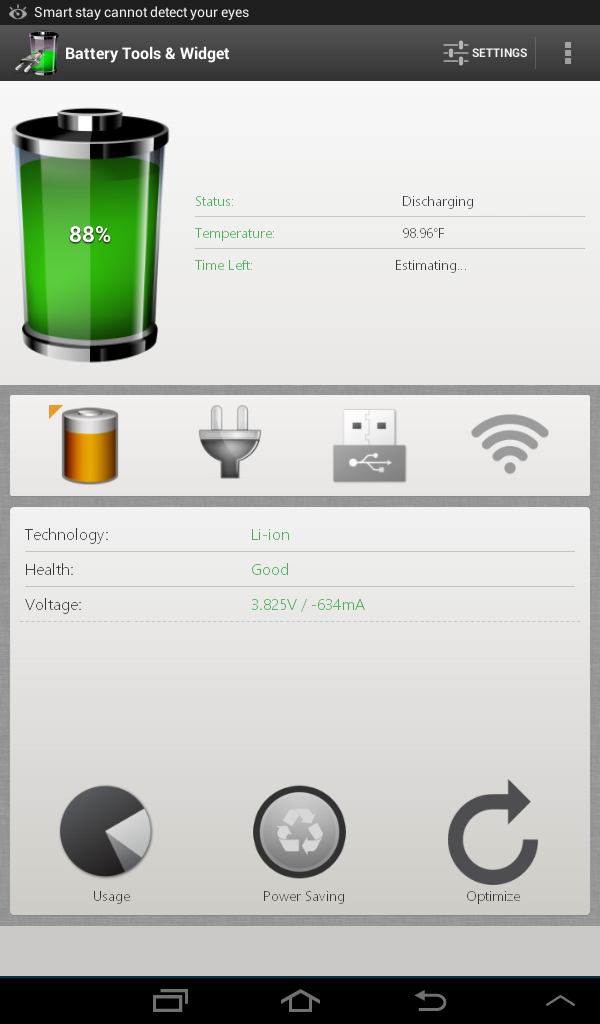
 Battery Tools and Widget Android includes the following important functions:
- Battery level with number and battery icon.
- Battery status.
- Battery temperature in both “Celsius” and “Fahrenheit”.
- The estimated time left for charging or discharging modes.
- Battery technology.
- Battery health.
- Battery voltage.
- Charging electric current for wide range of mobile phones.
- Button takes you to system battery usage screen.
- Customizable Power Saving Mode
- Battery optimization feature, you can adjust optimization options from settings
- Available in: English, Español, Română, العربية, Português, Português(Brasil), Pусский, Polski.
The above is all the information the app can display, here is what all the app allows you to set:
- Temperature unit.
- Widget transparent background.
- Show battery level in status bar.
- Power saving options
- Battery optimization options
A phone’s battery is vital to a phone’s existence. No matter how good or how expensive a phone is, no matter if it is rooted or unrooted, no matter how many apps we have downloaded on it for making our lives convenient, all this is of no use should there be no battery or should the battery not function properly.
A phone’s battery can also be called its heart, without which the phone is of no use, it is as good as a brick. Thus, it is important to download an app that caters specifically to the heat of the phone, that is, the battery of the phone. And amongst all other apps, Battery Tools and Widget Android proves to be a good option for your phone battery’s caretaker!
Battery Tools and Widget Android includes the following important functions:
- Battery level with number and battery icon.
- Battery status.
- Battery temperature in both “Celsius” and “Fahrenheit”.
- The estimated time left for charging or discharging modes.
- Battery technology.
- Battery health.
- Battery voltage.
- Charging electric current for wide range of mobile phones.
- Button takes you to system battery usage screen.
- Customizable Power Saving Mode
- Battery optimization feature, you can adjust optimization options from settings
- Available in: English, Español, Română, العربية, Português, Português(Brasil), Pусский, Polski.
The above is all the information the app can display, here is what all the app allows you to set:
- Temperature unit.
- Widget transparent background.
- Show battery level in status bar.
- Power saving options
- Battery optimization options
A phone’s battery is vital to a phone’s existence. No matter how good or how expensive a phone is, no matter if it is rooted or unrooted, no matter how many apps we have downloaded on it for making our lives convenient, all this is of no use should there be no battery or should the battery not function properly.
A phone’s battery can also be called its heart, without which the phone is of no use, it is as good as a brick. Thus, it is important to download an app that caters specifically to the heat of the phone, that is, the battery of the phone. And amongst all other apps, Battery Tools and Widget Android proves to be a good option for your phone battery’s caretaker!
Battery Tools and Widget - Your Android's Very Own Power Savior
3 min read
One of the most important and the most overlooked components of a smartphone is its battery. And no, I am not talking about how much battery is charged or whether we keep charging or phone to prevent the battery from draining out. I am talking about actually knowing how the battery functions. What all it requires and how we can take care of it. After all, we need to make sure that the battery keeps functioning properly in order to make sure that our phone does not cease to run smoothly.
If you're looking for a way out of this problem, you need to download a nifty little tool called Battery Tools and Widget Android from Google Play Store.
Battery Tools & Widget for Android, a simple app for monitoring and optimizing your battery, it provides battery information which allow you to control your power consumption, it comes with two widgets that can be set to your home screen, the widget background can be set to full transparent, the app allows you to display colored battery level on status bar with an option to hide it.
The app also estimates time left for charging or discharging modes, the time is estimated according to your power consumption; therefore, it will keep varying based on current power consumption. The estimated time will not appear immediately, the app needs some time to monitor your power consumption to be able to estimate the time left. And now with the latest version, you can enable your own power saving mode and optimize your power consumption with the optimization feature. both features are adjustable from settings.
Battery Tools and Widget Android includes the following important functions:
- Battery level with number and battery icon.
- Battery status.
- Battery temperature in both “Celsius” and “Fahrenheit”.
- The estimated time left for charging or discharging modes.
- Battery technology.
- Battery health.
- Battery voltage.
- Charging electric current for wide range of mobile phones.
- Button takes you to system battery usage screen.
- Customizable Power Saving Mode
- Battery optimization feature, you can adjust optimization options from settings
- Available in: English, Español, Română, العربية, Português, Português(Brasil), Pусский, Polski.
The above is all the information the app can display, here is what all the app allows you to set:
- Temperature unit.
- Widget transparent background.
- Show battery level in status bar.
- Power saving options
- Battery optimization options
A phone’s battery is vital to a phone’s existence. No matter how good or how expensive a phone is, no matter if it is rooted or unrooted, no matter how many apps we have downloaded on it for making our lives convenient, all this is of no use should there be no battery or should the battery not function properly.
A phone’s battery can also be called its heart, without which the phone is of no use, it is as good as a brick. Thus, it is important to download an app that caters specifically to the heat of the phone, that is, the battery of the phone. And amongst all other apps, Battery Tools and Widget Android proves to be a good option for your phone battery’s caretaker!
Battery Tools and Widget Android includes the following important functions:
- Battery level with number and battery icon.
- Battery status.
- Battery temperature in both “Celsius” and “Fahrenheit”.
- The estimated time left for charging or discharging modes.
- Battery technology.
- Battery health.
- Battery voltage.
- Charging electric current for wide range of mobile phones.
- Button takes you to system battery usage screen.
- Customizable Power Saving Mode
- Battery optimization feature, you can adjust optimization options from settings
- Available in: English, Español, Română, العربية, Português, Português(Brasil), Pусский, Polski.
The above is all the information the app can display, here is what all the app allows you to set:
- Temperature unit.
- Widget transparent background.
- Show battery level in status bar.
- Power saving options
- Battery optimization options
A phone’s battery is vital to a phone’s existence. No matter how good or how expensive a phone is, no matter if it is rooted or unrooted, no matter how many apps we have downloaded on it for making our lives convenient, all this is of no use should there be no battery or should the battery not function properly.
A phone’s battery can also be called its heart, without which the phone is of no use, it is as good as a brick. Thus, it is important to download an app that caters specifically to the heat of the phone, that is, the battery of the phone. And amongst all other apps, Battery Tools and Widget Android proves to be a good option for your phone battery’s caretaker!
Newsletter
Get the latest tech news delivered to your inbox weekly.