

How to Browse in Incognito Mode on Android
2 min read
Chrome’s Incognito Mode is an infamous way to “plan a secret party for your friends”, so to speak.
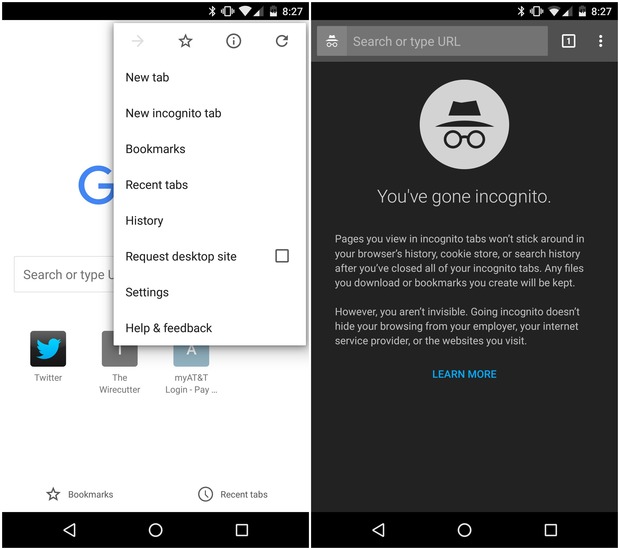
No matter why you’re browsing the internet privately, we’re going to show you how to use that same Incognito Mode on Android in our How To guide.
How Does Incognito Mode Work?
Incognito Mode is a mode where the sites you visit aren’t saved to your device history. Chrome doesn’t sync these sites to your Google account. Just like with Las Vegas, what happens in Incognito Mode stays in Incognito Mode. Of course, Incognito Mode doesn’t prevent all spying: your ISP still sees everything you’re doing, and there’s no real way to get around that. Incognito Mode also doesn’t prevent tracking by your employer, say, if you’re browsing a company network. Nevertheless, there won’t be any record of any files you downloaded on Incognito Mode, unless you specifically download those files yourself.How to Launch Incognito Mode on Chrome
Launching Incognito Mode on Chrome is as easy as following these simple steps: Step 1) Open Chrome Step 2) Select the three vertical dots in the top right corner of your browser Step 3) Tap New incognito tab A new browser with a spy-like logo with pop up, letting you know that you’re now browsing in Incognito Mode. That’s it! Enjoy planning your surprise party for your friends.One Click Root Author
One Click Root Author
Content Writer
Experienced writer covering technology and mobile development.
You Might Also Like
How-To
Android 14 Root Methods: What Changed?
Explore the new root methods and security changes in Android 14.
How-To
Latest Android Security Updates Impact Root Access
Understanding how the latest security patches affect root methods.
How-To
Google Pixel 8 Pro Root Guide Released
Complete step-by-step guide to rooting the Google Pixel 8 Pro.
Comments
JD
John Doe
2 days ago
Great article! Very informative and well-written. Thanks for sharing.
JS
Jane Smith
5 days ago
I found the security section particularly helpful. Looking forward to more content like this!
Leave a Comment
Newsletter
Get the latest tech news delivered to your inbox weekly.
Popular Posts
-
1
Getting Started with Android Development
12.5K views
-
2
Best Practices for Mobile Security
8.2K views
-
3
Understanding Smartphone Hardware
6.8K views