

 Step 4) Here, you’ll see the default Google text-to-speech engine settings as well as whatever other apps you’ve installed (Samsung phones will display the ‘Samsung text-to-speech engine’
Step 5) Tap on the gear beside your current text-to-speech engine
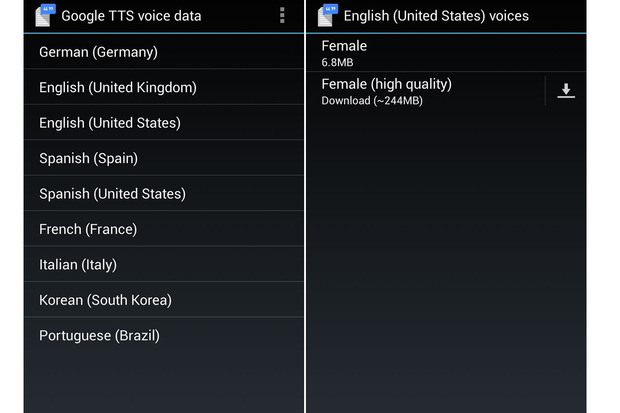
Step 6) From here, you can change your language settings and choose between UK English and US English on the ‘Google Text-to-speech’ setting.
Step 7) If you wish, you can change the rate at which text is spoken or listen to ‘an example of speech synthesis in English’ at different speeds.
Step 8) You can also install additional apps to change the voices on your phone. There are plenty of apps to be found on the Google Play Store, and once you install those apps, they’ll appear under the ‘Text-to-speech’ menu just like your Google and Samsung apps appear.
Some of the popular speech apps include:
-Speech to Text Translator TTS
-Classic Text to Speech
-Speech Commander Free
-Speech to Text
-Edwin, Speech-to-Speech
Step 4) Here, you’ll see the default Google text-to-speech engine settings as well as whatever other apps you’ve installed (Samsung phones will display the ‘Samsung text-to-speech engine’
Step 5) Tap on the gear beside your current text-to-speech engine
Step 6) From here, you can change your language settings and choose between UK English and US English on the ‘Google Text-to-speech’ setting.
Step 7) If you wish, you can change the rate at which text is spoken or listen to ‘an example of speech synthesis in English’ at different speeds.
Step 8) You can also install additional apps to change the voices on your phone. There are plenty of apps to be found on the Google Play Store, and once you install those apps, they’ll appear under the ‘Text-to-speech’ menu just like your Google and Samsung apps appear.
Some of the popular speech apps include:
-Speech to Text Translator TTS
-Classic Text to Speech
-Speech Commander Free
-Speech to Text
-Edwin, Speech-to-Speech

How to Change your Android’s Voice
2 min read
The future is here and you now have your very own robotic assistant.
Well, sorta.
If you use your Android as a virtual assistant, then you may have grown tired of the same robotic voice. Today, I’m going to show you how to change that robotic voice and refresh the sound of your smartphone.
Step 1) Hit the menu/settings/options button on your phone
Step 2) Tap My Device > Accessibility
Step 3) Scroll down until you see Text to Speech options
Step 4) Here, you’ll see the default Google text-to-speech engine settings as well as whatever other apps you’ve installed (Samsung phones will display the ‘Samsung text-to-speech engine’
Step 5) Tap on the gear beside your current text-to-speech engine
Step 6) From here, you can change your language settings and choose between UK English and US English on the ‘Google Text-to-speech’ setting.
Step 7) If you wish, you can change the rate at which text is spoken or listen to ‘an example of speech synthesis in English’ at different speeds.
Step 8) You can also install additional apps to change the voices on your phone. There are plenty of apps to be found on the Google Play Store, and once you install those apps, they’ll appear under the ‘Text-to-speech’ menu just like your Google and Samsung apps appear.
Some of the popular speech apps include:
-Speech to Text Translator TTS
-Classic Text to Speech
-Speech Commander Free
-Speech to Text
-Edwin, Speech-to-Speech
Step 4) Here, you’ll see the default Google text-to-speech engine settings as well as whatever other apps you’ve installed (Samsung phones will display the ‘Samsung text-to-speech engine’
Step 5) Tap on the gear beside your current text-to-speech engine
Step 6) From here, you can change your language settings and choose between UK English and US English on the ‘Google Text-to-speech’ setting.
Step 7) If you wish, you can change the rate at which text is spoken or listen to ‘an example of speech synthesis in English’ at different speeds.
Step 8) You can also install additional apps to change the voices on your phone. There are plenty of apps to be found on the Google Play Store, and once you install those apps, they’ll appear under the ‘Text-to-speech’ menu just like your Google and Samsung apps appear.
Some of the popular speech apps include:
-Speech to Text Translator TTS
-Classic Text to Speech
-Speech Commander Free
-Speech to Text
-Edwin, Speech-to-Speech
Newsletter
Get the latest tech news delivered to your inbox weekly.