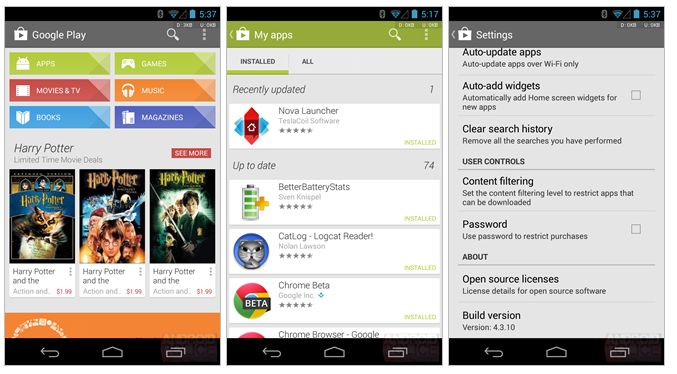
How to Easily Update the Google Play Store to the Latest Version
2 min read
One of the great things about Android is that all app updates are automatically downloaded through the Google Play Store as soon as they’re released.
But what happens when you need to update the Google Play Store?
That’s a good question.
Updating the Google Play Store typically requires you to manually download an APK file and then run that file to install the latest version. Otherwise, you can wait for the Play Store to update itself when you receive each new Android version.
However, thanks to a new method, you can now update the Google Play Store without waiting for Android version updates and without manually downloading APK files.
Here’s how:
Step 1) Open the Play Store app
Step 2) Tap on the ‘three lines’ icon on the top left corner of your screen
Step 3) Once you’re in the Settings menu, scroll down until you see ‘Build Version’
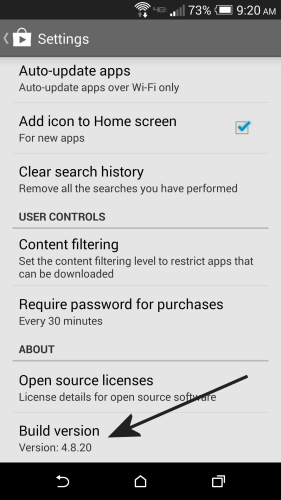
Step 4) Tap ‘Build Version’
Step 5) If a new version is available, Android will tell you that a new version will be downloaded immediately.
Step 6) Let Android complete the installation process and restart the app. It shouldn’t take more than a few minutes.
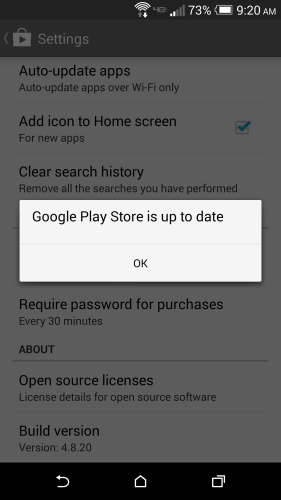
If successful, you’ll see a message saying “Google Play Store is up to date”
The latest Android version as of June 2014 is Android 4.8.20. However, not all Android users will receive that update. Depending on your geographic region, you may be locked to a previous version of the Google Play Store – so don’t worry if you can’t update to Android 4.8.20.

Step 4) Tap ‘Build Version’
Step 5) If a new version is available, Android will tell you that a new version will be downloaded immediately.
Step 6) Let Android complete the installation process and restart the app. It shouldn’t take more than a few minutes.
If successful, you’ll see a message saying “Google Play Store is up to date”
The latest Android version as of June 2014 is Android 4.8.20. However, not all Android users will receive that update. Depending on your geographic region, you may be locked to a previous version of the Google Play Store – so don’t worry if you can’t update to Android 4.8.20.

One Click Root Author
Content Writer
Experienced writer covering technology and mobile development.
You Might Also Like
How-To
Android 14 Root Methods: What Changed?
Explore the new root methods and security changes in Android 14.
How-To
Latest Android Security Updates Impact Root Access
Understanding how the latest security patches affect root methods.
How-To
Google Pixel 8 Pro Root Guide Released
Complete step-by-step guide to rooting the Google Pixel 8 Pro.
Comments
JD
John Doe
2 days ago
Great article! Very informative and well-written. Thanks for sharing.
JS
Jane Smith
5 days ago
I found the security section particularly helpful. Looking forward to more content like this!
Leave a Comment
Newsletter
Get the latest tech news delivered to your inbox weekly.
Popular Posts
-
1
Getting Started with Android Development
12.5K views
-
2
Best Practices for Mobile Security
8.2K views
-
3
Understanding Smartphone Hardware
6.8K views