If you’re one of those people who gets excited about incremental updates to the Gmail app (don’t be shy), then you probably noticed that Gmail 4.2 came with a cool swipe-to-delete feature that allows you to swipe to the left or right to banish an email to your trash bin.
But if you downloaded the Gmail 4.2 app, you may have noticed that you don’t have access to this feature by default. You have to enable it yourself.
Here’s a step-by-step guide to enabling swipe-to-delete in Gmail 4.2:
Step 1) Make sure you have
upgraded to the latest version of Gmail
Step 2) Check out your Gmail inbox. By default, swiping on a message from the main inbox screen will ‘archive it’. You can delete that message by swiping from the archive page, although that’s not always very convenient.
Step 3) To change the swipe function, head to the settings menu by tapping on the menu button. Then, choose Settings > General settings and find the box we’ve highlighted below:
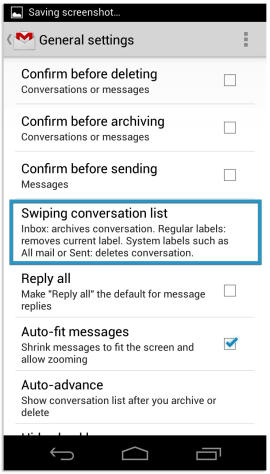
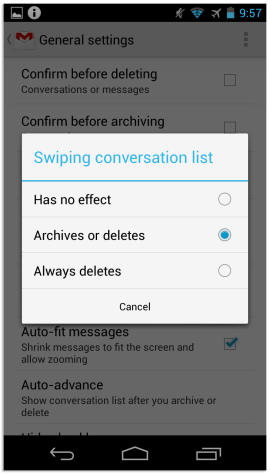
Step 4) Tap on that button and you’ll see a series of three options for swiping. Archive, delete, or no effect. Choose whichever one you want to use and you’re good to go.
And for those whose fingers can’t be trusted to delete the right email every time, Gmail 4.2 comes with a large and handy ‘Undo’ button in the top right corner. This button appears any time you delete an email, so if you go on a delete spree and remove something important, you can fix that problem with a tap of your finger.