Encryption is more important today than it has ever been in the past. Although the power of technology expands every day, hacking technology is keeping pace, and that means it’s surprisingly easy for someone to gain access to personal information on your mobile device.
Fortunately, Android Jelly Bean comes with a number of cool features, and enhanced encryption support is one of those features. Thanks to Jelly Bean’s device encryption tool, anyone can protect their device’s data against unwanted eyes.
What does encrypting do?
Encryption isn’t a firewall. It’s not antivirus software. It won’t protect your Android from malware attacks. Instead, it’s a secondary line of defense against hackers and thieves. Encryption coats all of your phone’s data in an extra layer of protection. It scrambles content so that it can only be read after entering a special password – a password that only you know (hopefully).

After encrypting your device, hackers who gain access to your phone over wireless networks or through malware (which is pretty unlikely) will not be able to read your data. But more importantly, someone who steals your phone physically (which is far more likely to happen), will not be able to plug your phone into a computer, drag away its files, and read the personal information that is stored on the device.
Some people hold sensitive information on their Android. Other people just don’t want some stranger reading their texts. Or maybe you’ve got pictures that you would prefer not to share. In any case, encryption is never a bad idea – unless you’re really bad at remembering passwords, in which case gaining access to an encrypted phone is basically impossible without wiping it or remembering the password.
How to encrypt your Android on 4.2 Jelly Bean
Step 1) Open your settings menu by sliding down the notification shade and pressing the ‘Gear’ icon in the top right corner
Step 2) Scroll down and tap on
Security
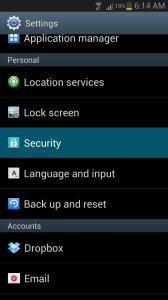
Step 3) Tap the Encrypt device button at the top
Step 4) Hit
Encrypt device from the next menu, choose your password, and your device will begin to encrypt its data. If you paid attention to the warning message above, you’ll know that your phone should have more than 80% of its charge remaining and you should allow approximately one hour for all of your data to be protected.
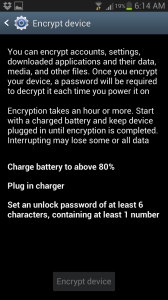
Step 5) Wait for the phone to complete the encryption process
Step 6) Good job! You’ve safeguarded your Android against hackers, thieves, and other wretched creatures