I don’t get out much. But when I do, I like to charge my phone before I leave. If I’m heading to a bar or nightclub and plan to stay out until 3am, then my Android can’t always keep up – especially if I unplugged my phone at 8am that morning.
If I don’t plug my phone in, it will die when I need it most – when I need to call a cab or a friend at 2am and my Android isn’t there, it makes me mad. But when charging isn’t an option, I need to start implementing battery optimization techniques as soon as possible.
If you’re like me and want your Android to last you through a night of activities, then follow these battery optimization tips and tricks that will work when you’re already away from home:
Disable Wi-Fi, GPS, Bluetooth, and NFC
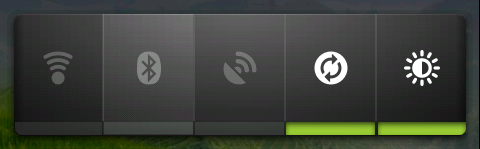
Once you’ve realized that you need to squeeze a few more hours of juice out of your phone, it’s time to disable some services you don’t need. Your Bluetooth and NFC scanners are usually disabled by default. But your GPS isn’t. And your GPS can soak up a surprising amount of battery life. But Wi-Fi is the real battery life killer – especially when you’re scanning for a signal and can’t find it.
Disable all of these things by opening the notification shade.
Lower screen brightness
Self-explanatory. Your screen uses more battery life than anything else on your Android. If you’re not in direct sunlight, you can afford to lower it as dim as it can go.
Disable always-on mobile data
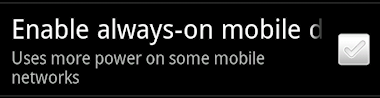
One reason why Android devices tend to lag behind iOS devices in battery life testing is because they require constant data from mobile networks in order to manage apps and widgets. All of these apps and widgets might seem convenient (and they are), but they can use up a lot of mobile data unnecessarily.
To prevent your apps and widgets from constantly draining mobile data, disable the “always-on” mobile data function, which means apps will only update themselves periodically. Important apps like Gmail and Google Talk receive push notifications, which basically means you won’t miss anything important. This is one of the most effective ways to save battery life.
To disable always-on mobile data, go to Settings > Wireless & networks > Mobile networks > Enable always-on mobile data
Note: this option could use more battery life if you have a lot of apps that need to connect to the internet – like a weather widget or messenger app. If you have dozens of apps that frequently connect and disconnect from mobile data networks, then this option could use more battery life. Use it wisely.
Note2: This tip won’t work with Android 4.0 and later devices. Instead of looking for the ‘Enable always-on mobile data’ option,
download JuiceDefender, which basically performs the same task for free (along with dozens of other battery optimization techniques)
Switch to a dark wallpaper
If you’re really looking to squeeze every ounce of battery life out of your device, try switching to a dark wallpaper. If you have a bright wallpaper, it forces your screen to use more battery life than it needs to. The best type of wallpaper for battery life is one that is completely black.
Check app battery usage and stop using those apps
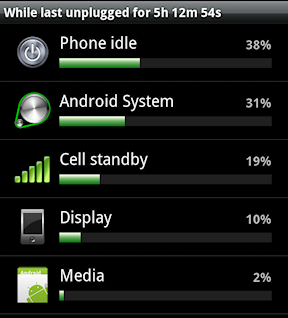
If you’re already away from your charger and need to extend battery life as much as possible, then you should be using your phone sparingly as it is. But instead of completely taking your phone away, just stop using the apps that use the most juice.
To find out which apps are using the most battery life, simply go to Settings > Battery and you will see a list of apps that are sucking up juice. Stop using those apps until you reach a charger.
Conclusion
Really, the best way to save battery life is to root your Android and install a battery life optimization tool
like SetCPU. Rooting your Android allows you to throttle important parts of the Android system that you wouldn’t otherwise be able to throttle – like CPU speed.
To learn more about Android rooting and to root your device in just minutes,
visit the One Click Root homepage today.