
How To Find Your Lost or Stolen Android With Google’s New “Android Device Manager” Tool
3 min read
Losing a smartphone is a devastating experience. You may not know if your smartphone has been stolen or if it has just fallen into a deep crack in the couch. Your Android may be safe, sound, and powered off, or some thieving goofball could be prying into your deepest, darkest secrets.
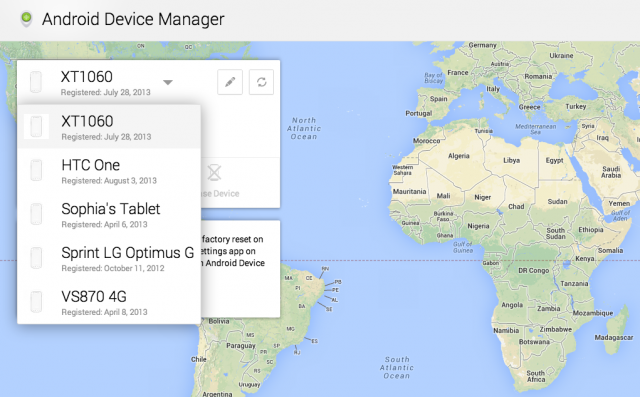
Google finally got around to making an official Android locating app. It’s called Android Device Manager, and it’s currently available as a free download weeks before it was scheduled to be released. Obviously, this isn’t the first and only Google device locator on the market today (‘Lookout’, Samsung’s ‘Find My Mobile’, etc.), but it is the first one created by Google.
How to use Android Device Manager
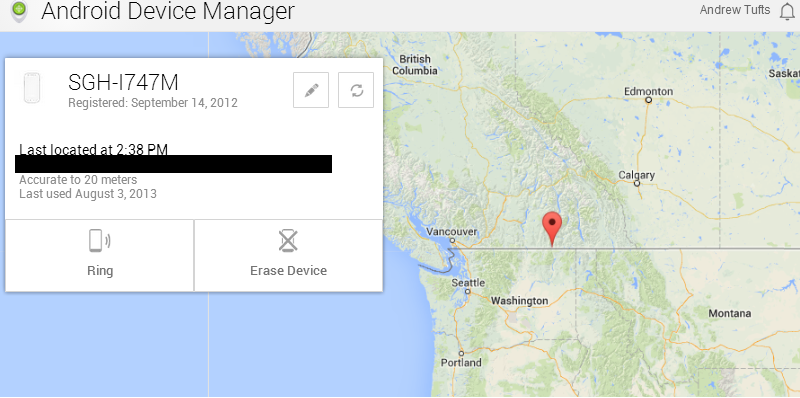
Unlike other Android locator apps, Android Device Manager is available natively on Android. You don’t have to download it and you don’t necessarily have to have the latest version of Android installed. Instead, the update is automatically rolling out to all Android devices over the next few weeks. In fact, you probably already have it. To check if Android Device Manager is available on your phone, keep reading. Follow the directions below to check out the Android Device Manager tool: Step 1) Go to your Android settings and navigate to Android Device Manager (if you can’t find this setting, just skip to step 3)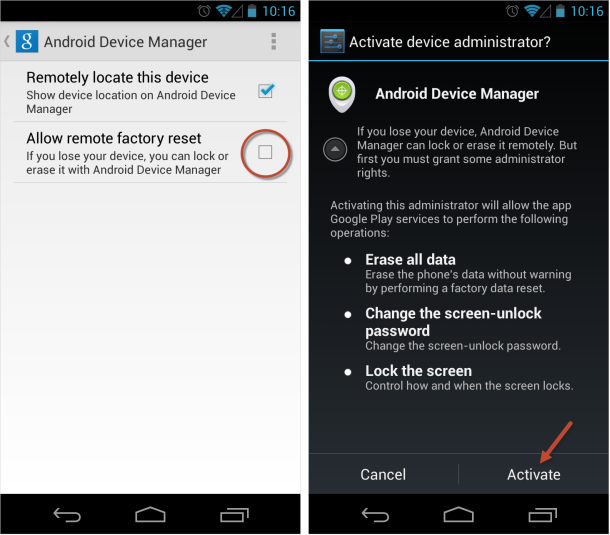

One Click Root Author
One Click Root Author
Content Writer
Experienced writer covering technology and mobile development.
You Might Also Like

How-To
Android 14 Root Methods: What Changed?
Explore the new root methods and security changes in Android 14.

How-To
Latest Android Security Updates Impact Root Access
Understanding how the latest security patches affect root methods.

How-To
Google Pixel 8 Pro Root Guide Released
Complete step-by-step guide to rooting the Google Pixel 8 Pro.
Comments
JD
John Doe
2 days ago
Great article! Very informative and well-written. Thanks for sharing.
JS
Jane Smith
5 days ago
I found the security section particularly helpful. Looking forward to more content like this!
Leave a Comment
Newsletter
Get the latest tech news delivered to your inbox weekly.
Popular Posts
-
1
Getting Started with Android Development
12.5K views
-
2
Best Practices for Mobile Security
8.2K views
-
3
Understanding Smartphone Hardware
6.8K views