If you’re like most Android users, then you’ve performed more than a few Google searches on your Android device over the years. But surprisingly few users are using Android search to its full potential.
Today, we’re going to show you how to get the most out of Android search and unlock your device’s full searching capabilities.
Add new features to your existing Google search bar
Jelly Bean Android devices have a fancy new search bar. You can type or talk into this search bar to perform Google searches over the internet. But many people are unaware just how powerful this search bar can be. Along with searching through the internet, your search widget can look through the contacts, note, and songs on your phone as well as through the databases on specific mobile apps.
Here’s a step-by-step guide to expanding Android’s native search tool
Step 1) Add the Google Seach widget to your homescreen if you haven’t already
Step 2) Tap the search tool and scroll to the bottom of the screen
Step 3) Tap the ‘overflow’ menu icon, which looks like three horizontal dots
Step 4) Tap
Settings
Step 5) You will see a screen that says either
Phone search or
Tablet search. Tap the one you need.
Step 6) After clicking on that link, you’ll find a list of services consisting of the apps that are installed on your device. It will look something like this:
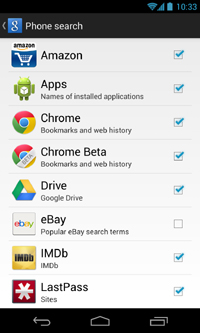
Step 7) Check off any of the apps and services you want to include in your Google search. If you want Google to look through files in your cloud storage account, tap the checkbox beside Google Drive, for example.
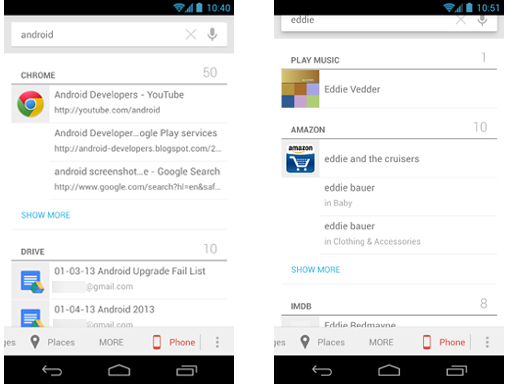
Step 8) Once you’ve done that, search for something using the search bar. You’ll see the same internet results on the front page, but you can view the in-app and in-phone search results by swiping over on the bar at the bottom of your screen. Simply swipe that bar and scroll to the right past options like
Images and
Web and you’ll see a
Phone or
Tablet option.
That’s it! If you’re wondering why in-app and in-phone searching would be useful, here are a few reasons:
-You need to find a contact in your phone
-You need to find a document that you wrote
-You want to look up information about an actor in both Google and in an app like IMDB
There are thousands of different reasons why you would want to use this feature. And since everything is neatly tucked away to the right of the traditional Android search bar, it’s easy to enable this option and then only use it when you need to use it.