

 Step 2) Once the app has completed its installation, go to your widgets drawer and browse through until you see the Giganticon widget. Drag and drop it onto your home screen.
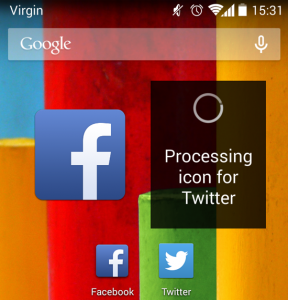
Step 3) Tap on the Giganticon widget and pick which app icons you want to display. Giganticon will display a few of your favorite apps by default and you can automatically add or remove whichever apps you want to display. Long press on any app icon to get a resizing menu, then pull the corners of the app icon until you like the size.
Downloading a third-party app isn’t an ideal solution, but it’s the only way to increase Android icon size. Fortunately, Giganticon appears to be a legitimate app and all icons are displayed in HD resolutions, which means they still look good when you resize them.
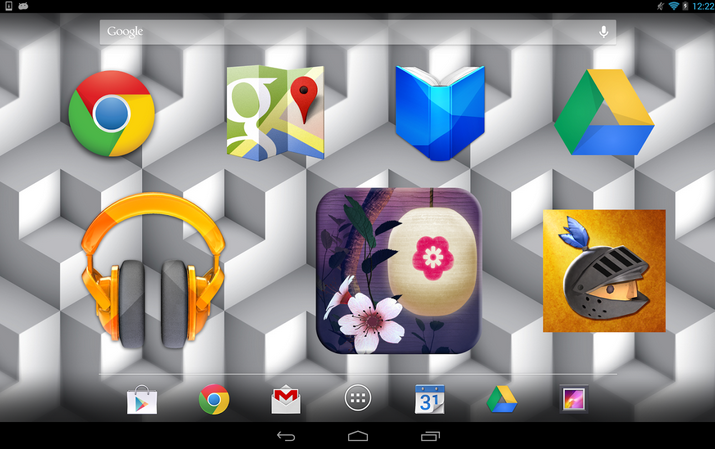
Giganticon is particularly useful if you’re a tablet user who wants to spread app icons across the entire screen. It’s also a cool and unique way to customize your Android device.
Once again, you can download the Giganticon app here to get resizing options for all your Android app icons: https://play.google.com/store/apps/details?id=com.gabetaubman.giganticon
Step 2) Once the app has completed its installation, go to your widgets drawer and browse through until you see the Giganticon widget. Drag and drop it onto your home screen.
Step 3) Tap on the Giganticon widget and pick which app icons you want to display. Giganticon will display a few of your favorite apps by default and you can automatically add or remove whichever apps you want to display. Long press on any app icon to get a resizing menu, then pull the corners of the app icon until you like the size.
Downloading a third-party app isn’t an ideal solution, but it’s the only way to increase Android icon size. Fortunately, Giganticon appears to be a legitimate app and all icons are displayed in HD resolutions, which means they still look good when you resize them.
Giganticon is particularly useful if you’re a tablet user who wants to spread app icons across the entire screen. It’s also a cool and unique way to customize your Android device.
Once again, you can download the Giganticon app here to get resizing options for all your Android app icons: https://play.google.com/store/apps/details?id=com.gabetaubman.giganticon
How to Increase Android Icon Size
2 min read
Are Android’s icons too small for your eyes? That’s okay. Today, you’re going to learn how to quickly and easily increase icon size on your Android home screens.
Unfortunately, there’s no way to change icon size on vanilla Android. Google has not yet made this option available, which is why you need to download a third-party app.
Step 1) Download the Giganticon App from here
Step 2) Once the app has completed its installation, go to your widgets drawer and browse through until you see the Giganticon widget. Drag and drop it onto your home screen.
Step 3) Tap on the Giganticon widget and pick which app icons you want to display. Giganticon will display a few of your favorite apps by default and you can automatically add or remove whichever apps you want to display. Long press on any app icon to get a resizing menu, then pull the corners of the app icon until you like the size.
Downloading a third-party app isn’t an ideal solution, but it’s the only way to increase Android icon size. Fortunately, Giganticon appears to be a legitimate app and all icons are displayed in HD resolutions, which means they still look good when you resize them.
Giganticon is particularly useful if you’re a tablet user who wants to spread app icons across the entire screen. It’s also a cool and unique way to customize your Android device.
Once again, you can download the Giganticon app here to get resizing options for all your Android app icons: https://play.google.com/store/apps/details?id=com.gabetaubman.giganticon
Step 2) Once the app has completed its installation, go to your widgets drawer and browse through until you see the Giganticon widget. Drag and drop it onto your home screen.
Step 3) Tap on the Giganticon widget and pick which app icons you want to display. Giganticon will display a few of your favorite apps by default and you can automatically add or remove whichever apps you want to display. Long press on any app icon to get a resizing menu, then pull the corners of the app icon until you like the size.
Downloading a third-party app isn’t an ideal solution, but it’s the only way to increase Android icon size. Fortunately, Giganticon appears to be a legitimate app and all icons are displayed in HD resolutions, which means they still look good when you resize them.
Giganticon is particularly useful if you’re a tablet user who wants to spread app icons across the entire screen. It’s also a cool and unique way to customize your Android device.
Once again, you can download the Giganticon app here to get resizing options for all your Android app icons: https://play.google.com/store/apps/details?id=com.gabetaubman.giganticon
Newsletter
Get the latest tech news delivered to your inbox weekly.