

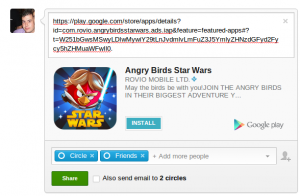
 Here’s how to share apps with your friends on Google +:
Step 1) Find the app on the Play store
Step 2) Copy the URL for that app and paste it into your Plus post section
Step 3) Press Share and your friends will be able to instantly install that app with a single click
If you play social games that are better with friends, then this will be a very useful feature. Instead of telling your friends the name of the app and then expecting them to go download it themselves, you can post it on Google+ and make installing that app as easy as possible.
Will this drive more people towards Google+? Is there anything that would make you consider using Google+? If Google keeps adding features like this, then Google+ will start to look like a more and more tempting option. Now I just have to wait for my friends to start using it.
Here’s how to share apps with your friends on Google +:
Step 1) Find the app on the Play store
Step 2) Copy the URL for that app and paste it into your Plus post section
Step 3) Press Share and your friends will be able to instantly install that app with a single click
If you play social games that are better with friends, then this will be a very useful feature. Instead of telling your friends the name of the app and then expecting them to go download it themselves, you can post it on Google+ and make installing that app as easy as possible.
Will this drive more people towards Google+? Is there anything that would make you consider using Google+? If Google keeps adding features like this, then Google+ will start to look like a more and more tempting option. Now I just have to wait for my friends to start using it.

How to install Android apps directly from Google+
2 min read
If you’re one of millions of people around the world who regularly use Google+, then I’d be surprised. But whether you love Google+ or hate it, there’s no doubt that Google wants people to use its darling social media site.
Google recently made using Google+ a little more attractive for Android users. It added the ability to install Android apps directly from the Google+ stream. When friends share an app on your timeline, also known as the “Plus Stream”, there will be an install button available directly from that link.
Google did a similar thing with its Music feature. After sharing a good song on Google+, those who followed that user could click ‘Download’ to instantly access that song (or buy it).
Here’s how to share apps with your friends on Google +:
Step 1) Find the app on the Play store
Step 2) Copy the URL for that app and paste it into your Plus post section
Step 3) Press Share and your friends will be able to instantly install that app with a single click
If you play social games that are better with friends, then this will be a very useful feature. Instead of telling your friends the name of the app and then expecting them to go download it themselves, you can post it on Google+ and make installing that app as easy as possible.
Will this drive more people towards Google+? Is there anything that would make you consider using Google+? If Google keeps adding features like this, then Google+ will start to look like a more and more tempting option. Now I just have to wait for my friends to start using it.
Here’s how to share apps with your friends on Google +:
Step 1) Find the app on the Play store
Step 2) Copy the URL for that app and paste it into your Plus post section
Step 3) Press Share and your friends will be able to instantly install that app with a single click
If you play social games that are better with friends, then this will be a very useful feature. Instead of telling your friends the name of the app and then expecting them to go download it themselves, you can post it on Google+ and make installing that app as easy as possible.
Will this drive more people towards Google+? Is there anything that would make you consider using Google+? If Google keeps adding features like this, then Google+ will start to look like a more and more tempting option. Now I just have to wait for my friends to start using it.
Newsletter
Get the latest tech news delivered to your inbox weekly.