“On Your marks, get set, GO!” are commands that probably encapsulate the essence of life itself – a race to find out what the fastest everything is. Internet is one of the biggest enablers of the global information revolution and has completely integrated itself into our lifestyles as an educator, an entertainer and even as an extension of our own personality through social networking.
This is why it makes a big difference when you decide what data plan you need for your Android smartphone. Good internet speed can be your passport to enlightenment and it’s highly recommended to test out its download and upload speeds in order to ensure you are getting exactly what you paid for.
Here are two useful Android apps that will tell you exactly how fast and efficient the internet speeds of your data plan or Wi-Fi connection are.
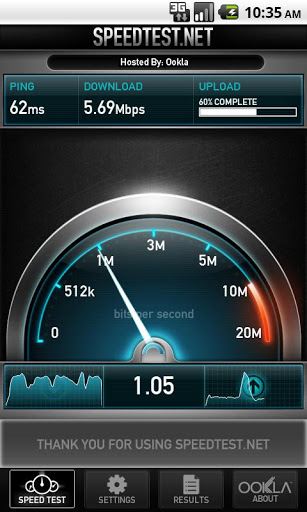
This is an extremely simple and easy to use Android app that gives you the best results. The user simply clicks on the “Begin Test” button and it all begins.
The app gives extremely accurate results and all is due to the integrated global network working on it all at once.
This app enables you to troubleshoot and verify seeds that you were promised.
The app also supports real time graphs that is a great reflector of consistency and can easily be used to demonstrate to the service provider when something wrong.
The user can save these reports for future references as well.
Not only that, you can also share these results to see and compare with the relative speeds of your friends.
SpeedTest.net scores extremely highly on reliability in the Android app store and with its constant version updates is a top favourite. It has a 4.5 star average rating.
Download today and see how true the claims of your service provider are.
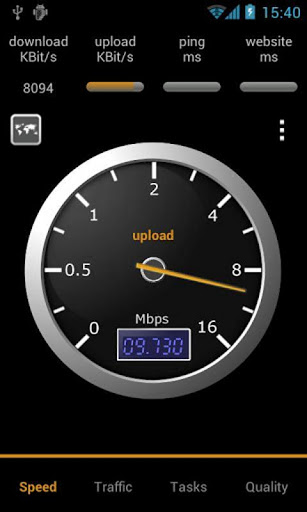
This is fantastic dual function Android app consists of two major features:
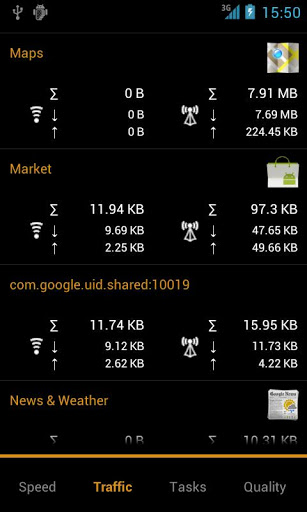
- Traffic counter
- Speed tester.
Using the Data traffic counter, you can set a start day and end day that ranges from anywhere between 1 day to 30 days.
The traffic counter is available for wireless and mobile access both and can be easily separated by upload and download.
The device is used as a mobile hotspot and all the tethering traffic is measured via the central hub.
This app also gives you traffic statistics per respective application with traffic history as well.
It gives you availability and feedback on the available data services in the areas as well.
The speedometer on the app measures the delay and speed on the wireless connection.
It has an additional feature of it locating your current location and comparing your data throughput against those in the area. This gives you an idea of how things in the area are performing and whether your speed is up to the mark or not.
The app has a Task Manager that helps keep a tab on the currently running apps on your smartphone and sees the memory usage as well.
This app also kills traffic hungry apps when not in use an kills the memory hungry apps as well. Pretty efficient isn’t it?
This doesn’t end there.
Furthermore, you can check the Battery status (level, voltage, and temperature), cell tower, cellular signal strength information, GPS status, Mobile network
Traffic Monitor also happens to be completely free of advertisements. This app enjoys a 4.4 star average rating and is completely free.
So there you go. Two really efficient and accurate apps that will ensure you have glitch free internet.