

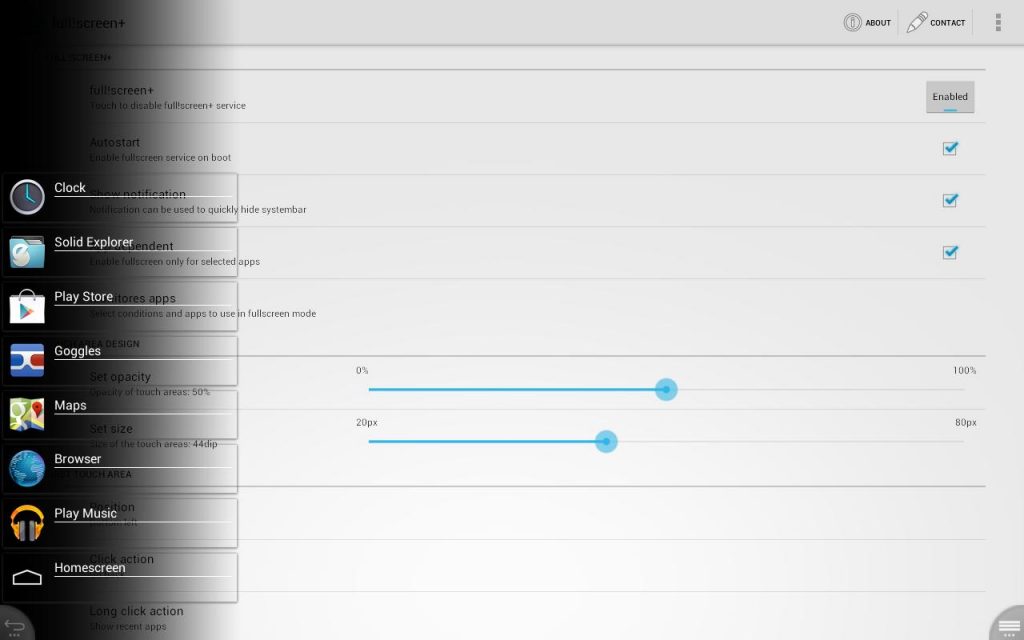
 There is also a plus-Version available which supports an automatic mode:
Just define the apps you want to use in fullscreen mode and full!screen+ takes care of the rest. It will automatically disable the bottom bar for those apps.
- Start your browser -> bottom bar is gone.
- Switch back to Home -> the bar reappears.
- Play Video -> always in fullscreen.
As good as it is, there are, however, a few limitations that occur while using Full!Screen:
- in case you experience problems after reboot like notifications not working or not able to autostart:
Please upgrade/change your SuperUser-Manager and use it to upgrade/install latest su-binary!
- There are limitations with phone devices. You might lose ability to accept incoming calls or receive SMS in fullscreen mode. Please make sure to test this before using full!screen.
- On devices with split system bar (notifications on top and navigation on bottom) it is not possible to just hide navigation bar. This unfortunately is a system-limitation and no workaround possible.
So even though there are a few limitations, most of them can be helped, making this a good app for those who find the bottom soft bars annoying. I would like to end this by saying that every drop counts!
There is also a plus-Version available which supports an automatic mode:
Just define the apps you want to use in fullscreen mode and full!screen+ takes care of the rest. It will automatically disable the bottom bar for those apps.
- Start your browser -> bottom bar is gone.
- Switch back to Home -> the bar reappears.
- Play Video -> always in fullscreen.
As good as it is, there are, however, a few limitations that occur while using Full!Screen:
- in case you experience problems after reboot like notifications not working or not able to autostart:
Please upgrade/change your SuperUser-Manager and use it to upgrade/install latest su-binary!
- There are limitations with phone devices. You might lose ability to accept incoming calls or receive SMS in fullscreen mode. Please make sure to test this before using full!screen.
- On devices with split system bar (notifications on top and navigation on bottom) it is not possible to just hide navigation bar. This unfortunately is a system-limitation and no workaround possible.
So even though there are a few limitations, most of them can be helped, making this a good app for those who find the bottom soft bars annoying. I would like to end this by saying that every drop counts!
How to Make Better Use of Your Android Screen
3 min read
Whether you have the smallest touch screen or the biggest one, whether it is your phone or your tablet, the whole of the screen never gets used because of the bottom tool bar. Whatever you buy, if the reason is a big screen, you do not get to use all of it. But in my opinion, you should be able to use everything you have paid for. Therefore, if you really want that extra space, there is a way to bid a temporary goodbye to the lower soft keys, that way is called Full!Screen - an app for the rooted android devices.
You can hide the system bar and use your tablet in fullscreen-mode without losing system bars main functions: navigation options and notifications with Full!Screen. This app is a light-weight replacement/companion for the default system bar on tablets.
It can disable the bottom system bar on most tablets running Android 3 or Android 4.
Now you can use the full screen for your own apps without wasting space for the bottom bar.
- Play games,
- Watch videos,
- Surf the web,
- Read your mails.
Everything fullscreen and without losing the main functions of the system bar:
Go back, Go to Home screen, switch between recently used apps, access notifications.
The provided replacement buttons can be configured in function, visibility, position and size. Following actions can be assigned to any button:
• Go back: Navigate back within apps.
• Go to home screen: Shortcut to directly go to home screen.
• Show recent apps: Quickly switch between recently used apps.
• Show notifications: Display a panel with notifications.
• Restore system bar: An action to quickly restore system bar.
• Open apps menu: Easy access even to menu of older apps.
• Pie-Menu: Opens a configurable pie-menu.
There is also a plus-Version available which supports an automatic mode:
Just define the apps you want to use in fullscreen mode and full!screen+ takes care of the rest. It will automatically disable the bottom bar for those apps.
- Start your browser -> bottom bar is gone.
- Switch back to Home -> the bar reappears.
- Play Video -> always in fullscreen.
As good as it is, there are, however, a few limitations that occur while using Full!Screen:
- in case you experience problems after reboot like notifications not working or not able to autostart:
Please upgrade/change your SuperUser-Manager and use it to upgrade/install latest su-binary!
- There are limitations with phone devices. You might lose ability to accept incoming calls or receive SMS in fullscreen mode. Please make sure to test this before using full!screen.
- On devices with split system bar (notifications on top and navigation on bottom) it is not possible to just hide navigation bar. This unfortunately is a system-limitation and no workaround possible.
So even though there are a few limitations, most of them can be helped, making this a good app for those who find the bottom soft bars annoying. I would like to end this by saying that every drop counts!
There is also a plus-Version available which supports an automatic mode:
Just define the apps you want to use in fullscreen mode and full!screen+ takes care of the rest. It will automatically disable the bottom bar for those apps.
- Start your browser -> bottom bar is gone.
- Switch back to Home -> the bar reappears.
- Play Video -> always in fullscreen.
As good as it is, there are, however, a few limitations that occur while using Full!Screen:
- in case you experience problems after reboot like notifications not working or not able to autostart:
Please upgrade/change your SuperUser-Manager and use it to upgrade/install latest su-binary!
- There are limitations with phone devices. You might lose ability to accept incoming calls or receive SMS in fullscreen mode. Please make sure to test this before using full!screen.
- On devices with split system bar (notifications on top and navigation on bottom) it is not possible to just hide navigation bar. This unfortunately is a system-limitation and no workaround possible.
So even though there are a few limitations, most of them can be helped, making this a good app for those who find the bottom soft bars annoying. I would like to end this by saying that every drop counts!
Newsletter
Get the latest tech news delivered to your inbox weekly.