

How to Manage your Android’s Internal Storage Over Wi-Fi
2 min read
Whether you’ve lost your micro USB cord or just can’t get up from your office chair, there are plenty of good reasons to manage your Android’s internal storage over Wi-Fi.
Today, I’m going to show you how to easily manage, add, and delete files from your Android without ever connecting it to your PC.
Step 1) Download an app called Droid Over Wi-Fi
Step 2) Open the app and type in your IP address and port number
Step 3) Generate your PIN code and open your internet browser on your computer
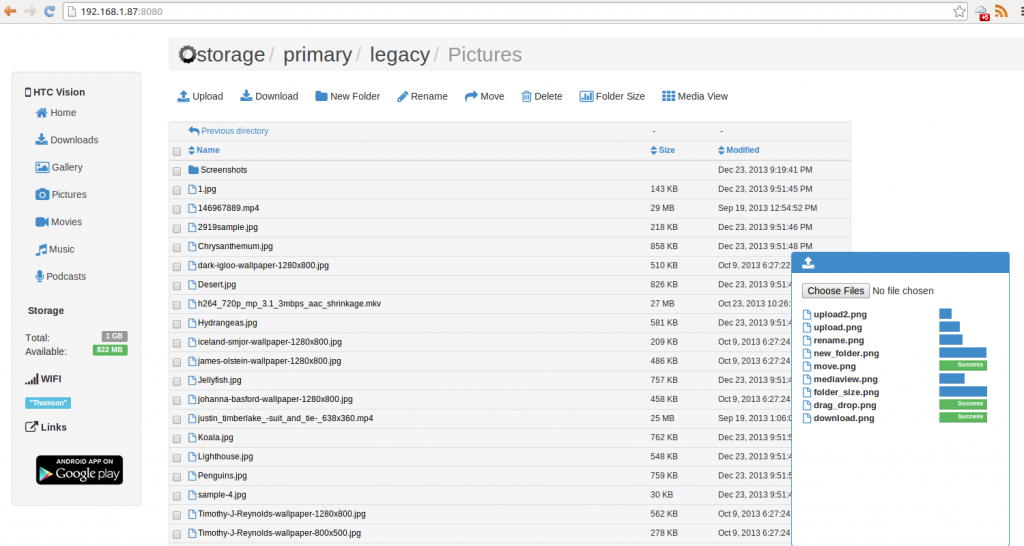
Step 4) Go to the address displayed in your app and you’ll see a list of your phone’s files
That’s it! From here, you can manage your files just like you would manage any folder on your PC. You can even stream files from your Android onto your computer – which is great if you’re transferring video files or songs.
This method does not require drivers, wires, cables, or Bluetooth. It relies only on Wi-Fi and the beauty of technology. You can transfer any types of files to and from your device using any browser on any computer operating system. Not bad at all!
You can view the original XDA Developers Forum thread for Droid Over Wi-Fi here.
Newsletter
Get the latest tech news delivered to your inbox weekly.