Every once in a while, you need to send a large file from one Android device to another. Or you may need to send a large file to your email or to another person’s phone.
Whether you’re sending vacation videos or a software program from one phone to another, there are a number of different services you can use to transfer large files. Most apps have size restrictions, so it’s important to pay attention to those restriction to make sure your file gets through.
-You can use WhatsApp to send files up to 12MB in size
-You can use Gmail to send files up to 30MB in size
-You can send and receive files through Google Drive, although you can’t directly download videos through the service, you can only stream them
-You can use Bluetooth to send files between any two Bluetooth devices, although this is a painfully slow method of transfer
-Dropbox is also an option, although both the sending and receiving device need to have the Dropbox app installed
-You could put an SD card or micro-USB stick in each device and move the file that way, although moving SD cards between devices can be painful and it can be difficult to find USB drives that are compatible with two different phones (you’ll also need a USB to micro-USB transfer cable)
Using Wi-Fi Direct file transfer
Really, the best way to transfer files between two Androids is to use a feature called Wi-Fi Direct. Wi-Fi Direct is a technology included on all Android 4.1 devices, although you’ll need to download an app in order to access that technology.
Many Wi-Fi Direct apps require users to be on the same wireless network. That’s not an ideal solution. Fortunately,
there’s an app called Wi-Fi Shoot! Wi-Fi Direct that lets you transfer files between any two Android devices without being on the same wireless network.
Here’s how to do it:
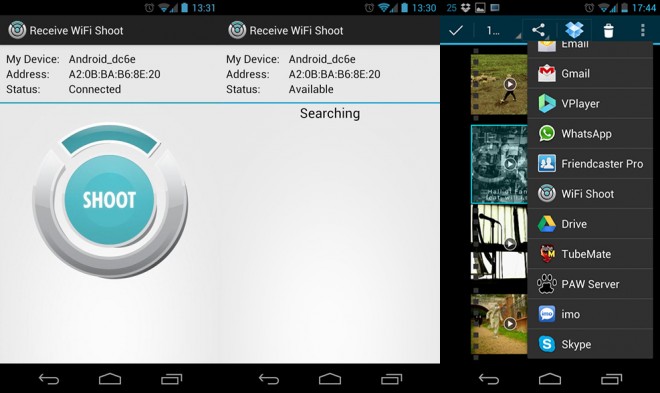
-Both Android users need to
download Wi-Fi Shoot! from the Google Play Store here
-After installing the app, both Androids need to start the Wi-Fi Shoot! app
-Start the Wi-Fi Shoot Receive app on the phone that is receiving the file
-On the sending phone, choose the files that need to be transferred
-Wait for the phones to find each other (they need to be fairly close to one another)
-Tap the ‘Shoot!’ button to send files of any size to the other phone
-That’s it! I like Wi-Fi Shoot! because it’s simple, safe and convenient.
There are other ways to use Wi-Fi Direct to send files between devices. Just search for ‘Wi-Fi Direct’ in the Google Play Store and you’ll find a wide variety of apps to use, all of which function in a similar way to Wi-Fi Shoot!