

 Step 2) Open Developer Options and scroll down until you see the following three settings:
-Window animation scale
-Transition animation scale
-Animator animation scale
By default, all three of the above settings are set to 1x speed. Cut that speed in half and set it to .5x to see if that improves Android performance.
In most cases, the performance improvement should be instantly noticeable. When you open an app, you no longer have to wait as long for the in-app screen to appear, and when transition between windows within an app, you’ll be moving blazing fast.
If you have noticed poor Android performance since a recent update, then this simple change should fix that problem and make your Android feel like a beautiful brand new phone once again.
Step 2) Open Developer Options and scroll down until you see the following three settings:
-Window animation scale
-Transition animation scale
-Animator animation scale
By default, all three of the above settings are set to 1x speed. Cut that speed in half and set it to .5x to see if that improves Android performance.
In most cases, the performance improvement should be instantly noticeable. When you open an app, you no longer have to wait as long for the in-app screen to appear, and when transition between windows within an app, you’ll be moving blazing fast.
If you have noticed poor Android performance since a recent update, then this simple change should fix that problem and make your Android feel like a beautiful brand new phone once again.
How to Significantly Speed Up Android Performance by Changing 3 Simple Settings
2 min read
We’d all like a faster smartphone. Even if your Android is fresh, clean, and speedy, it always feels like it could be a little better in terms of performance.
Today, I’m going to show you three simple Android settings that will dramatically increase the performance of your device.
Those three settings affect the animation scale on Android, including the animations that play when you open a window, transition between windows, and perform other regular Android tasks.
Here’s how to access those settings:
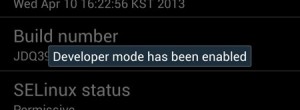
Step 1) Go to your Settings > About Device > Tap Build number 7 times (Developer Options was hidden by default after the Android 4.3 update and that’s now the only way to access it on Android 4.3+ devices). After tapping on it 7 times, Developer Options should once again appear on your settings menu.
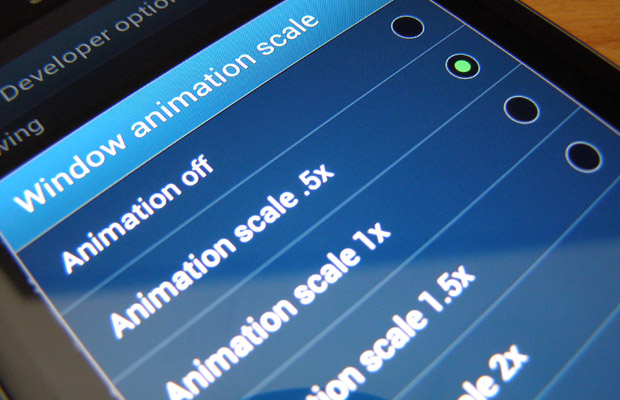
Step 2) Open Developer Options and scroll down until you see the following three settings:
-Window animation scale
-Transition animation scale
-Animator animation scale
By default, all three of the above settings are set to 1x speed. Cut that speed in half and set it to .5x to see if that improves Android performance.
In most cases, the performance improvement should be instantly noticeable. When you open an app, you no longer have to wait as long for the in-app screen to appear, and when transition between windows within an app, you’ll be moving blazing fast.
If you have noticed poor Android performance since a recent update, then this simple change should fix that problem and make your Android feel like a beautiful brand new phone once again.
Step 2) Open Developer Options and scroll down until you see the following three settings:
-Window animation scale
-Transition animation scale
-Animator animation scale
By default, all three of the above settings are set to 1x speed. Cut that speed in half and set it to .5x to see if that improves Android performance.
In most cases, the performance improvement should be instantly noticeable. When you open an app, you no longer have to wait as long for the in-app screen to appear, and when transition between windows within an app, you’ll be moving blazing fast.
If you have noticed poor Android performance since a recent update, then this simple change should fix that problem and make your Android feel like a beautiful brand new phone once again.
Newsletter
Get the latest tech news delivered to your inbox weekly.