Whether you’re a busy workaholic, a social butterfly, or both, keeping track of all important calls and text messages is a very difficult task indeed. You may often be required to follow up with instant replies and reminders to ensure everything is going as per schedule. For this reason, the Android app marketplace is stacked with plenty of great organizer and schedule management apps. However, working with a combination of such apps may not be the most feasible solution. Enter
CallFlakes – an app designed to make day-to-day communication on your Android device much more efficient. This app doubles up as your virtual personal assistant and is designed for people with busy lifestyles who constantly need to exchange important information and follow up with a host of people.
Features
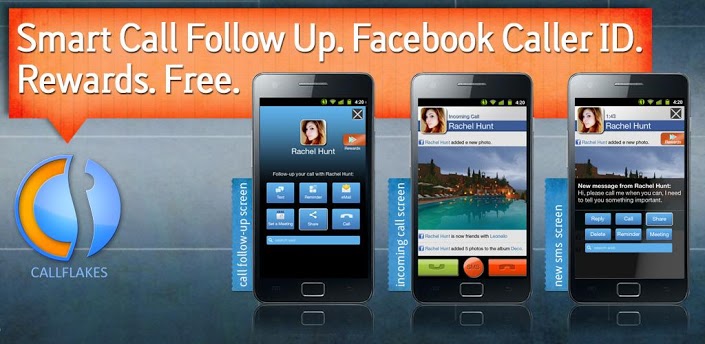
CallFlakes takes conventional voice calling features to more intuitive and efficient levels. As soon you finish making or taking a call, this app will instantly display a pop-up window on your Android screen with multiple options for responsive actions to take with respect to the person you just spoke to. This means you can instantly take care of any pending business such as e-mailing, texting, calling, or posting content to the social media profiles of the person you were speaking to. You never have to worry about forgetting about an important task or event you just finished discussing about with your friend or coworker anymore. Its user interface integrates perfectly with your caller screen and is very simple to navigate through. Additionally, you can also schedule events or browse the internet right after finishing your call.
This nifty little app also lets you connect directly with your Facebook account and provides the unique service of augmenting your Caller ID with the profile picture of the person calling you along with their recent wall posts even if you do not have their numbers available in your contact list.
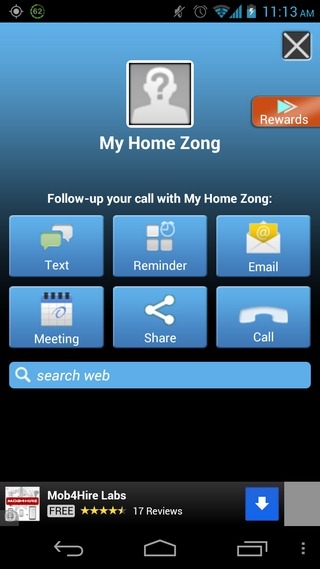
To get started, all you need to do is to download and install the CallFlakes app from Google Play Store for free. Once you have input your smartphone number and configured your account correctly, CallFlakes will simply automate its features and run smoothly along with your calling services. This app will now show you a pop-up screen known as the productivity board on your display as soon as you hang up a call or receive a text message requesting for a responsive action. By using this productivity board, you can now schedule important meetings or set up reminders for a task you must carry out later so that you are completely up-to-date with your objectives. You can even reply directly from the caller screen itself in case you are receiving a call from someone.
Another great bonus feature offered by CallFlakes is the ability for you to claim a wide variety of rewards offered by Beintoo. Beintoo is a service that lets you redeem virtual currency in exchange for free coupons and gifts offered by companies such as GroupOn, Zappos, Gap, etc. The more you use your CallFlakes productivity board, the higher your Beintoo virtual currency goes.