

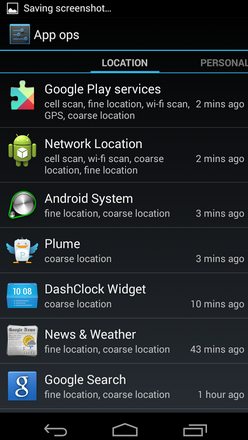
 But there’s no reason for some apps to monitor your location. Some apps track your location just to deliver geotargetted advertisements, for example, while others use your location to steal your identity and perform other evil tasks.
Do you want to know which apps are tracking your location? Today, I’m going to show you exactly how to identify those annoying (and often malicious) apps.
But there’s no reason for some apps to monitor your location. Some apps track your location just to deliver geotargetted advertisements, for example, while others use your location to steal your identity and perform other evil tasks.
Do you want to know which apps are tracking your location? Today, I’m going to show you exactly how to identify those annoying (and often malicious) apps.
How to Tell Which Apps are Tracking your Location
2 min read
Android apps use your location data to do a lot of useful things.
Google Maps tells you the fastest route to get home from wherever you are in the world. The McDonald’s app identifies all the nearest McDonald’s locations.
But there’s no reason for some apps to monitor your location. Some apps track your location just to deliver geotargetted advertisements, for example, while others use your location to steal your identity and perform other evil tasks.
Do you want to know which apps are tracking your location? Today, I’m going to show you exactly how to identify those annoying (and often malicious) apps.
But there’s no reason for some apps to monitor your location. Some apps track your location just to deliver geotargetted advertisements, for example, while others use your location to steal your identity and perform other evil tasks.
Do you want to know which apps are tracking your location? Today, I’m going to show you exactly how to identify those annoying (and often malicious) apps.
Newsletter
Get the latest tech news delivered to your inbox weekly.