

 Step 2) Get out and do what you need to do
Step 3) Come back to the parking lot and ask Google “Ok Google, where is my car?”
Google automatically tracks the last stopped position of your car. If it detects your car has been stopped for an extended period of time, then Google will place a pin in that location. It’s really that simple.
The feature still has some minor bugs. If you ride public transit or get a ride from a friend, for example, then Google may have trouble differentiating those modes of transportation. Expect bugs to be ironed out in the next patch.
If you can’t get this feature to work, then make sure you’ve updated to the latest version of Google Search.
Whether you’re trying to find your car after a rough night at the bar or just stumbling through a mall parkade at Christmas time, this feature could save you a lot of headaches – best of all, you don’t need to do anything until you actually need to use it.
Step 2) Get out and do what you need to do
Step 3) Come back to the parking lot and ask Google “Ok Google, where is my car?”
Google automatically tracks the last stopped position of your car. If it detects your car has been stopped for an extended period of time, then Google will place a pin in that location. It’s really that simple.
The feature still has some minor bugs. If you ride public transit or get a ride from a friend, for example, then Google may have trouble differentiating those modes of transportation. Expect bugs to be ironed out in the next patch.
If you can’t get this feature to work, then make sure you’ve updated to the latest version of Google Search.
Whether you’re trying to find your car after a rough night at the bar or just stumbling through a mall parkade at Christmas time, this feature could save you a lot of headaches – best of all, you don’t need to do anything until you actually need to use it.
How to Use Google Now to Remember your Parking Spot
2 min read
Google Now has lots of cool tips and tricks that most Android users don’t use.
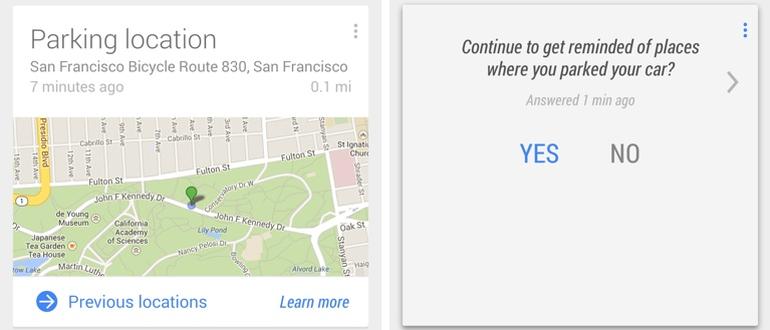
The “find my parking spot” tip is one of those. Today, I’m going to show you how to use Google Now to remember where you parked your car.
This feature, by the way, just arrived with the latest Google Now update, so don’t feel bad if you’ve never used it before.
Step 1) Park your car
Step 2) Get out and do what you need to do
Step 3) Come back to the parking lot and ask Google “Ok Google, where is my car?”
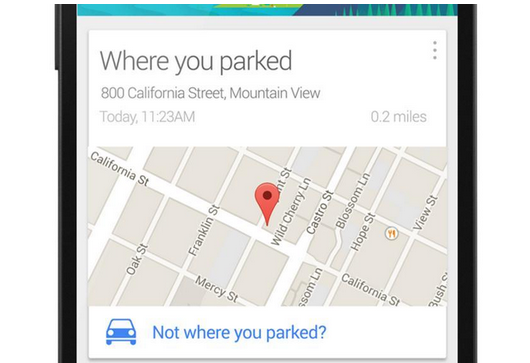
Google automatically tracks the last stopped position of your car. If it detects your car has been stopped for an extended period of time, then Google will place a pin in that location. It’s really that simple.
The feature still has some minor bugs. If you ride public transit or get a ride from a friend, for example, then Google may have trouble differentiating those modes of transportation. Expect bugs to be ironed out in the next patch.
If you can’t get this feature to work, then make sure you’ve updated to the latest version of Google Search.
Whether you’re trying to find your car after a rough night at the bar or just stumbling through a mall parkade at Christmas time, this feature could save you a lot of headaches – best of all, you don’t need to do anything until you actually need to use it.
Step 2) Get out and do what you need to do
Step 3) Come back to the parking lot and ask Google “Ok Google, where is my car?”
Google automatically tracks the last stopped position of your car. If it detects your car has been stopped for an extended period of time, then Google will place a pin in that location. It’s really that simple.
The feature still has some minor bugs. If you ride public transit or get a ride from a friend, for example, then Google may have trouble differentiating those modes of transportation. Expect bugs to be ironed out in the next patch.
If you can’t get this feature to work, then make sure you’ve updated to the latest version of Google Search.
Whether you’re trying to find your car after a rough night at the bar or just stumbling through a mall parkade at Christmas time, this feature could save you a lot of headaches – best of all, you don’t need to do anything until you actually need to use it.
Newsletter
Get the latest tech news delivered to your inbox weekly.