

 Google’s recent update ensures you never have to miss any action in the World Cup. Whether you’re cheering for the United States or Uruguay, here’s how to use Google Now to get updates on the World Cup:
-Open Google Now (tap your search bar widget or open the Google Search app)
-Scroll to the bottom of the app until you see the ‘magic wand’. Tap the wand.
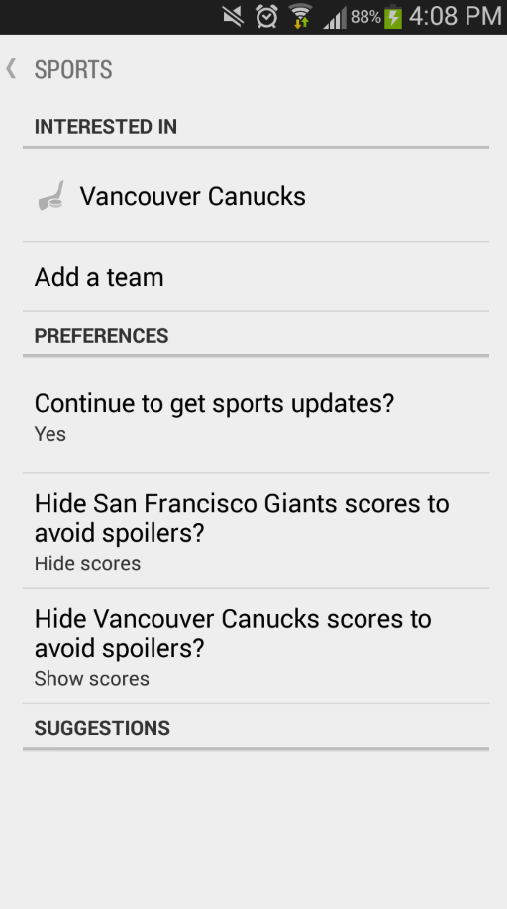
-From the Customize menu, tap Sports and then check to see if your favorite team is already listed under that menu (it will be if you’ve already searched for it or checked scores lately).
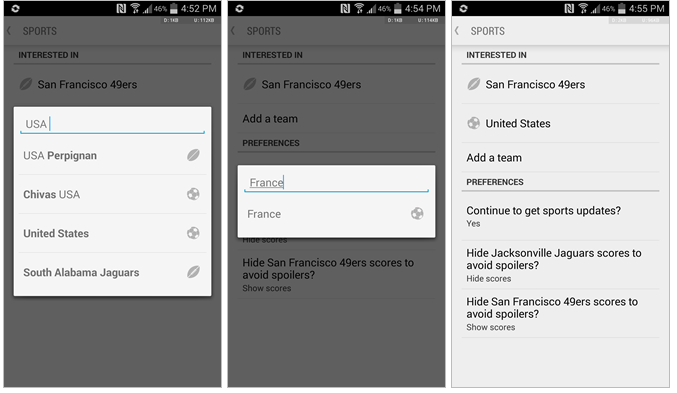
-If you don’t already see your national team on the list, then you can tap ‘Add a team’ to – you guessed it – add your team
-Simply type in your favorite country and Google will find your soccer team. All World Cup teams have been added to Google Now, so you shouldn’t have much trouble.
If you don’t plan on watching the games live, then you can also tap the ‘Hide Scores’ button to avoid spoilers – Google is nice like that.
That’s it! Adding your favorite soccer/football team to Google Now has never been easier. Of course, like everything on Google Now, you can just search for World Cup scores a few times and Google will figure out that you like soccer.
No matter how you add World Cup to Google Now, the World Cup is on and it’s time to support your favorite country’s best players as they compete for the world’s biggest soccer trophy.
Google’s recent update ensures you never have to miss any action in the World Cup. Whether you’re cheering for the United States or Uruguay, here’s how to use Google Now to get updates on the World Cup:
-Open Google Now (tap your search bar widget or open the Google Search app)
-Scroll to the bottom of the app until you see the ‘magic wand’. Tap the wand.
-From the Customize menu, tap Sports and then check to see if your favorite team is already listed under that menu (it will be if you’ve already searched for it or checked scores lately).
-If you don’t already see your national team on the list, then you can tap ‘Add a team’ to – you guessed it – add your team
-Simply type in your favorite country and Google will find your soccer team. All World Cup teams have been added to Google Now, so you shouldn’t have much trouble.
If you don’t plan on watching the games live, then you can also tap the ‘Hide Scores’ button to avoid spoilers – Google is nice like that.
That’s it! Adding your favorite soccer/football team to Google Now has never been easier. Of course, like everything on Google Now, you can just search for World Cup scores a few times and Google will figure out that you like soccer.
No matter how you add World Cup to Google Now, the World Cup is on and it’s time to support your favorite country’s best players as they compete for the world’s biggest soccer trophy.
How to Use Google Now to Stay Updated on World Cup 2014
2 min read
Google Now has lots of cool features and most users never scratch the surface of its capabilities.
The other day Google Now told me where I parked my car. I didn’t even ask it to remember where I parked my car, nor was I looking for my car, but somehow it knew to keep track of my car while I was out and about.
You can now use Google Now to stay updated on World Cup 2014. The World Cup runs from June 12 to July 13 and is the biggest sporting event of the year (sorry, Winter Olympics).
Google’s recent update ensures you never have to miss any action in the World Cup. Whether you’re cheering for the United States or Uruguay, here’s how to use Google Now to get updates on the World Cup:
-Open Google Now (tap your search bar widget or open the Google Search app)
-Scroll to the bottom of the app until you see the ‘magic wand’. Tap the wand.
-From the Customize menu, tap Sports and then check to see if your favorite team is already listed under that menu (it will be if you’ve already searched for it or checked scores lately).
-If you don’t already see your national team on the list, then you can tap ‘Add a team’ to – you guessed it – add your team
-Simply type in your favorite country and Google will find your soccer team. All World Cup teams have been added to Google Now, so you shouldn’t have much trouble.
If you don’t plan on watching the games live, then you can also tap the ‘Hide Scores’ button to avoid spoilers – Google is nice like that.
That’s it! Adding your favorite soccer/football team to Google Now has never been easier. Of course, like everything on Google Now, you can just search for World Cup scores a few times and Google will figure out that you like soccer.
No matter how you add World Cup to Google Now, the World Cup is on and it’s time to support your favorite country’s best players as they compete for the world’s biggest soccer trophy.
Google’s recent update ensures you never have to miss any action in the World Cup. Whether you’re cheering for the United States or Uruguay, here’s how to use Google Now to get updates on the World Cup:
-Open Google Now (tap your search bar widget or open the Google Search app)
-Scroll to the bottom of the app until you see the ‘magic wand’. Tap the wand.
-From the Customize menu, tap Sports and then check to see if your favorite team is already listed under that menu (it will be if you’ve already searched for it or checked scores lately).
-If you don’t already see your national team on the list, then you can tap ‘Add a team’ to – you guessed it – add your team
-Simply type in your favorite country and Google will find your soccer team. All World Cup teams have been added to Google Now, so you shouldn’t have much trouble.
If you don’t plan on watching the games live, then you can also tap the ‘Hide Scores’ button to avoid spoilers – Google is nice like that.
That’s it! Adding your favorite soccer/football team to Google Now has never been easier. Of course, like everything on Google Now, you can just search for World Cup scores a few times and Google will figure out that you like soccer.
No matter how you add World Cup to Google Now, the World Cup is on and it’s time to support your favorite country’s best players as they compete for the world’s biggest soccer trophy.
Newsletter
Get the latest tech news delivered to your inbox weekly.