

How to View Saved Wi-Fi Passwords in Android
2 min read
So you connected to a wireless network with your Android device and can’t remember the password you used.
Fortunately, there’s an easy way to view you saved Wi-Fi passwords in Android. Today, we’re explain how to view saved Wi-Fi passwords after you’ve already connected to them (regardless of whether or not you’re actively connected).
In fact, recovering your password on Android is as easy as installing one file manager app and browsing to one folder on your device.
The only catch to this method is that you’ll need a rooted device. The folder in which the Wi-Fi passwords are saved is not visible on non-rooted phones.
Here are the step by step instructions:
Step 1) Install ES File Explorer on your device (it’s free, download it here)
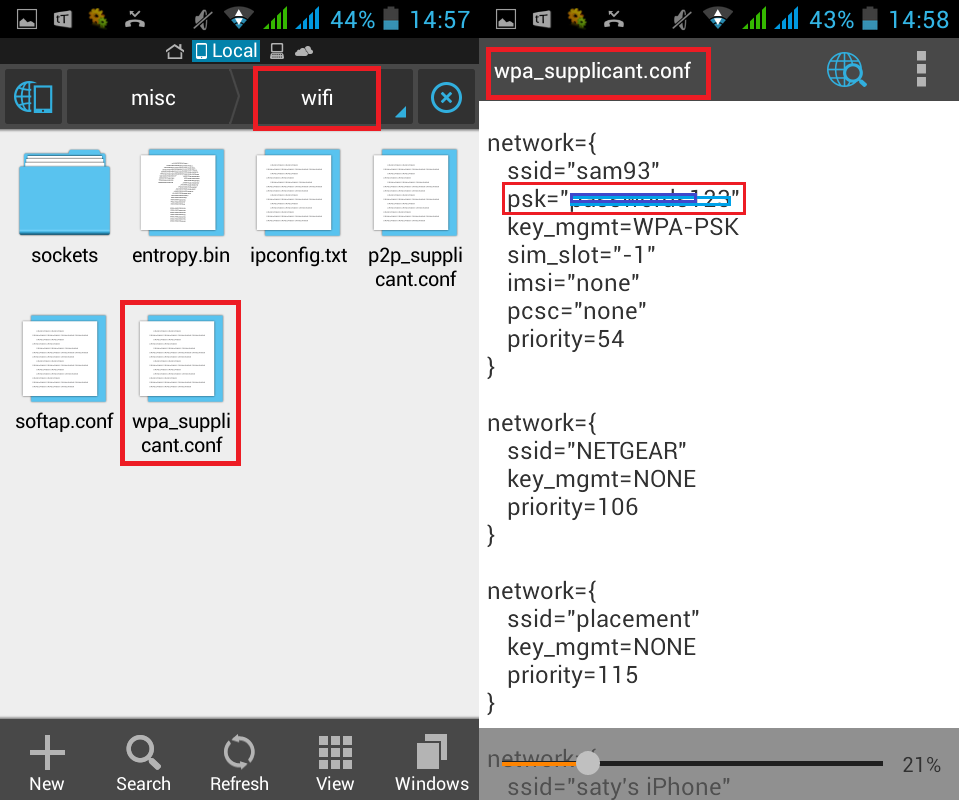
Step 2) Open the file management app and navigate to your data/misc/wifi folder (once again, this folder will not be visible on non-rooted phones)
Step 3) Open the file called wpa_supplicant.conf to see a list of saved Wi-Fi networks along with their passwords
That’s it! After opening that list, you’ll see the text Wi-Fi passwords for every network you’ve ever connected to. It’s helpful if you don’t feel like looking up the wireless password, or if somebody else entered the password on your device.
Newsletter
Get the latest tech news delivered to your inbox weekly.