Streaming videos using the internet is too mainstream for the app we unveil to you today; and thus, it takes viewing videos and streaming to gargantuan levels. It’s time you finally complete the transition to your mobile device as your 360 degree entertainment needs.
We all use Dailymotion and YouTube to stream interesting videos on a daily basis on the internet. But these videos are about pre-recorded instances or music videos and concerts, trailers and recordings all that have occurred at a time frame from the past; videos that have value to our sight but have been recorded after dozens and dozens of takes processed through multiple image reels and what not.
 Veetle
 is an ingenious Android app that goes well beyond this realm streams things going on live, as you read this and as and when you use the app.
Veetle is an app that streams and allows you to stream live videos as you see them in the present moment of time. Give the app permission to your camera and all you have to do then is hold up your phone and record what’s happening in front of you and it streams live to the audiences of Veetle. It is a journalist’s dream app where they can record live instances as they happen and reach out to the world with their message.
With Veetle you can also be at the viewer’s end where you can see what’s going on live right in front of your eyes.
The interface of the Veetle Android app is considerably easy to navigate through for users and facilitates a refined viewing experience for your favorite streamed content.
On launching and entering the Veetle app, it tells you what to do and how to do with eye-catchy graphics.
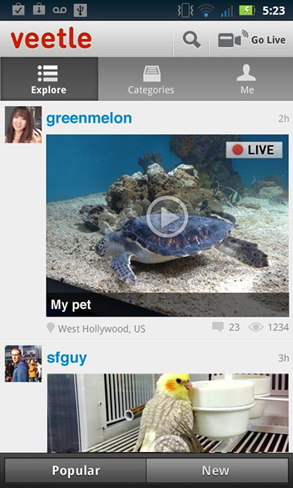
It then takes you to the home screen with the Veetle logo to the top and ‘Go Live’ Button in the same line. The ‘Search’ button appears to the top with a magnifying glass where you can look for live videos of what you want to see using key words.
The option bar is at the top right and a drop down with a menu for settings and refreshing the page appears.
The 3 categories that you can access from the main menu of the Veetle app are:
The first category gives you a list of all the possible videos streamed live by users. These are classified as Popular and New videos.
It is displayed in a list with a huge thumbnail of the video with a ‘Live’ tag to the top to give you a feel as good as you watch something live on a news channel.
Scrolling down gives you a large list of live streamed videos for your viewing purpose.
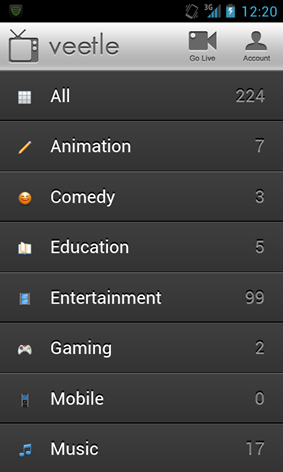
The Category tab displays all the possible segregations of videos. They are from:
- Mobile
- Action
- Video
- Movies
- Films
- Action
- Drama
- Animation
- Comedy
- Entertainment
All of these are segregated into modern and classic for further filtering.
You can also access the ME category which displays you and your profile and everything you have streamed. View all that you took, how many comments you got on it and how people have interacted with all that you created.
So that’s Veetle for you! An app that livestreams your beloved TV channels and movies that will be broadcasted whenever you want it to be there. Download it now from Google Play Store and upgrade your entertainment experience once and for all.