The open-source nature of the Android platform is one of the features beloved by users and developers alike. When people discuss the near limitless potential for personalization and customization of their device, it’s apps like
Widgetsoid that are able live up to that bold promise and deliver. As the name suggests,
Widgetsoid is an Android app lets you select from a plethora of widgets, as well as giving you the ability to customize some of them for your needs. Widgets are all about becoming the path of least resistance for your device – toggling any info you may need without the need of opening an application.
Widgestsoid brings you a ton of convenient widgets such as the digital clock, weather widget, battery monitor, gauges, calendar widgets, etc. The current version contains over 40 different toggles to pick from, and even lets you select a custom background for each widget and choose its color patterns. It gives you the ability to play interior designer for your Android device, and you will find yourself engaged in creating some superbly designed widgets and save your favorite configurations.
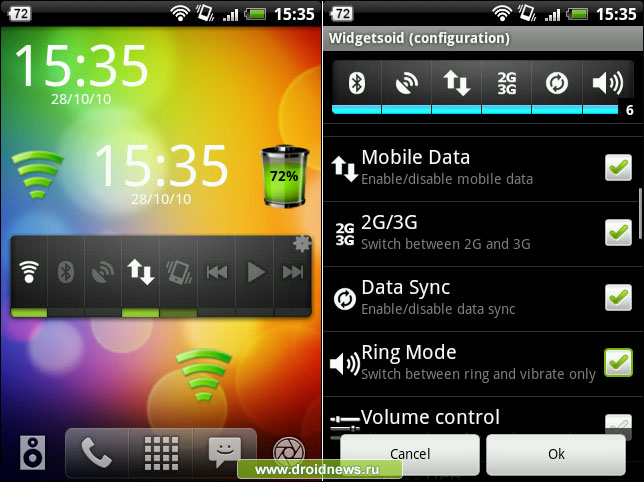 Simply download the Widgetsoid app from the Google Play Store. Once installed, you can access this widget by doing a long-press on your device’s homescreen and choose the widget size you prefer. Current widget sizes range from 1*1 to 5*1/1*5. Now you can select the settings you would prefer to enable/disable. The basic layout and concept is similar to the “Power Control” default widget available in the latest Android phones; however, Widgetsoid comes out as a clear winner because of its extensive customizability features. By customizing your icon’s size, background, colors, placement, and toggle features, you can truly make your widgets unique and blend in with your live wallpapers and themes. As both vertical and horizontal bars of various sizes can be supported by Widgetsoid, you can potentially insert as many widgets as you need on your homescreen. As soon as you have finished customizing the widget you need, press the “save” button available at the far-right of the bottom bar.
Highlighting the key widgets offered by
Widgetsoid:
|
SECTION
|
WIDGETS
|
|
SCREEN
|
Lock screen, orientation, stay awake, screen always on, screen timeout, auto lock
|
|
NETWORK
|
WiFi, Bluetooth, mobile data, 2G/3G/4G, tether USB, airplane mode, data sync, USB storage
|
|
SOUND
|
Volume control, music controls, ring mode, silent Omode, media scanner
|
|
OTHERS
|
Battery indicator, SD card, flashlight, digital clock, weather, calendar, reboot.
|
You can even assign shortcuts for any of your favorite downloaded Android apps or for your personal contacts for your convenience. Effective utilitzation of your homescreen and the collaborative integration of customization and convenience help enhance your Android experience. This is why
Widgetsoid is a neat and effective widget creator app as it serves the above purpose well.
For more info and user reviews for
Widgetsoid, click
here.