

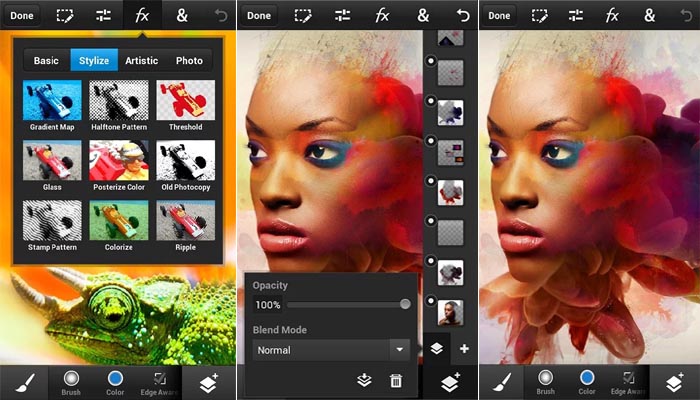
 Combine images, apply professional effects, and share results with friends and family through Facebook and Twitter — all from the convenience of your phone. Enjoy most of the same features as the tablet version:
• Use popular Photoshop features, such as layers, selection tools, adjustments, and filters, to create mind-blowing images.
• Improve your photos using classic Photoshop features to bring out the best in your photography. Apply precise tone and color adjustments to your entire composition, a particular layer, or a select area.
• Create something other-worldly using painting effects, filter brushes, and so much more. With Photoshop Touch, the creative possibilities are endless.
• Make your images pop with graphical text. Apply strokes, add drop shadows and fades, and more.
• Take advantage of your device’s camera to fill an area on a layer with the unique Camera Fill feature.
• Quickly combine images together. Select part of an image to extract just by scribbling with the Scribble Selection tool. With the Refine Edge feature, use your fingertip to easily capture hard-to-select image elements, like hair.
• Start a project on your phone and finish it on your tablet or back in Photoshop at your desk using a free membership to Adobe Creative Cloud™.It’s easy to manually sync your files between devices.
• Free membership to Creative Cloud provides 2GB of cloud storage.
• Work on high-resolution images while maintaining the highest image quality. Images up to 12 megapixels are supported.
Please note that Creative Cloud may not be available in all countries or languages and may be subject to change or discontinuation without notice.
Therefore, keep clicking pictures and making them better without the hassle of opening Photoshop on your laptop again and again. You may just do it in an easier way by downloading Photoshop Touch!
Combine images, apply professional effects, and share results with friends and family through Facebook and Twitter — all from the convenience of your phone. Enjoy most of the same features as the tablet version:
• Use popular Photoshop features, such as layers, selection tools, adjustments, and filters, to create mind-blowing images.
• Improve your photos using classic Photoshop features to bring out the best in your photography. Apply precise tone and color adjustments to your entire composition, a particular layer, or a select area.
• Create something other-worldly using painting effects, filter brushes, and so much more. With Photoshop Touch, the creative possibilities are endless.
• Make your images pop with graphical text. Apply strokes, add drop shadows and fades, and more.
• Take advantage of your device’s camera to fill an area on a layer with the unique Camera Fill feature.
• Quickly combine images together. Select part of an image to extract just by scribbling with the Scribble Selection tool. With the Refine Edge feature, use your fingertip to easily capture hard-to-select image elements, like hair.
• Start a project on your phone and finish it on your tablet or back in Photoshop at your desk using a free membership to Adobe Creative Cloud™.It’s easy to manually sync your files between devices.
• Free membership to Creative Cloud provides 2GB of cloud storage.
• Work on high-resolution images while maintaining the highest image quality. Images up to 12 megapixels are supported.
Please note that Creative Cloud may not be available in all countries or languages and may be subject to change or discontinuation without notice.
Therefore, keep clicking pictures and making them better without the hassle of opening Photoshop on your laptop again and again. You may just do it in an easier way by downloading Photoshop Touch!
Photoshop Touch - Your Mobile Photoshop Companion
3 min read
While the in-built photo editing options on our android devices are nice, there is not much detailed editing that you can do with it. While you can add filters, enhance lighten, auto-correct brightness, remove red eye and crop the image, that is about everything phone editing can achieve. Also, whatever editing is done, it is done to the picture as a whole. Editing cannot be done to certain parts of the image, if required. Basically, there is no detail editing option available on out smartphones, whether or not they are rooted.
But we all know how important good editing is. It is not just about taking good pictures anymore. Good editing that appeals to the ones watching it is also very important. Especially if you are heavily into social media. If picture heavy social media platforms, like Instagram and Pinterest, are your favourite ones, you will understand the need to have visually appealing pictures. You will also realise that you cannot open your laptop, load a picture in Photoshop and start editing each time you want to upload a new picture because there are times when you might be on the go and need to give live updated. Thus, it is important to have an app that can take care of our pictures and make them better easily.
Therefore, today’s app is Photoshop Touch. Bring the fun and creative possibilities of Adobe Photoshop software to your phone with Adobe Photoshop Touch for phone. Transform your images with core Photoshop features.
Combine images, apply professional effects, and share results with friends and family through Facebook and Twitter — all from the convenience of your phone. Enjoy most of the same features as the tablet version:
• Use popular Photoshop features, such as layers, selection tools, adjustments, and filters, to create mind-blowing images.
• Improve your photos using classic Photoshop features to bring out the best in your photography. Apply precise tone and color adjustments to your entire composition, a particular layer, or a select area.
• Create something other-worldly using painting effects, filter brushes, and so much more. With Photoshop Touch, the creative possibilities are endless.
• Make your images pop with graphical text. Apply strokes, add drop shadows and fades, and more.
• Take advantage of your device’s camera to fill an area on a layer with the unique Camera Fill feature.
• Quickly combine images together. Select part of an image to extract just by scribbling with the Scribble Selection tool. With the Refine Edge feature, use your fingertip to easily capture hard-to-select image elements, like hair.
• Start a project on your phone and finish it on your tablet or back in Photoshop at your desk using a free membership to Adobe Creative Cloud™.It’s easy to manually sync your files between devices.
• Free membership to Creative Cloud provides 2GB of cloud storage.
• Work on high-resolution images while maintaining the highest image quality. Images up to 12 megapixels are supported.
Please note that Creative Cloud may not be available in all countries or languages and may be subject to change or discontinuation without notice.
Therefore, keep clicking pictures and making them better without the hassle of opening Photoshop on your laptop again and again. You may just do it in an easier way by downloading Photoshop Touch!
Combine images, apply professional effects, and share results with friends and family through Facebook and Twitter — all from the convenience of your phone. Enjoy most of the same features as the tablet version:
• Use popular Photoshop features, such as layers, selection tools, adjustments, and filters, to create mind-blowing images.
• Improve your photos using classic Photoshop features to bring out the best in your photography. Apply precise tone and color adjustments to your entire composition, a particular layer, or a select area.
• Create something other-worldly using painting effects, filter brushes, and so much more. With Photoshop Touch, the creative possibilities are endless.
• Make your images pop with graphical text. Apply strokes, add drop shadows and fades, and more.
• Take advantage of your device’s camera to fill an area on a layer with the unique Camera Fill feature.
• Quickly combine images together. Select part of an image to extract just by scribbling with the Scribble Selection tool. With the Refine Edge feature, use your fingertip to easily capture hard-to-select image elements, like hair.
• Start a project on your phone and finish it on your tablet or back in Photoshop at your desk using a free membership to Adobe Creative Cloud™.It’s easy to manually sync your files between devices.
• Free membership to Creative Cloud provides 2GB of cloud storage.
• Work on high-resolution images while maintaining the highest image quality. Images up to 12 megapixels are supported.
Please note that Creative Cloud may not be available in all countries or languages and may be subject to change or discontinuation without notice.
Therefore, keep clicking pictures and making them better without the hassle of opening Photoshop on your laptop again and again. You may just do it in an easier way by downloading Photoshop Touch!
Newsletter
Get the latest tech news delivered to your inbox weekly.