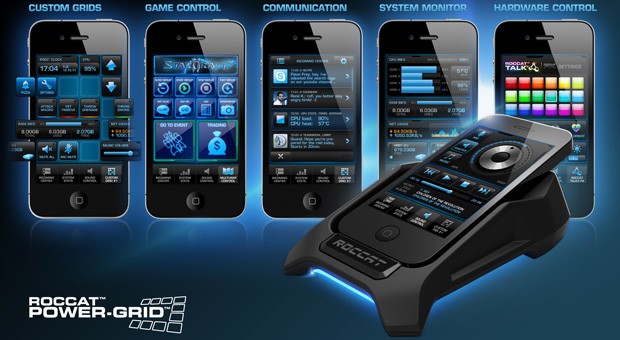
Here’s a gem of a utility app that has been created by Roccat for the benefit of the world of Android users. Its name is
Power Grid, and its power-packed name packs a serious punch thanks to its ingenious set of features that will amaze you more every day. It promises to give you the most advanced optimized smartphone experience possible. The Power Grid Android app works as a simple universal remote control to your PC that lets you take access from anywhere in front of your screen and control it.
Power Grid presents itself in a beautiful futuristic blue avatar that instantly attracts users as they enter it. It does seem to be an advanced user’s app, but it is not that complex in functionality and lets you take control of elements on your PC that none other do. So let’s get straight to it.
The main screen has 4 major options at the top that can be chosen from:
- Income stats
- System Stats
- Sound Control
- Remote Grid
- and Word Grid
The Income stats look to be in the form of push notifications that’s show you a list of messages all that have been integrated into the Power Grid app like Facebook, Skype etc.
The system stats are a list of everything that is going on in the background and inside the PC. This includes all the data from CPU usage, RAM usage, E: drive, F: drive, and even the internet usage.
In such an instance, if you need to know what files and programs are taking up the most space and RAM, then you can use the Power Grid app to analyze and accordingly make suitable changes to rectify and kickstart a smooth and quicker smartphone experience.
The Sound Control interface is also smooth and looks quite a bit complicated to function along. You see the Mic, Master and Music volume control at the side with a massive speaker in the centre that has a blue ring around it that signifies the sound.
The master volume control lies right at the bottom with the Play and Pause buttons above it to directly control the music from.
The next grid is the remote grid that is as good as a mini keyboard in your hands with the direction keys, the ‘ESC’ button, back, forward and save buttons on the grid and a power button thrown in there too.
The Word grid #1 is one of a set of customizable grids available that can be used to tamper and play around with Microsoft Word and the Home tab as seen on word is present in the first grid.
There is one more grid that makes 2 grids that are fully customizable and can be used to control games right from the palm of your hand.
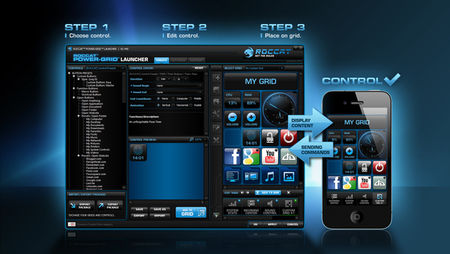
These custom grids can be changed in colour and overall appearance as per your liking. With 100 preset buttons and 1800+ icons thrown in there, there’s a lot to explore with the app. All you need to do is download the same host software onto your PC and ensure that both the mobile device and the PC are connected to the same Wi-Fi.
The best part is that it’s available for download free on Google Play Store and is only 2.7 MB in size. For an app that looks like it offers a lot more, the Power Grid app is one app you’ll definitely not regret giving a try.