

Text Friends from your PC Using an Android App Called MySMS
3 min read
If you’re like me, you spend a lot of time every day sitting at your computer. Sometimes, I work at my PC. Other times, I’m doing absolutely nothing but browsing the internet. But when I’m on my computer, I don’t like to look away from the screen to pick up my little phone and respond to a text.
That’s why a new app called MySMS is easy to fall in love with. Designed for Android, Windows Phone 8, and iOS, MySMS makes texting from your computer as easy as possible.
Before you get mad: I know MySMS isn’t the first service that lets you send texts from your computer. But here’s what I do like about it – there are no browsers required. In fact, I think MySMS is the only remote SMS app that doesn’t require users to access their browsers in any way. You can simply sit down at your computer, bring up the MySMS desktop client, and you’re ready to go.
Here’s how it works:
-Download and install MySMS on your Android and on your PC
-After installing MySMS on your phone, the app will send you a text message with a PIN. Enter that PIN into the computer version of MySMS (there are several different options available, including options for Mac, Windows, and whatever browser you’re currently using). You can also use MySMS on your tablet to send texts on your phone.
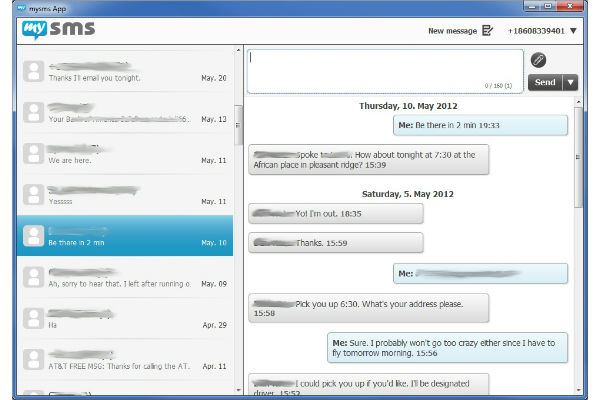
-No matter which version of the app you’re using, the interface is almost always identical. It’s friendly, easy-to-use, and self-explanatory. It looks like an email inbox, and you can easily choose conversations to open and read. Simply click the ‘New message’ button to fire off a text to one of your contacts.

Here’s how it works:
-Download and install MySMS on your Android and on your PC
-After installing MySMS on your phone, the app will send you a text message with a PIN. Enter that PIN into the computer version of MySMS (there are several different options available, including options for Mac, Windows, and whatever browser you’re currently using). You can also use MySMS on your tablet to send texts on your phone.
-No matter which version of the app you’re using, the interface is almost always identical. It’s friendly, easy-to-use, and self-explanatory. It looks like an email inbox, and you can easily choose conversations to open and read. Simply click the ‘New message’ button to fire off a text to one of your contacts.
The Android advantage
The iOS version of MySMS is basically useless. For whatever reason, Apple doesn’t allow third-party apps to mess with its SMS functionality, so MySMS basically turns into a fancy version of WhatsApp – you can only text other MySMS users. And since MySMS is a fairly new and relatively unknown app, your friends probably don’t have it yet. Fortunately, the Android version of MySMS is significantly better. There are no limitations in terms of texting functionality, and you can simply open up your desktop client and begin typing away to your friends. Just don’t forget that you’re using a smartphone and that your friends may not appreciate receiving email-length text messages in their inbox every day. Other than that, happy texting!One Click Root Author
One Click Root Author
Content Writer
Experienced writer covering technology and mobile development.
You Might Also Like
How-To
Android 14 Root Methods: What Changed?
Explore the new root methods and security changes in Android 14.
How-To
Latest Android Security Updates Impact Root Access
Understanding how the latest security patches affect root methods.
How-To
Google Pixel 8 Pro Root Guide Released
Complete step-by-step guide to rooting the Google Pixel 8 Pro.
Comments
JD
John Doe
2 days ago
Great article! Very informative and well-written. Thanks for sharing.
JS
Jane Smith
5 days ago
I found the security section particularly helpful. Looking forward to more content like this!
Leave a Comment
Newsletter
Get the latest tech news delivered to your inbox weekly.
Popular Posts
-
1
Getting Started with Android Development
12.5K views
-
2
Best Practices for Mobile Security
8.2K views
-
3
Understanding Smartphone Hardware
6.8K views