The most important reason to root an Android device is to get full control over it. This control include flashing custom kernels.
As we all know, there are various kinds of custom kernels available, each having different specifications. All we need to do is find one that fits our needs. However, there are a handful of us who are very picky about everything, including kernels.
We know exactly what we want our custom kernel to have, but unfortunately, that does not always happen. There is something or the other in every kernel that we wish to change. Since that is not possible, we settle for the one closest to what we want.
But not anymore because now we have an app called
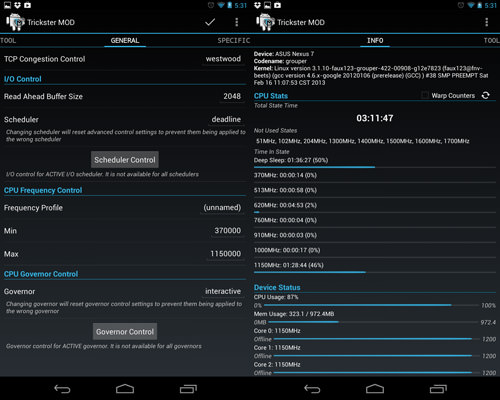
Trickster MOD Kernel Settings. Trickster MOD app is a tweaking tool to change various settings included in your kernel and other mods to your phone.
Trickster MOD has abilities to do the following:
- ADB over WLAN
- Set I/O scheduler, read ahead buffer, CPU scaling governor, min and max CPU speed
- CPU Statistics
- Set Device hostname
- Apply Grace Period (was Bootloop Preventer)
- Frequency Lock
If you donate to their app, you can further unlock these features:
- I/O scheduler advanced control
- Color profile for device with color settings
- CPU Frequency profile
- Voltage profile for some settings
- Sound control for faux's patches
- Advanced gamma control for N4 with faux's patch
- Touch Filter Control for N4 with supported kernels
- Bootloader lock/unlock without fastboot and data wipe for some devices
- Kernel backup/restore on some supported devices
- Launcher shortcuts to some app operations
The following features depend on kernel support:
- Color for Galaxy Nexus and Nexus 4, contrast and gamma tweaks for Galaxy Nexus
- Generic hotplug
- CPU Temp limit
- Minimal SmartReflex voltage of Core, IVA, and MPU domains
- Nominal SmartReflex voltage for Core, IVA, and MPU domains
- Regulator voltages
- GLaDOS live OC of Core, GPU and MPU
- WIFI mode for screen off (power saving or full speed)
- Vibrator strength
- Headset volume boost
- High performance sound
- Force fast charge
- Battery live extender
- Touch wake and touch wake duration
- fsync control
- Sweep 2 wake
- ZRAM
The devices that Trickster MOD Kernel Settings officially supports are:
- GALAXY NEXUS (toro, maguro, toroplus)
- Nexus 7 (grouper) and Nexus 7 3G (tipalia)
- Nexus 7 2013 (flo)
- Nexus 4 (mako)
- Nexus 5 (hammerhead, preliminary support)
- Sony Xperia Z (yuga) and ZL (odin)
- LG Optimus G
- Galaxy SIII with Exynos SOC
- HTC Incredible S (vivo: preliminary support)
- Nexus 10 (preliminary support)
- HTC One X International (endeavoru; preliminary support)
- HTC One M7U and M7UL
- Galaxy SIII with Qualcomm SOC (preliminary support)
Before using
Trickster MOD Kernel Settings, you need to make sure that your android device is rooted and has working busy box installation. Once all the requirements for this app are fulfilled, you will get the exact settings of the kernel, just the way you wanted it. This application will trick your smartphone into giving you the exact custom kernel, after all, a custom kernel means a kernel customised for your liking. So now we never have to settle for the second best!