5 Android Features That Make the iPhone Feel Like It's From 1999
6 min read
The iPhone 5 was released in September of 2012. So far, we don’t know any details about the inevitable upcoming iPhone 5S (or iPhone 6), but rumors should be coming from “supply chain sources” in the very near future.
Apple is losing key ground in smartphone markets around the world, and if the next iPhone is as lackluster as the iPhone 5, then Apple’s market share will continue to drop as consumers scoop up the latest Androids.
There are plenty of cool things to do on Android that you can’t do on an iPhone. Today, I’ve narrowed that list down to the top 5 things that make me appreciate my Android every day. Here are the top 5 things I love about my Android that I just can’t do on an iPhone:
5) Replace the battery in three seconds
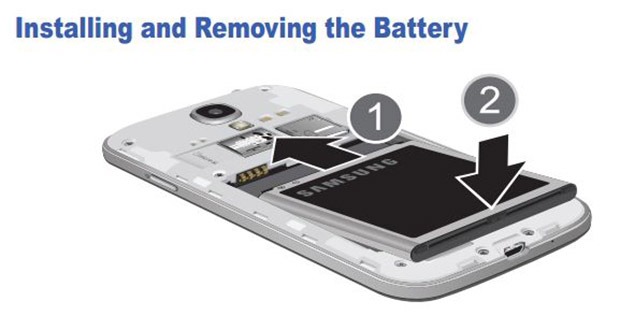
No matter who made your smartphone, battery life is always an issue and it’s going to be like that until someone comes up with a better portable source of energy than lithium ion. While Androids and iPhones tend to be fairly equal in terms of battery life, Androids have one very important advantage over the iPhone: even an idiot can replace the battery in under 5 seconds.
Lithium ion batteries start to degrade after a year or two of use, which means they might only last for a few hours instead of a full day. That sucks. However, relief is only a few dollars away. Order a brand new battery directly from your Android manufacturer or from third-party websites like eBay and Amazon.
Once your battery arrives, simply pop off your Android cover, take out the old battery, and replace it with the new one. If this takes more than three or four seconds, you’re doing something wrong. Once installed, your new battery will be the same as the day you bought it.
Oh, and did I mention how cheap it was to replace an Android battery? Check out this one for sale on Amazon.com for $6.99. And that’s not some shady third-party retailer from Bangladesh: that’s a genuine Galaxy S3 battery manufactured officially by Samsung.For $6.99.
Apple intentionally makes the batteries on its devices difficult to access. Why? Well, when battery life starts going down, it’s not good for business if that iPhone user can just go out and buy a new battery for $5.99, is it? Instead, Apple wants users to constantly upgrade to the newest devices. It’s not impossible to replace your iPhone battery at home, but you will need special tools and the process is way more complicated than it should be.
So how much does it cost to replace an iPhone battery? Apple charges $79 USD for battery replacements plus an extra $6.95 for shipping (plus tax). You can buy a brand new Android battery for the same amount it costs you just to ship your device to Apple.
4) Add memory to your phone after you bought it
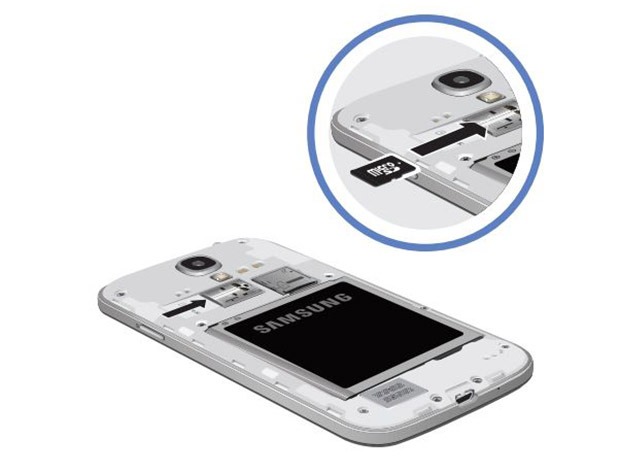
I purchased an 8GB Samsung Galaxy S3 because my carrier had a great promotion at the time. 8GB isn’t much space, but that’s okay, because I went out and purchased a 32GB SD card a few weeks later. The SD card was $20 and I slipped it into my phone in about 3 seconds. I’venever had to delete a single photo, video, or app from my phone due to space requirements, and I don’t think I ever will because 40GB is a lot of space to have on a smartphone – at least for an average user like me.
If I bought an 8GB iPhone, then I would literally have no way to upgrade the physical space on my device. Oh wait – I could pay $500 for a new 32GB or 64GB iPhone. Or pay Apple $40 per year for iCloud, which gives me 20GB of virtual storage space that can only be accessed when your phone has an internet connection and you’re not on a strict data limit.
3) Drag and drop files from your computer
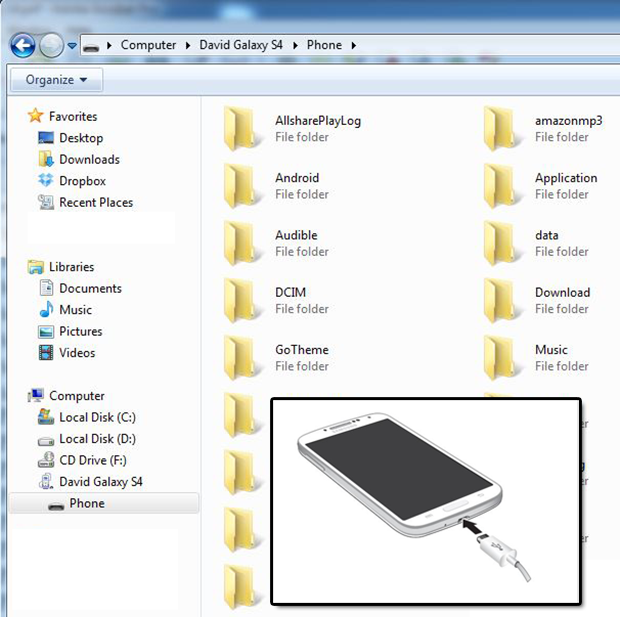
It’s ridiculous that, in 2013, you can’t plug an iPhone into a computer and drag and drop media files onto it. When I plug my Galaxy S3 into my computer’s USB port, I instantly see a Windows Explorer menu with all of the parts of the phone I could ever need to access. If I want to add a few songs onto my device, it’s as simple as dragging and dropping those files over. I can drag and drop a movie into any folder on that device and my Galaxy will recognize it.
Apple doesn’t allow its users to do that. Sure, you can add music through iTunes. But try adding a video file that isn’t Mpeg-4 to your iPhone. Well, you can’t get anywhere close to doing that because iTunes won’t even recognize movies that aren’t in Mpeg-4 format. What is this, 1993? For those that hate using iTunes, moving files onto an iPhone can be really frustrating.
2) Full 1080p displays
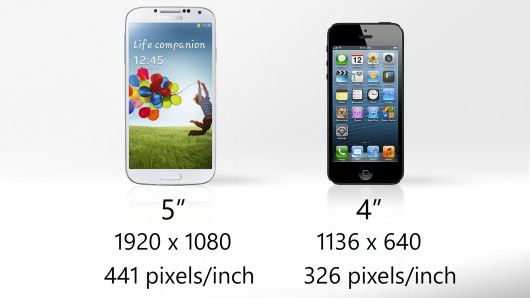
This advantage doesn’t apply to all Androids, but it does apply to the newest lineup of devices. Viewing a 1080p screen on your smartphone is as good as mobile devices get. Popular devices like the HTC One and Galaxy S4 – released just a few months after the iPhone 5 – both feature beautiful 1080p screens.
When you hold both the iPhone and a 1080p Android in your hands, it’s amazing how cramped and small the iPhone screen will feel. I feel like I’m hopping on the 10 year old computer at my grandparents’ house that’s stuck in 800x600 resolution.
1) Customization options
A sample of some of the remarkable changes made to the iOS interface over its 6 year history from the iPhone 1 to the iPhone 5
For a company that prides itself on being unique, Apple sure doesn’t like its users to be unique. If you line up ten iPhones side by side on a table and press the ‘Home’ button, they’re all going to look pretty much the same. Homescreens look the same, the lockscreen looks the same, and all the default Apple apps look exactly the same.
In fact, the only things you can change on the iPhone are the wallpaper and the case in which you put your iPhone. Otherwise, your iPhone looks exactly the same as your friend’s iPhone.
Android allows you to customize everything on the lockscreen and homescreen. Add widgets, remove icons, or even install a totally new UI app (without rooting!).
As one Android writer succinctly put it here, new Androids make the iPhone feel “like it comes from the 1990s.” Apple isn’t going away any time soon, but if it wants to recapture some market share, it’s time to start fixing some of the issues listed above – otherwise, I’m sticking to Android.
Get the latest tech news delivered to your inbox weekly.
Cookie Preferences
We use cookies to enhance your browsing experience, serve personalized content, and analyze our traffic. You can choose which types of cookies to allow. See our Cookie Policy for more information.
Essential Cookies
They are necessary for the operation of our website services and to secure area access.
Always Active
Performance and Functionality Cookies
They enhance website performance. Some features may not be available without them.
Analytics and Customization Cookies
They collect aggregated data to understand usage and customize the website.
Advertising Cookies
They enhance the relevance of ads, prevent repetition, and ensure proper display.
Social Networking Cookies
They enable content sharing and may support advertising.


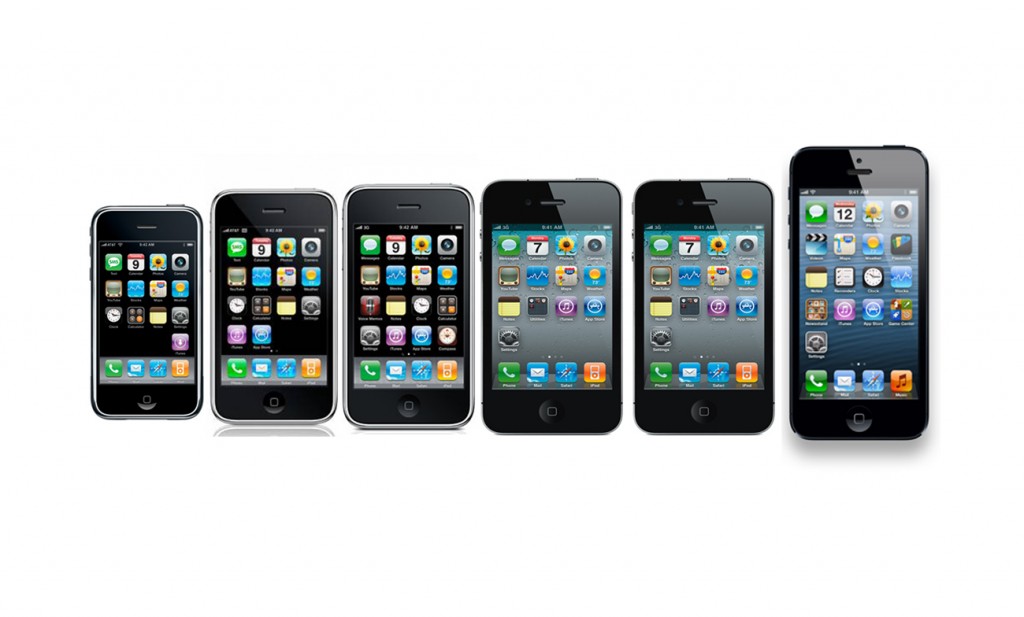 A sample of some of the remarkable changes made to the iOS interface over its 6 year history from the iPhone 1 to the iPhone 5