As the name suggests, it is an app that is capable of editing and customizing mp3s in our Android device. Imagine the convenience of being able to edit songs or music on your device without transferring the file to your PC!
MP3 cutter is one such application which enables the user to play around with a music file in their device. It is an easy and simple app to use. Developed and designed by accountlab, it is claimed to be the fastest mp3 cutter available on Google Play Store as of now.
Details
The mp3 cutter has three basic functional aspects and these are as follows:
Cutting – It can cut any mp3 file in the memory of the device according to our desire. Downloading songs or uploading them in your device is a different story but it is assumed that, with an app like this, the user is more than familiar with mp3 files. The process can be executed according to the following steps:
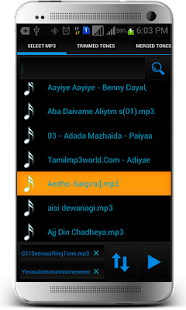
- List all mp3 files in your device, SD card included
- Select the files to be edited from the list
- Cut the mp3 file or track using the forward and backward selector in the user interface of the app. The app UI is integrated with a wave viewer which helps in obtaining perfect cuts
- Save the edited file to memory card
- Set the saved files as tones for calls or alarms
Merger – This app can be used as a tool for merging two different files to create a single file – Fusion, in other words. This feature is experimental in nature and you can merge your favorite tracks to create a unique track. The application is easy to use and it delivers results pretty fast. Follow the steps below to create one:
- Select mp3 files you wish to merge from the list displayed on the UI screen
- Press or choose the merge icon for starting the process
- Save file to SD card and apply it tone settings accordingly
The process is quite fast while the quality remains intact.
Creating – Creating a new file is just a by-product of the above mentioned functions. Nevertheless, it is worth mentioning because of the effortless execution. Many a times, we have had situations where we want to keep a particular part of a song as a ringtone, but due to lack of proper editing tools we are left helpless in this regard. With this tool, we can create specific tones for calls, notifications, alarms etc. by following the steps below:
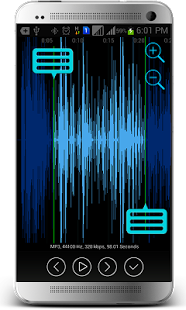
- Repeat the cutting actions on the selected file
- There is a zooming function integrated with the waveform representation of the mp3 file which helps in precise selection of cutting points
- Save the edited file to SD card and apply it to tone settings of calls, alarm, notifications etc.
This Android app is available for download in Google Play store and for a file size of less than 1 MB, so make sure you get with it because this one’s a steal.