

Top Fonts for Android Content Creators Using CapCut PC
5 min read
If you're an Android fan, operate a mobile company, or build things in the Android universe, you understand how much it matters to make your online content stand out, particularly because short videos are so popular these days. Great graphics and active effects are crucial, but most people ignore the significance of fonts. However, typography is part of your video's personality, quality, and brand image, particularly when you're publishing Android-related material.
CapCut Desktop Video Editor is an excellent, free application great for Android content creators who wish to enhance their video editing without wrestling with complex software. Its simple design, robust features such as text to speech, various font templates, and an AI video creator make CapCut PC an ideal companion for your Android work. It provides you with the flexibility and creative freedom required to create good videos, whether you are editing screen captures or preparing clips for social media.
[caption id="attachment_66753" align="aligncenter" width="565"]
Image from capcut.com[/caption]
Why Fonts Are Critical for Your Android Content Branding
Fonts do far more than add stylistic flair—they are a cornerstone of how your brand is perceived by the Android community and beyond. The right font can instantly communicate that your Android app review is cutting-edge, your modding tutorial is reliable, or your tech showcase is premium. Conversely, a poor font selection or a boring font can detract from your credibility, no matter how good your Android content is.
If you create YouTube tutorials of Android phone rooting, run a social handle for Android customization, or create reviews of the latest Android technology, using bold and legible fonts makes people trust you and remember your brand. CapCut PC allows you to add trendy fonts easily to all your videos, be it Android screen recording or final editing, keeping your brand presence strong and identifiable.
Bonus: CapCut's text-to-speech functionality is perfect for Android developers. It assists you in coming up with original voiceovers that suit your font and your brand. This comes in handy while explaining Android interfaces in great detail or if you wish to make content in a flash for various platforms.
Font Ideas in CapCut PC That Make Your Android Content Pop
Looking to make your Android-focused content stand out? Here are a few font ideas in CapCut PC to inspire you:
Image from capcut.com[/caption]
Why Fonts Are Critical for Your Android Content Branding
Fonts do far more than add stylistic flair—they are a cornerstone of how your brand is perceived by the Android community and beyond. The right font can instantly communicate that your Android app review is cutting-edge, your modding tutorial is reliable, or your tech showcase is premium. Conversely, a poor font selection or a boring font can detract from your credibility, no matter how good your Android content is.
If you create YouTube tutorials of Android phone rooting, run a social handle for Android customization, or create reviews of the latest Android technology, using bold and legible fonts makes people trust you and remember your brand. CapCut PC allows you to add trendy fonts easily to all your videos, be it Android screen recording or final editing, keeping your brand presence strong and identifiable.
Bonus: CapCut's text-to-speech functionality is perfect for Android developers. It assists you in coming up with original voiceovers that suit your font and your brand. This comes in handy while explaining Android interfaces in great detail or if you wish to make content in a flash for various platforms.
Font Ideas in CapCut PC That Make Your Android Content Pop
Looking to make your Android-focused content stand out? Here are a few font ideas in CapCut PC to inspire you:
- Minimalist Fonts: Think clean, sleek, and modern (e.g., Roboto, Open Sans). These are perfect for tech tutorials, Android app demonstrations, or showcasing clean UI from screen recordings. Simplicity here conveys clarity and sophistication.
- Bold Fonts: Use these to make an immediate impact (e.g., Montserrat Bold, Impact). Ideal for highlighting new Android features, device comparisons, update announcements, or critical steps in a rooting guide.
- Handwritten Fonts: These add a personal, approachable touch (e.g., Pacifico, Caveat). They work wonders for tech vlogs, behind-the-scenes glimpses of your Android projects, or more informal commentary.
- Elegant Serif Fonts: For longer pieces such as flagship Android phone reviews, in-depth software tests, or spotlight pieces on special apps, serif fonts (such as Playfair Display and Merriweather) can make it appear more classy and authoritative.
- Text-to-Speech: Effortlessly convert your scripts—perhaps drafted on your Android device—into high-quality voiceovers. This is invaluable for clear narration over Android screen recordings, tutorials, or creating multilingual content for a global Android audience.
- AI Video Generator: Need inspiration or a quick start? CapCut’s AI video generator can suggest or even help create video ideas based on your existing content, a great way to repurpose Android blog posts or forum discussions into engaging video formats.
- Install CapCut PC: Head to the official CapCut website and download the free version. Most essential features are available immediately, with optional premium tools accessible via subscription.
- Import Your Android Project: Launch CapCut and click “Import.” CapCut PC acts as the perfect polishing station for your raw Android captures.
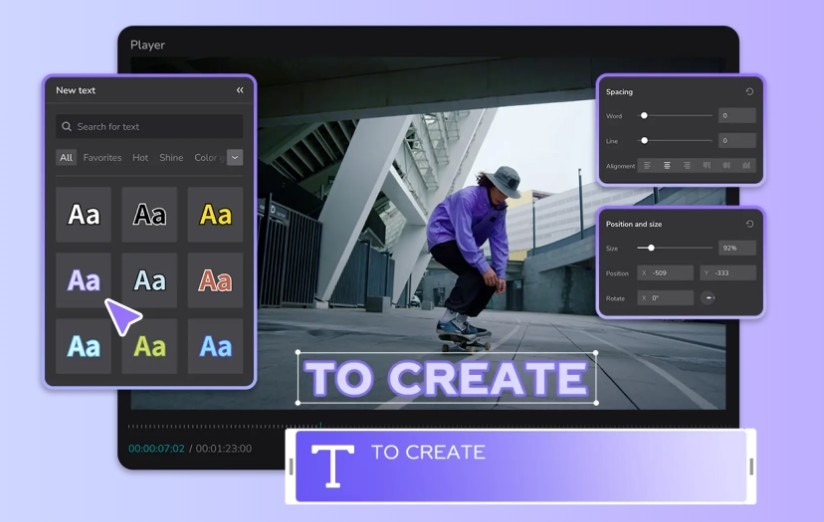
- Add and Customize Text: Select the “Text” option in the tools panel. Browse CapCut’s extensive library of built-in fonts or upload your custom brand fonts. Adjust font style, animation, colors, and layout to perfectly match your Android content’s theme and your brand’s visual identity.
- Save Templates for Brand Consistency: Once you’ve perfected your text styles, save them as templates. This is key for maintaining a consistent look and feel across all your Android-focused videos, reinforcing your brand with every upload. You can further enhance this with consistent voice changer settings or text-to-speech styles.
- Export and Share to Android-First Platforms: After you’re satisfied, export your video. Choose the resolution and format best suited for platforms where Android users congregate, like YouTube, Instagram Reels, TikTok, or tech forums.
One Click Root Author
Content Writer
Experienced writer covering technology and mobile development.
You Might Also Like
PC
Android 14 Root Methods: What Changed?
Explore the new root methods and security changes in Android 14.
PC
Latest Android Security Updates Impact Root Access
Understanding how the latest security patches affect root methods.
PC
Google Pixel 8 Pro Root Guide Released
Complete step-by-step guide to rooting the Google Pixel 8 Pro.
Comments
JD
John Doe
2 days ago
Great article! Very informative and well-written. Thanks for sharing.
JS
Jane Smith
5 days ago
I found the security section particularly helpful. Looking forward to more content like this!
Leave a Comment
Newsletter
Get the latest tech news delivered to your inbox weekly.
Popular Posts
-
1
Getting Started with Android Development
12.5K views
-
2
Best Practices for Mobile Security
8.2K views
-
3
Understanding Smartphone Hardware
6.8K views