What you usually see in the process of a workout is a trainer holding a stopwatch in the hands and dictating terms to the trainee as to what all is to be done. He them times the trainee and records this progress. This is done at consistent intervals with exercises and breaks all for an equal amount of time.
Now the scope for human error in such instances is high, and the below apps that you are about to see have been designed to circumvent this very same problem, so the accuracy in breaks and exercise schedules is consistent without a glitch of a second up or down. Are you ready to upgrade your training routine from a backyard bush league hotshot to a legitimate Olympian athlete? If you have the determination and raw talent, then these 2 apps will help you truly channel that energy for glorious purpose.
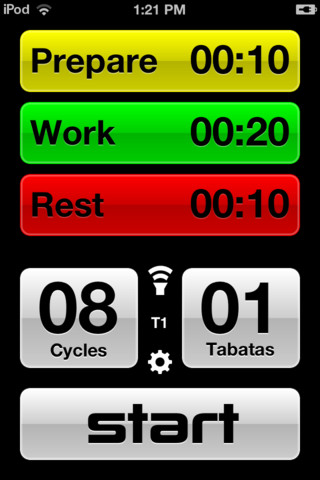
The Tabata training is a concept that was developed in Japan at the national Institute of Sports and Fitness. The objective of it is to accompany Tabata Training. Though this app is based on those training principles, it can be used for multiple purposes in a routine exercise that require extensive repetition. It is majorly used for cardio interval training.
The Tabata Timer Android app has a simple dark green interface and a timer at the top just like a stop watch. What is expected of you is to simply add in the time of the exercise. Say for instance if it the act of skipping, set the timer to 20 seconds and set the interval to 10 seconds.
The Tabata Timer app will automatically pick this and continue the same routine again and again so that there is perfect timing between both. You can add in sound effects to indicate changes in the routine.
There can also be Sound alarms added and a volume control through the app itself.
Taking a step further in order to indicate the fact that you have changed from exercise to stop/halt you will see a colour change too if you set it as such that is from the settings.
You can also preset the number of cycles that you would like to repeat all this for. And finally, this followed by clocking in the resting time and the stopping time.
Workout Forge
Very much similar to the Android app listed above, Workout Forge is small in size, which delivers all the functionality that is expected of a timer for cardio training and that’s about it. The five choices are:
- Get Ready
- Pacer
- Interval
- Rest
- Period
Each of these parameters can be preset depending on the kind of exercise, example, Cross trainer, Cycle, treadmill, Squats, skipping, Sprinting etc.
The Workout Forge app is also designed to ensure that there are different types of exercises.
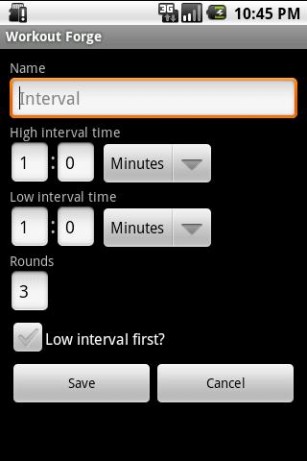
This implies that you can make presets for each one of your different exercises fill in the details and most importantly the name of the exercise.
Here you can set in a low and a high interval as well so in case of a varying routine a high interval and lower one with different small breaks can be set. You can also select which interval will come first and set the number of rounds.
With an eye-catching and remarkably user-friendly interface, the Workout Forge app will replace the efforts of an external trainer to the operational extent and train like a professional.