Bamboo Paper - Presenting Your School Notebooks in a Cool Virtual Environment
4 min read
Here’s an app that will take you back to your school days and help you relive those moments of aimlessly scribbling on to a notebook in the middle of a boring class. We grew up to understand the importance of that very notebook and its utility and the actually started taking down notes on it for everyday life. Bamboo Paper is an app whose interface will give you the feel of the same old notebook you used back in your school days.
From the makers of the Wacom, the company best known for creating and manufacturing smart phone and tablet pens for drawing and writing, this creative new app transforms your Android device into a virtual notebook with an interface that will give you the feel of using a regular notebook.
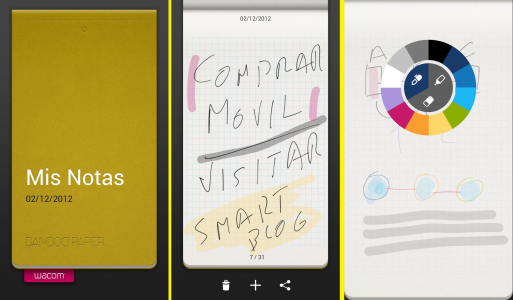
The Bamboo Paper Android app was once available only on the iPad that was available for free is now freely to use on the android platform and has many handy features.
On installing and launching the Bamboo Paper app, you see a large and well-laid notebook that you can directly dive into.
To the left, you see the world of features that enable you to draw, paint, highlight and write down your notes with a handwriting that auto picks and gives you the feeling of a typical notebook that belongs to one of the kids.
The difference is only the use of different colours and shapes that can be used to highlight your writings and make the notebook look captivating.
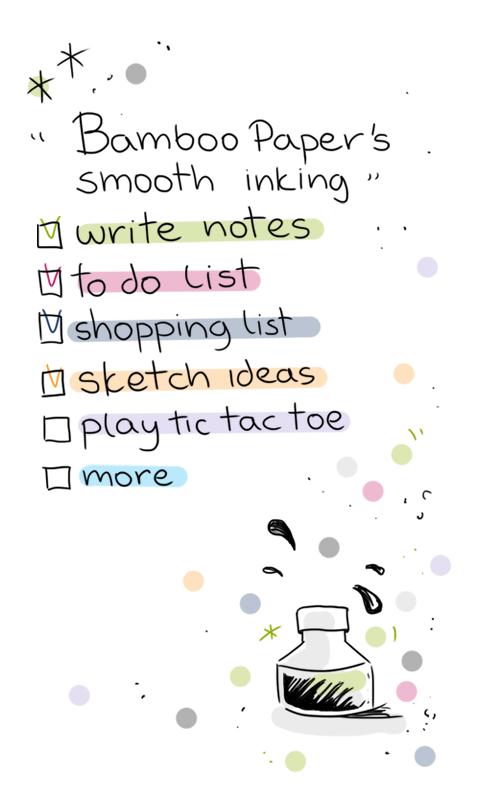
The use of a stylus makes for the best usage of this app. It can be used to flip around the app and get precision while writing. Though not having it isn’t exactly a disadvantage as the app is optimized for both kinds of usage.
The interface is slick and animations are very alluring. In order to change the layout of the typical single lined book, click down and keep pressed and a horizontal list appears.
You can pinch to zoom in and out and then take down notes to get a clear larger view. Keep the screen pressed and colour option will appear.
Flip the page and you can move to the next one. Click on the bottom of the screen for all the pages to appear and you can move directly to pages within the notebook. We bet your school book didn’t let you do that!
The top left of the app screen will let you shut the notebook and move out of it. A few devices are compatible with the use of multiple notebooks.
Along with this, you can even change the colour of the cover of your notebook and skip between notebooks.
Moving back into it, another feature your traditional notebook never allowed you to take advantage of was the ability to directly add images and take notes simultaneously. Bamboo Paper gives you the perfect solution to this problem.
The general use of the Bamboo Paper app is for:
You can send all that you have created to Evernote and e-mail these notes too.
Bamboo Paper is an eco-friendly Android app that gets all your notebook utility to your smartphone or tablet screen and ensures you save the trees getting cut down by using your notebook on your device.
Though it is not as power packed as the version available on the iPad where it originated, Bamboo Paper is making efficient upgrades to its Android versions and moving up the popularity ladder quickly on Google Play Store.
The Bamboo Paper Android app was once available only on the iPad that was available for free is now freely to use on the android platform and has many handy features.
On installing and launching the Bamboo Paper app, you see a large and well-laid notebook that you can directly dive into.
To the left, you see the world of features that enable you to draw, paint, highlight and write down your notes with a handwriting that auto picks and gives you the feeling of a typical notebook that belongs to one of the kids.
The difference is only the use of different colours and shapes that can be used to highlight your writings and make the notebook look captivating.
The use of a stylus makes for the best usage of this app. It can be used to flip around the app and get precision while writing. Though not having it isn’t exactly a disadvantage as the app is optimized for both kinds of usage.
The interface is slick and animations are very alluring. In order to change the layout of the typical single lined book, click down and keep pressed and a horizontal list appears.
You can pinch to zoom in and out and then take down notes to get a clear larger view. Keep the screen pressed and colour option will appear.
Flip the page and you can move to the next one. Click on the bottom of the screen for all the pages to appear and you can move directly to pages within the notebook. We bet your school book didn’t let you do that!
The top left of the app screen will let you shut the notebook and move out of it. A few devices are compatible with the use of multiple notebooks.
Along with this, you can even change the colour of the cover of your notebook and skip between notebooks.
Moving back into it, another feature your traditional notebook never allowed you to take advantage of was the ability to directly add images and take notes simultaneously. Bamboo Paper gives you the perfect solution to this problem.
The general use of the Bamboo Paper app is for:
- Recipe books
- Science and math notebooks
- A rough book
- And illustrative book
- A scrap book and a whole lot more.
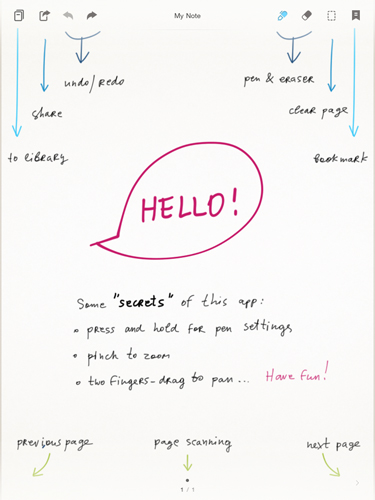
You can send all that you have created to Evernote and e-mail these notes too.
Bamboo Paper is an eco-friendly Android app that gets all your notebook utility to your smartphone or tablet screen and ensures you save the trees getting cut down by using your notebook on your device.
Though it is not as power packed as the version available on the iPad where it originated, Bamboo Paper is making efficient upgrades to its Android versions and moving up the popularity ladder quickly on Google Play Store.

One Click Root Author
Content Writer
Experienced writer covering technology and mobile development.
You Might Also Like
Reviews
Android 14 Root Methods: What Changed?
Explore the new root methods and security changes in Android 14.
Reviews
Latest Android Security Updates Impact Root Access
Understanding how the latest security patches affect root methods.
Reviews
Google Pixel 8 Pro Root Guide Released
Complete step-by-step guide to rooting the Google Pixel 8 Pro.
Comments
JD
John Doe
2 days ago
Great article! Very informative and well-written. Thanks for sharing.
JS
Jane Smith
5 days ago
I found the security section particularly helpful. Looking forward to more content like this!
Leave a Comment
Newsletter
Get the latest tech news delivered to your inbox weekly.
Popular Posts
-
1
Getting Started with Android Development
12.5K views
-
2
Best Practices for Mobile Security
8.2K views
-
3
Understanding Smartphone Hardware
6.8K views