

 After a few minutes with Clean Master, you can easily free up several GB of space on your Android. We all have apps that we don’t really use, and even clearing out a few large caches can uncover a surprising amount of space.
With nearly 200,000 downloads on the Google Play Store, Clean Master is the most popular Android cleaning app available today.
Download it from the Google Play Store today to start immediately freeing up space on your Android.
After a few minutes with Clean Master, you can easily free up several GB of space on your Android. We all have apps that we don’t really use, and even clearing out a few large caches can uncover a surprising amount of space.
With nearly 200,000 downloads on the Google Play Store, Clean Master is the most popular Android cleaning app available today.
Download it from the Google Play Store today to start immediately freeing up space on your Android.
Free Up Space on your Android With Clean Master
2 min read
When I first got my Samsung Galaxy S3, I wondered how I was ever going to fill up 8GB of space on my internal storage card. Then I started taking pictures, adding music, and downloading apps.
Eventually, I upgraded to a microSD card. But it’s only a matter of time before that fills up too. Which is why apps like Clean Master are incredibly useful.
Clean Master aims to free up space on any Android device. It alerts users when they’re running low on space and allows them to delete unwanted files from the device in order to make more space.
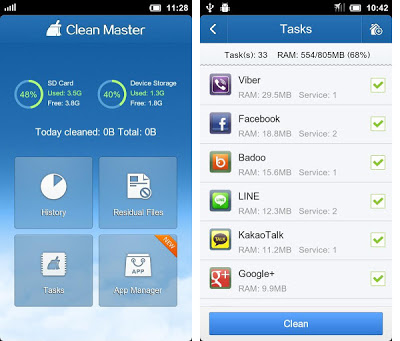
Clean Master can target both your SD card and your device’s onboard storage. Users can also browse through the ‘history’ section of the app to find the specific cache sizes of all installed apps. Users can selectively delete the caches of particular apps or just click ‘clean’ to wipe out all caches.
After a few minutes with Clean Master, you can easily free up several GB of space on your Android. We all have apps that we don’t really use, and even clearing out a few large caches can uncover a surprising amount of space.
With nearly 200,000 downloads on the Google Play Store, Clean Master is the most popular Android cleaning app available today.
Download it from the Google Play Store today to start immediately freeing up space on your Android.
After a few minutes with Clean Master, you can easily free up several GB of space on your Android. We all have apps that we don’t really use, and even clearing out a few large caches can uncover a surprising amount of space.
With nearly 200,000 downloads on the Google Play Store, Clean Master is the most popular Android cleaning app available today.
Download it from the Google Play Store today to start immediately freeing up space on your Android.
Newsletter
Get the latest tech news delivered to your inbox weekly.