

Ginger Page & Grammar Keyboard – Gone Are The Days Of Changing Sentences Because Of One Difficult Word!
3 min read
If you have ever faced the problem of wanting to use big, intelligent sounding words but did not know their spelling or their exact usage, do not worry, you are not dumb or uneducated. All of us face the dilemma of either Googling the correct spelling and usage or changing the whole sentence. Let us be honest, most of us change the entire sentence because of one word. It does not sound so elite anymore but we are lazy and tell ourselves that it works. And it does work, but the effect of jargon is different. It is classier. Hence, an app was created because an app is created at the drop of a hat. Soon there will be an app created to create an app. And when it is, I will be the first one to tell you about it!
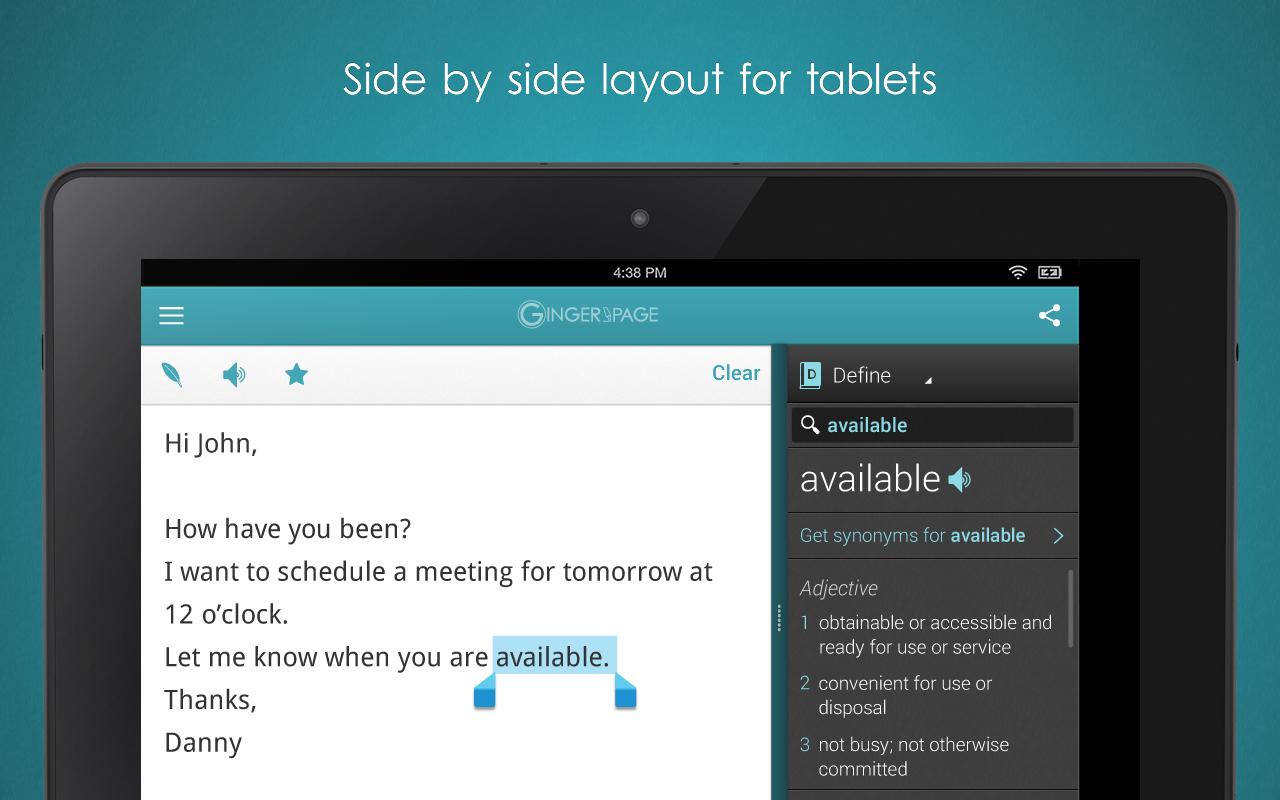
For now, let us stick to the app currently being discussed: GINGER PAGE AND GRAMMAR KEYBOARD. It is the ultimate app for text enhancement. It enhances text in a number of ways including word prediction, emoji (emoticons), automatic spacing, grammar and spelling corrections, translations, synonyms, definitions, text to speech, rephrasing suggestions and punctuation checks. Are you awestruck already? Just wait till you read the rest of its features:
• Contextual word prediction – Boost your writing speed instantly with word predictions that adapt to your intended message.
• Tons of Emojis – Express yourself better and faster with hundreds of emojis (emoticons).
• Smart Typing – Save taps with smart typing features such as automatic spacing, auto-capitalization, auto-punctuation (periods) and more.
• World's #1 proofreader – Contextually detects and corrects 10 times more mistakes.
• As you type proofreading – Get live corrections and as you type rephrase suggestions with Ginger's cutting-edge keyboard. *Requires that you enable your Ginger keyboard.
• Advanced rephrasing – Discover alternative ways to write your text.
• Translations – Translate your text between 40 different languages.
• Contextual Synonyms and Definitions
• Text Reader – Human voice text to speech.
• Favorites – Save your texts as templates to reuse later.
• Share your text – Easily export your text to any writing or social app.
• Personal Dictionary – Add slang, names, locations and other words for a personalized Ginger writing experience.
• Phrase of the Day – Get fun tips to spice up your English, share them with your friends!
• Word prediction in over 25 languages.
 GINGER PAGE AND GRAMMAR KEYBOARD’s translation feature supports translation between the following languages:
Arabic, Bulgarian, Catalan, Chinese Simplified, Chinese Traditional, Czech, Danish, Dutch, English, Estonian, Finnish, French, German, Greek, Haitian Creole, Hebrew, Hindi, Hmong Daw, Hungarian, Indonesian, Italian, Japanese, Korean, Latvian, Lithuanian, Malay, Norwegian, Persian, Polish, Portuguese, Romanian, Russian, Slovak, Slovenian, Spanish, Swedish, Thai, Turkish, Ukrainian, Urdu, Vietnamese.
This app is not just good in creating high quality English documents but also for learning other languages. GINGER PAGE AND GRAMMAR KEYBOARD makes it easier to impress that boss from another country or your in-laws, since you happened to fall in love with that exotic, beautiful person who does not speak your language.
GINGER PAGE AND GRAMMAR KEYBOARD’s translation feature supports translation between the following languages:
Arabic, Bulgarian, Catalan, Chinese Simplified, Chinese Traditional, Czech, Danish, Dutch, English, Estonian, Finnish, French, German, Greek, Haitian Creole, Hebrew, Hindi, Hmong Daw, Hungarian, Indonesian, Italian, Japanese, Korean, Latvian, Lithuanian, Malay, Norwegian, Persian, Polish, Portuguese, Romanian, Russian, Slovak, Slovenian, Spanish, Swedish, Thai, Turkish, Ukrainian, Urdu, Vietnamese.
This app is not just good in creating high quality English documents but also for learning other languages. GINGER PAGE AND GRAMMAR KEYBOARD makes it easier to impress that boss from another country or your in-laws, since you happened to fall in love with that exotic, beautiful person who does not speak your language.
GINGER PAGE AND GRAMMAR KEYBOARD’s translation feature supports translation between the following languages:
Arabic, Bulgarian, Catalan, Chinese Simplified, Chinese Traditional, Czech, Danish, Dutch, English, Estonian, Finnish, French, German, Greek, Haitian Creole, Hebrew, Hindi, Hmong Daw, Hungarian, Indonesian, Italian, Japanese, Korean, Latvian, Lithuanian, Malay, Norwegian, Persian, Polish, Portuguese, Romanian, Russian, Slovak, Slovenian, Spanish, Swedish, Thai, Turkish, Ukrainian, Urdu, Vietnamese.
This app is not just good in creating high quality English documents but also for learning other languages. GINGER PAGE AND GRAMMAR KEYBOARD makes it easier to impress that boss from another country or your in-laws, since you happened to fall in love with that exotic, beautiful person who does not speak your language.

One Click Root Author
One Click Root Author
Content Writer
Experienced writer covering technology and mobile development.
You Might Also Like

Reviews
Android 14 Root Methods: What Changed?
Explore the new root methods and security changes in Android 14.

Reviews
Latest Android Security Updates Impact Root Access
Understanding how the latest security patches affect root methods.

Reviews
Google Pixel 8 Pro Root Guide Released
Complete step-by-step guide to rooting the Google Pixel 8 Pro.
Comments
JD
John Doe
2 days ago
Great article! Very informative and well-written. Thanks for sharing.
JS
Jane Smith
5 days ago
I found the security section particularly helpful. Looking forward to more content like this!
Leave a Comment
Newsletter
Get the latest tech news delivered to your inbox weekly.
Popular Posts
-
1
Getting Started with Android Development
12.5K views
-
2
Best Practices for Mobile Security
8.2K views
-
3
Understanding Smartphone Hardware
6.8K views