

HIIT Interval Training Timer – An App That Supervises Your Sports Training Routines
3 min read
Sports training facilities and world class gymnasiums have a long history of being breeding grounds for champion athletes. With professional trainers and high-end equipment at their disposal, it’s not hard to see why these athletes perfect their skills and go on to do great things. Unfortunately, these amazing facilities may not be feasible for casual fitness enthusiasts or affordable for athletes with poor finances.
Luckily, the inception of the ingenious and nifty HIIT Interval Training Timer application for smartphones and tablets will now empower you to take matters into your own hands with utmost convenience. You can use this app in conjunction with any of your training sports routines for cycling, weightlifting, sprinting, boxing, etc. and attain elite level proficiency without spending a bombshell amount for it.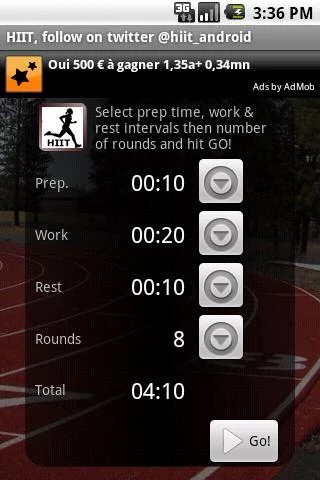 This tool can be used not only for sports, but for multiple home training sessions as well. Remember the famous bodyrock.tv site? Well, this app takes that novel concept to a whole another level by giving you a one-stop destination to cover all your major physical training routines on your smartphone.
Whether you’re planning to run a triathlon or just unwind after a long day working at your office, this app will be right by your side to guide you to fitness supremacy.
The usage of the HIIT Interval Training Timer app is remarkably simple. All you have to do is be well-versed with the workout timings and intervals that suit your body and you are good to go. Set your own training schedule by adding in the following information:
This tool can be used not only for sports, but for multiple home training sessions as well. Remember the famous bodyrock.tv site? Well, this app takes that novel concept to a whole another level by giving you a one-stop destination to cover all your major physical training routines on your smartphone.
Whether you’re planning to run a triathlon or just unwind after a long day working at your office, this app will be right by your side to guide you to fitness supremacy.
The usage of the HIIT Interval Training Timer app is remarkably simple. All you have to do is be well-versed with the workout timings and intervals that suit your body and you are good to go. Set your own training schedule by adding in the following information:
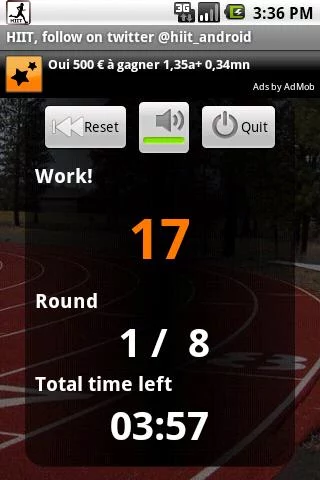 Another great addition to the HIIT Timer app is the integration with the training schedules of other users. People actively upload their results and training schedules using this app. This gives you a deep insight into how other people are going about losing weight and help you understand how to suitably improve your own workout routines.
Other than the above features, the HIIT Interval Training Timer app also performs the following key functions:
- Log your training sessions so that your routine never fails you.
- Give you awards as you work out so that you feel motivated to go on.
- Download and upload the training sessions to the internet too so that you can inspire others with your workout performances.
Another great addition to the HIIT Timer app is the integration with the training schedules of other users. People actively upload their results and training schedules using this app. This gives you a deep insight into how other people are going about losing weight and help you understand how to suitably improve your own workout routines.
Other than the above features, the HIIT Interval Training Timer app also performs the following key functions:
- Log your training sessions so that your routine never fails you.
- Give you awards as you work out so that you feel motivated to go on.
- Download and upload the training sessions to the internet too so that you can inspire others with your workout performances.
This tool can be used not only for sports, but for multiple home training sessions as well. Remember the famous bodyrock.tv site? Well, this app takes that novel concept to a whole another level by giving you a one-stop destination to cover all your major physical training routines on your smartphone.
Whether you’re planning to run a triathlon or just unwind after a long day working at your office, this app will be right by your side to guide you to fitness supremacy.
The usage of the HIIT Interval Training Timer app is remarkably simple. All you have to do is be well-versed with the workout timings and intervals that suit your body and you are good to go. Set your own training schedule by adding in the following information:
- Number of rounds
- Ready time
- Round time
- Rest time
- Relax time
Another great addition to the HIIT Timer app is the integration with the training schedules of other users. People actively upload their results and training schedules using this app. This gives you a deep insight into how other people are going about losing weight and help you understand how to suitably improve your own workout routines.
Other than the above features, the HIIT Interval Training Timer app also performs the following key functions:
- Log your training sessions so that your routine never fails you.
- Give you awards as you work out so that you feel motivated to go on.
- Download and upload the training sessions to the internet too so that you can inspire others with your workout performances.

One Click Root Author
One Click Root Author
Content Writer
Experienced writer covering technology and mobile development.
You Might Also Like

Reviews
Android 14 Root Methods: What Changed?
Explore the new root methods and security changes in Android 14.

Reviews
Latest Android Security Updates Impact Root Access
Understanding how the latest security patches affect root methods.

Reviews
Google Pixel 8 Pro Root Guide Released
Complete step-by-step guide to rooting the Google Pixel 8 Pro.
Comments
JD
John Doe
2 days ago
Great article! Very informative and well-written. Thanks for sharing.
JS
Jane Smith
5 days ago
I found the security section particularly helpful. Looking forward to more content like this!
Leave a Comment
Newsletter
Get the latest tech news delivered to your inbox weekly.
Popular Posts
-
1
Getting Started with Android Development
12.5K views
-
2
Best Practices for Mobile Security
8.2K views
-
3
Understanding Smartphone Hardware
6.8K views