There are thousands and thousands of specialized health-focused apps cluttering Google Play Store, which promise to liberate us from our unwise health choices. Now what kind of an Android app would you call
Drinking Water? Well, you’re just about to find out. Simplicity is the very essence of life and within the realm of simplicity comes the even more simple and enduring H2O. Water that pretty much is the essence of life, comes to the Android platform in a novel way to keep you up to date with, well your habits. Your drinking habits, to be more specific. No not the alcoholic ones, but the other kind of drinking that arguably matters too. We’re talking about your daily consumption of water.
Now it goes without saying what the importance of water is and thus this app designed by ChickPin in the Health and Fitness category has been invented to ensure you never miss out on consuming just enough for your body to run and perhaps ensure that you’re daily needs for water are met too.
Simple enough right? It sure is.
But before we go on, let’s just recollect a bit of school science as we go along the way to familiarize you with the purpose of the Drinking Water app:
- Water hydrates the body. Period.
- It makes sure everything else that’s going wrong with you if at all there is anything, will be in check.
- Water keeps all of the internal haemostasis in check and makes sure you’re on the right track for the day.
- It keeps you less tired, reduces chance of heart diseases, keeps your skin clean and is the best source for weight loss too. Yeah, that sure sounds like a lucrative proposition now, doesn’t it?
So now that we’ve reinstated the power of water, let’s jump in and see what the Drinking Water Android app can do for you.
On downloading the Drinking Water app and opening it up, you have to tell it the number of times you would like to have a glass of water every day. Add in the usual wake-up and sleep alert time and you’re all set.
According to your schedule, Drinking Water sets an alarm pattern for the day, and if you are set for an every hour drink of water, you’ll be intimated through the app.
It is rather surprising how well the Drinking Water app can work and moreover surprising when you realise how less of water do you consume on a daily basis.
Androiders who have extensively used the app state very happily how well it has changed their drinking habits and how much they have seen a change from a mere 3-4 glasses a day to 7-8 and even up to 10 glasses a day.
You may be familiar with the popular adage that goes, “An apple a day keeps the doctor away”. However, it may be mistaking our priorities a little because more than the apple, a glass of water was actually the need of the hour, and now that’s right in the bag.
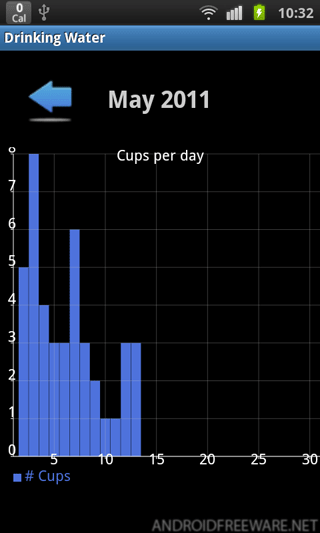
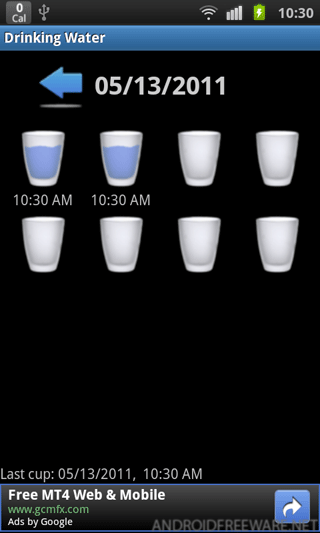
When you keep the screen straight and vertical you see the number of glasses that you have consumed in a day and when you tilt it to the right you see a graph in statistics format to see the progress of your daily and consistent performance.
On the technical front, the latest version of the Drinking Water app has all the bugs fixed and can be stored in the memory card as well.
The Drinking Water Android app is a meagre 391 kb in size and for the improvement in the quality of life in general, this one’s a definite download that will cut you a first class ticket to a healthy lifestyle!