
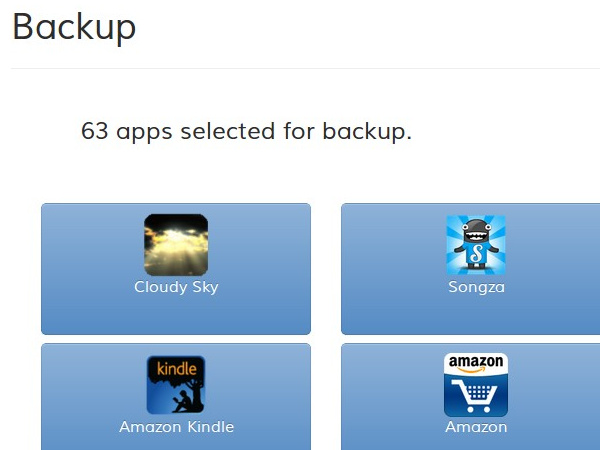
New ‘Carbon’ App Automatically Backs Up Your Android Apps And Syncs Them To The Cloud, SD Cards, or Other Androids
4 min read
Backing up your Android is an important task that most users don’t bother doing. Sure, we all like to talk about how important it is to back up your files, but very few of us actually bother taking a few minutes out of our day to do it.
 This awesome photo courtesy of Tech2.in.com[/caption]
Up to this point, you may be thinking that ‘Carbon’ sounds an awful lot like Titanium Backup and ClockworkMod Recovery, which are the world’s most popular ways to backup Android apps. You’re absolutely right – the apps are very similar to one another.
But there’s a good reason why the two apps are so similar – they were designed by the same person. That person is Koushik “Koush” Dutta, who developed ClockworkMod and other popular rooted Android apps.
The main advantage that Carbon has over Titanium Backup is that – one day – the app will feature support for non-rooted devices. So if you don’t want to root your device, you may get the ability to backup your entire Android at some point in the future thanks to Carbon.
This awesome photo courtesy of Tech2.in.com[/caption]
Up to this point, you may be thinking that ‘Carbon’ sounds an awful lot like Titanium Backup and ClockworkMod Recovery, which are the world’s most popular ways to backup Android apps. You’re absolutely right – the apps are very similar to one another.
But there’s a good reason why the two apps are so similar – they were designed by the same person. That person is Koushik “Koush” Dutta, who developed ClockworkMod and other popular rooted Android apps.
The main advantage that Carbon has over Titanium Backup is that – one day – the app will feature support for non-rooted devices. So if you don’t want to root your device, you may get the ability to backup your entire Android at some point in the future thanks to Carbon.
What is Carbon?
Well, here’s another app that aims to make backing up Android as easy as possible. It’s called Carbon, and it automatically backs up and restores all your apps and their data. Even better, Carbon can sync apps between multiple Android phones and tablets. Backups are performed through Google Drive, and you can sync to other phones that are also connected to your Drive account. This is an easy way to keep app data and settings the same across your account. Sure, you might not have two phones, but if you have an Android phone and a tablet, this feature will be incredibly useful. Users are not forced to use Google Drive. You can back up files to an SD card that’s connected to your Android or to a connected PC. Although Dropbox is not currently supported by Carbon, it will be supported in the very near future. For an in-depth explanation of how Carbon works, check out this video: http://www.youtube.com/watch?feature=player_embedded&v=Dsg6SnLOdscCarbon can be used to…
If you own a non-rooted Android, then there is no way to fully recover your device after it crashes. On a rooted Android, you can completely recover your Android to look exactly the same as it did before it crashed – and you can do it with just a few taps of your finger. On that note, Carbon can be used to back up everything on your Android smartphone or tablet. It will immediately restore all apps and any unique system settings you might have. With automatic backup options available, you can rest assured that you will always be able to recover your Android if something awful happens to it.Similar to Titanium Backup and Clockwork Mod Recovery?
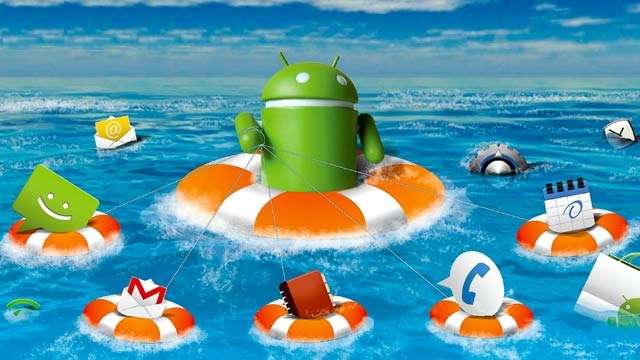
[caption id="attachment_4033" align="aligncenter" width="640"] This awesome photo courtesy of Tech2.in.com[/caption]
Up to this point, you may be thinking that ‘Carbon’ sounds an awful lot like Titanium Backup and ClockworkMod Recovery, which are the world’s most popular ways to backup Android apps. You’re absolutely right – the apps are very similar to one another.
But there’s a good reason why the two apps are so similar – they were designed by the same person. That person is Koushik “Koush” Dutta, who developed ClockworkMod and other popular rooted Android apps.
The main advantage that Carbon has over Titanium Backup is that – one day – the app will feature support for non-rooted devices. So if you don’t want to root your device, you may get the ability to backup your entire Android at some point in the future thanks to Carbon.
Requires rooted Android
Just like ClockworkMod and Titanium Backup, Carbon can only be used on rooted Android phones. Although a non-rooted version may arrive in the future, Carbon is solely for rooted users today. To quickly, easily, and safely root your Android, download One Click Root today. If the program doesn’t automatically root your phone (for whatever reason), One Click Root will instantly refund your money. It’s also the only rooting program that doesn’t have a chance of bricking your phone. Once you’ve rooted Android, you can install Carbon and backup everything on your phone right away. Download the beta version of Carbon today by clicking here
One Click Root Author
One Click Root Author
Content Writer
Experienced writer covering technology and mobile development.
You Might Also Like
Reviews
Android 14 Root Methods: What Changed?
Explore the new root methods and security changes in Android 14.

Reviews
Latest Android Security Updates Impact Root Access
Understanding how the latest security patches affect root methods.

Reviews
Google Pixel 8 Pro Root Guide Released
Complete step-by-step guide to rooting the Google Pixel 8 Pro.
Comments
JD
John Doe
2 days ago
Great article! Very informative and well-written. Thanks for sharing.
JS
Jane Smith
5 days ago
I found the security section particularly helpful. Looking forward to more content like this!
Leave a Comment
Newsletter
Get the latest tech news delivered to your inbox weekly.
Popular Posts
-
1
Getting Started with Android Development
12.5K views
-
2
Best Practices for Mobile Security
8.2K views
-
3
Understanding Smartphone Hardware
6.8K views