The 700,000+ apps available in Google Play Store are packed with plenty of great sports news apps for both casual and hardcore sports fans. However, the one thing both casual and sports fans miss is the larger-than-life social experience that comes with watching sports games live in stadiums.
PlayUp is a unique app that aims to bring that excitement virtually to your Android devices by connecting you to other avid sports enthusiasts who love to get into intense discussions, joint celebrations, and rants about your favorite sports.
An Overview
PlayUp curates the best and latest sports news feed and video content from a variety of news sources like ESPN, FOXSports, NBC, Reuters, etc. Fans of the NFL, NBA, EPL, rugby, hockey, cricket, and other sports can now browse through their favorite sports categories, find schedules of upcoming games, analyze results, and even create live hangouts for privately or publicly discussing a sports-related topic. When you install the app and create an account, you can pick the sports you love to follow to receive regular updates on them. You also have the ability to choose between a live or elapsed game in case you want to avoid any spoilers. PlayUp will then open up the stats board of the game along with live updates from other users as the game progresses.
PlayUp also allows any user to create different rooms and private chats during a current game, which makes socializing even more simple. The basic interface of the app is very clean and easy to use, even for people new to Android.
The application has a really sleek and user-friendly interface. Keeping track of posts and updates is just a click away, and you can easily share your posts and feeds via special buttons at the top of the app homescreen.
Features
A Vivid Social Experience
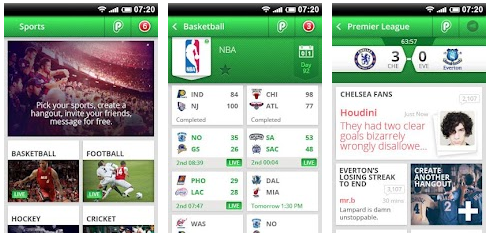
You can use the same IM and chat features in PlayUp as the ones available via Twitter or Facebook. You can now share your favorite posts on PlayUp through your Facebook and Twitter accounts. Along with the updated game score feed, PlayUp also engages you in a more socially uplifting experience by giving you access to score notifications, friend alerts, private messages, forum posts, hangouts, team scores, etc. Inviting and adding your friends is remarkably easy as PlayUp gives you the option to link your Facebook and Twitter accounts.
Improved Messaging System
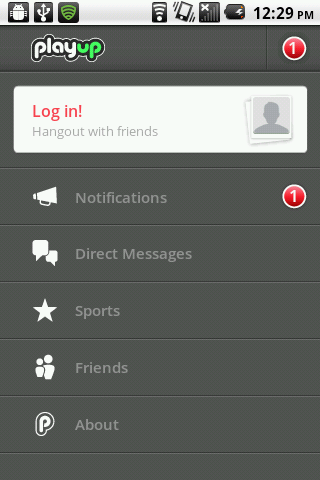
PlayUp lets you choose between exchanging private or public messages with your friends or other fans of the sport who are discussing a topic. This improved messaging feature gives PlayUp a unique edge over other scoring app competitors that have not put enough emphasis into the social experience of watching sports. The occasional issue of spam messaging may be a bit problematic while you use this feature; however, it does not detriment the social experience of the app by much.
Live Scores & Updates

With a wide variety of sports to pick, and updated statistics for over 28,000 games, PlayUp is one of the most diverse sports apps available for the Android. You can even pick any sports event happening across the world and get live scores and updates on it.
Once you have chosen the game you want to view, you will be shown the current scores between the teams participating and the history of scores in the elapsed game time. You can narrow down your searches more effectively by using a filter to choose games according to a particular day or week.
Along with the live score updates, PlayUp will also display a pop-up box showing you information regarding the last scorer and the best performances of players from both teams.
Final Analysis
Although PlayUp lacks some key features such as a diverse library of sports videos, game highlight reels, player interviews, etc., it shines as a great social app for sports fans. This enhanced sharing experience is something most sports app have not focused on too much and this is where PlayUp excels; bringing the long-missing enthusiastic stadium-esque feel of participating in a big spectacle to sports fans on their Android devices.